WORDPRESS
WordPress MCP Public Abilities: Security and Side Effects
Audit public WordPress MCP Abilities safely. Check exposure metadata, permission callbacks, data leakage, side effects and real allowed/denied client tests.
FREE WORDPRESS PLUGIN
Agent Readiness Audit
Audit how AI clients discover and read your WordPress site, and whether relevant structured capabilities are available.
- Install the local audit plugin
- Select Read, Act or Manage profile
- Review findings and next steps
Local read-only WordPress Ability metadata and readiness signals only. Cannot prove real MCP client authorization, enforce exposure or permission gates, inspect all sensitive outputs, prevent downstream side effects, or certify security.
A WordPress Ability marked public is not automatically safe—and it is not necessarily anonymous. In the official MCP Adapter, public metadata controls which Abilities the default server exposes to clients. A WordPress user must still pass the server and the individual Ability’s permission checks. But discovery restrictions alone cannot stop data leakage, unintended writes or downstream effects from a badly designed execution callback. To review an AI-connected WordPress site, inspect exposure, caller identity, object-level authorization, data returned, write effects and actual staging behavior separately.
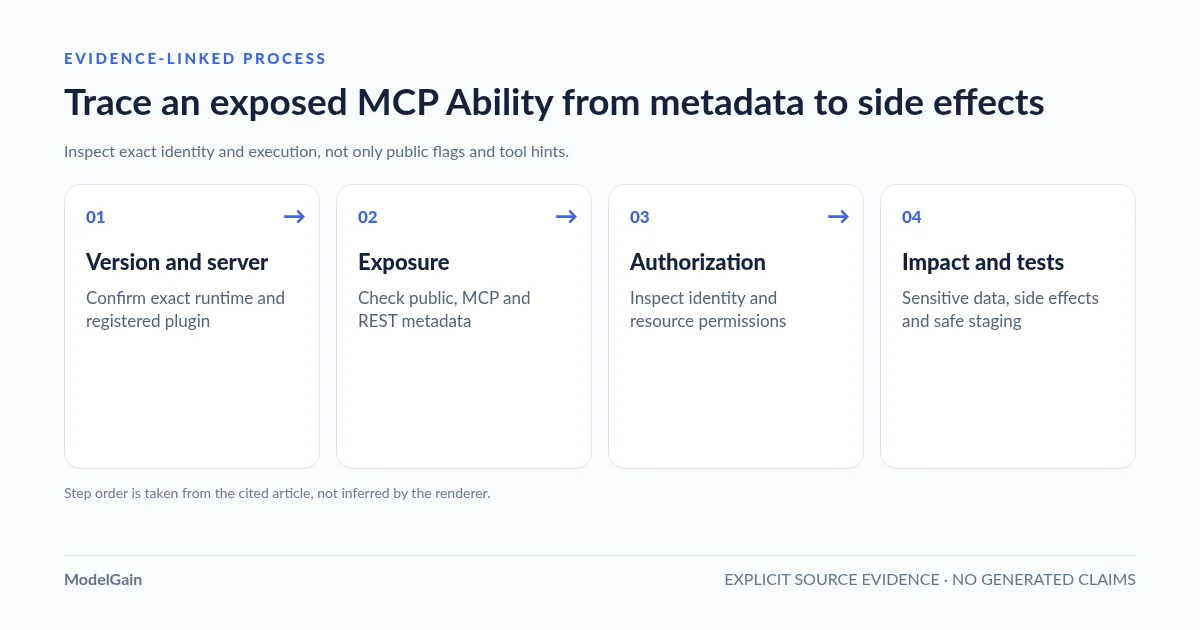
Quick audit: identify the effective WordPress and MCP Adapter versions → inventory registered Abilities and all exposure metadata → inspect the default or custom MCP server → trace authentication and permission checks → classify read/write and data sensitivity → run safe allowed/denied tests → record revocation, monitoring and recovery. Do not fix a missing tool by making every Ability public or weakening permission callbacks.
This guide covers the security review of a specific public Ability, not initial account setup. For creating a dedicated low-privilege identity and managing Read / Act / Manage access, use the WordPress AI agent permissions guide. For a broader local site preflight, consult the Agent Readiness Audit checklist.
If an agent appears to execute tools without a login, first distinguish a cached tool list, still-valid Application Password, public REST discovery and truly anonymous private execution. Use our WordPress agent access-without-login troubleshooting guide for credential-free, read-only staging verification before classifying the incident.
What is the risk of this WordPress MCP Ability?
Applies when: Classify default MCP server Ability discovery, REST exposure, object permissions and side effects without changing WordPress credentials or publishing private data.
Quick answer
Public Ability metadata governs exposure, not unrestricted anonymous execution. Determine all channels, the caller, per-resource execution permissions, returned private data, side effects and test evidence before widening access.
What to do
-
Record the exact site, active MCP server and registering plugin; include vendored copies and multisite differences.
-
Review meta.public, meta.mcp.public, meta.show_in_rest, and any explicitly configured custom server. Do not use invented MCP types as private flags.
-
Inspect the current WordPress user, the transport gate, object-level permission callback, input schema and sensitive output fields.
-
Check database writes, email, payments, webhooks, queues and retries. Tool annotations do not enforce safe behavior.
-
Collect authorized, denied, private/not-discoverable, side-effect and revoked-credential evidence before any production change.
Which WordPress MCP public-Ability concern are you investigating?
All paths are listed below. Select a symptom to focus on the most relevant path.
Public discovery is not automatically anonymous execution
On the official default server, meta.public opts the ability into discovery but the caller still faces authenticated server and Ability permission checks. Confirm actual REST and custom-server exposure too. A public label alone is insufficient evidence of either a vulnerability or safety.
Use explicit MCP-only opt-in and verify REST separately
Leave high-level meta.public unset and set meta.mcp.public=true on the intended Ability. On WordPress 6.9/7.0, REST exposure uses meta.show_in_rest; core 7.1 also derives a REST default from meta.public. Test the real version and registered routes.
Set an explicit supported opt-out and check other servers
For the official default Adapter server, meta.mcp.public=false overrides broad public exposure for MCP. Inventory REST access and any custom server that directly lists the Ability. Do not use fake meta.mcp.type values as an opt-out.
Keep the denial until its cause is verified
Identify the WordPress identity, transport/server gate and the specific Ability permission_callback for the requested object. A discoverable Ability can correctly deny execution. Never set a destructive Ability callback to always true to remove the error.
Read-only does not mean non-sensitive
The MCP readOnlyHint is advisory, not enforced. Inspect actual output data, post/customer visibility, private fields and external requests. A read operation can leak data without mutating the database. Test with synthetic records and distinct users.
Use recognized metadata, then reproduce the loaded release
Upstream GitHub issue #297 reports that unknown meta.mcp.type could fall back to callable tool in an affected code path. Do not rely on an invented type for exclusion. Use explicit meta.mcp.public=false, server allowlists and restrictive permission callbacks; verify the installed code.
Require scope, approval and reversible staging proof
Map actual downstream posts, email, payments, queues and third-party APIs. The tool's destructiveHint and idempotentHint do not enforce authorization or prevent duplicate effects. Test allowed and denied behavior on staging, and require a separate review gate for irreversible writes.
Did this help?
1. Public discovery, anonymous access and execution are three different properties
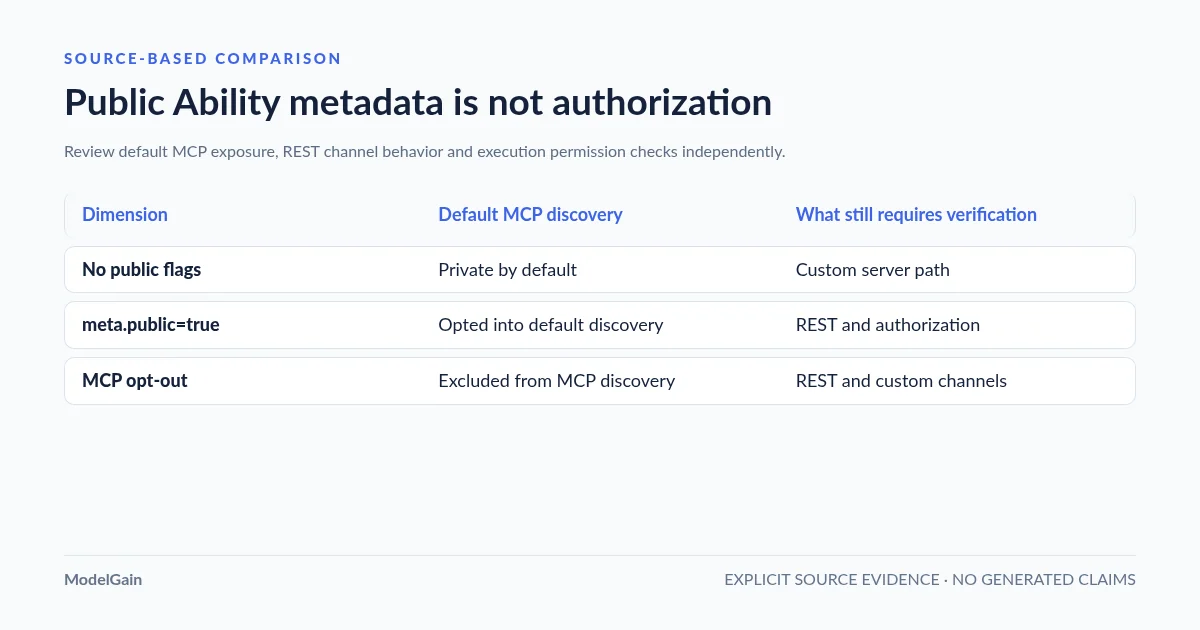
According to the current WordPress MCP Adapter Ability guide, the default MCP server does not automatically expose every registered Ability. A high-level meta.public=true opts an Ability into general client exposure. An explicit meta.mcp.public overrides that value for MCP exposure, including a deliberate false opt-out. This is discovery policy for the default server, not a permission to bypass WordPress authentication.
| Metadata example | Default Adapter MCP exposure | What still needs checking |
|---|---|---|
| No public flags | Private by default | A custom server may explicitly list it; verify all active servers |
meta.public=true; no MCP override |
Opted into default-server discovery | REST channel behavior, authentication, actual permission callback |
meta.public=true and meta.mcp.public=false |
Excluded from the default MCP discovery model | REST exposure and any independent custom-server paths |
Only meta.mcp.public=true |
Opted into MCP without a broad high-level public opt-in | User permissions and whether other client channels are exposed |
Version-sensitive REST behavior: WordPress 6.9 and 7.0 use an explicit meta.show_in_rest=true flag for REST API exposure, while the MCP Adapter honors meta.public for MCP. Beginning with WordPress 7.1, core also applies meta.public to REST exposure defaults. After any core upgrade, recheck both the REST and MCP surfaces. Do not add meta.public=true as a generic solution to a missing MCP tool when you intended MCP-only exposure; choose meta.mcp.public deliberately.
2. Inspect the effective server rather than a metadata snippet
The official Adapter’s default server exposes three meta-tools: discover Abilities, get Ability information and execute an Ability. Discovery is layered, so the client’s tools/list may show the three meta-tools rather than every WordPress Ability as an individual tool. A custom MCP server can instead list specific Abilities directly. That difference matters for scope, logs and test coverage.
Record the exact site and Adapter versions, default versus custom server, authenticated user, active endpoint, and the source plugin defining the Ability. An Ability might also be offered by another extension or an independently configured REST route. Do not conclude that it is inaccessible simply because one server’s discovery excludes it. Use the official transport permissions guide to confirm the server-wide admission check. The default server requires an authenticated WordPress identity with a read capability for its built-in discovery/execution meta-tools unless a reviewed configuration changes those gates. A read gate for the server does not grant permission to run an arbitrary Ability.
For authorized WP-CLI inventory, the following read-only commands can establish the correct instance and active plugin version, but they do not prove which vendored PHP package wins at runtime:
wp core version
wp plugin get mcp-adapter --fields=name,version,status --format=table
wp plugin list --status=active --fields=name,version --format=table
On multisite, confirm the relevant blog and its effective plugin loading path. Do not expose configuration files, Application Passwords or session headers while collecting evidence. If the Ability is unexpectedly missing, first use our registration versus MCP discovery diagnostic instead of loosening security.
3. Build a concrete risk inventory for every exposed Ability
Review an Ability as an executable contract, not a tool name. A read-only order lookup might disclose a customer’s address; a content update might trigger webhooks, email or indexing jobs even when it does not delete anything. The minimum audit inventory should capture the following facts:
| Review field | Evidence to collect | Reason |
|---|---|---|
| Owner and effective version | Registering plugin, installed version, overriding code, server implementation | Different releases can implement different exposure and authorization rules |
| Exposure | meta.public, meta.mcp.public, meta.show_in_rest and custom server allowlists |
One Ability may be reachable through multiple channels |
| Caller | Authenticated WordPress user, role/capabilities and credential type | Credentials inherit real account permissions |
| Execution authorization | permission_callback, post/record ownership, tenant or site scope |
Broad edit_posts does not prove edit_post on the requested object |
| Input and output data | Schemas, validation, sensitive fields, attached files, redaction rules | Read operations can expose private information |
| Side effects | Database writes, publication, email, payments, third-party API calls, hooks, queues | A benign-sounding tool can create irreversible effects |
| Recovery and evidence | Approval, idempotency, actor attribution, logs, revoke/retry and rollback | Detect and contain unintended execution |
Start with the most consequential actions: deletion, publication, user or plugin administration, WooCommerce order/customer reads, email dispatch and operations accepting externally supplied URLs. Treat any Ability with an unknown callback owner or unclear output sensitivity as review required, not automatically safe or automatically compromised.
4. Why readOnlyHint and destructiveHint are not permission checks
MCP tool annotations provide useful signals such as readOnlyHint, destructiveHint, idempotentHint and openWorldHint. These are advisory descriptions supplied by the tool provider, not access-control logic. The MCP maintainers’ March 2026 security discussion explicitly warns that a server can mislabel a destructive tool as read-only and that annotations do not enforce data or network boundaries.
Review the actual PHP callbacks and downstream calls, not only generated tool schemas. A readOnlyHint=true operation may still read private posts, secrets or personal data. An idempotentHint=true does not establish that retries will avoid duplicate email, purchase or external webhook side effects. Conversely, an unspecified hint should prompt inspection rather than a definitive vulnerability claim. Client-side confirmation interfaces can improve user experience, but server-side authorization, data scoping and execution gates remain mandatory.
If the Ability includes externally retrieved text, treat that content as untrusted input for the agent. A malicious instruction inside a blog comment or product description must not become authority to call an unrelated management tool. Separate untrusted retrieval from privileged execution and enforce a deterministic allowlist and approval boundary for side effects. This is an agent workflow concern, not a capability granted by WordPress metadata.
5. Validate the real permission callback and target object
With WordPress Abilities API, permission_callback is the authoritative policy for the Ability’s execution. The WP_Ability permission reference distinguishes permission checking from input validation; check_permissions() can return true, false or a WP_Error. If plugin code calls it directly, treating a non-empty WP_Error as a truthy success is unsafe. Use the documented execution API and explicitly check errors.
For an Ability that edits an existing WordPress post, a narrow permission pattern looks like this (illustrative excerpt, not a complete installable plugin):
'permission_callback' => function( $input ) {
    if ( ! is_array( $input ) || empty( $input['post_id'] ) ) {
        return false;
    }
    $post_id = absint( $input['post_id'] );
    $post = get_post( $post_id );
    if ( ! $post || 'post' !== $post->post_type ) {
        return false;
    }
    return current_user_can( 'edit_post', $post_id );
},
The real execution callback must still validate all schemas and values, enforce allowed post status transitions, check ownership/site scope at the point of mutation and handle concurrent edits. Avoid __return_true for a write or private-data Ability. A WordPress user authenticated with an Application Password has that user’s normal capabilities; the password itself does not grant additional per-Ability permissions. Do not escalate to Administrator simply because discovery succeeds but execution is denied.
6. Four real upstream issues that change the review
GitHub discussions provide useful, version-specific risks. They should be treated as reported behavior and unmerged proposals unless verified on the exact production release, not as proof that every installation is exploitable.
- Unknown MCP component type may be coerced to a tool. Issue #297, open at the November 2026 review, describes a code path that converts an unrecognized
meta.mcp.typevalue into a callabletool. Do not use invented type strings as a privacy opt-out. Use an explicit supportedmeta.mcp.public=false, verify effective behavior and keep real execution permissions restrictive. - Global exposure does not necessarily isolate servers. Issue #243 describes the lack of a per-server filter for the default meta-tools’ exposure decision in its reported implementation. Sites serving multiple audiences should verify server-specific allowlists, custom server registration and user permission checks rather than assuming one global public flag is tenant-isolated.
- Annotations do not provide a built-in approval queue. Issue #176 proposes a pre-execution approval interface. Its continued open discussion means the proposal cannot be described as a universal shipped confirmation mechanism. An owner who needs production approval must implement and test it at an existing trusted workflow boundary.
- Metrics are not necessarily a complete audit trail. Issue #228 requests richer execution audit events. Its updated author report clarifies that
mcp.requestcan include denied outcomes, but the available signals do not automatically provide full actor identity, arguments or classification. A live site must test its actual logging and data-retention policy rather than claiming every action is already attributable.
One additional historical point: Issue #69 proposed returning denied tool calls as MCP isError=true results instead of generic JSON-RPC errors. It is closed. It concerns how failure is represented to the client, not whether permission was bypassed. Do not use it as evidence of an active authorization vulnerability.
7. Run an allowed/denied/side-effect/revoke test on staging
- Allowed discovery: use the intended limited user and current client to list only the approved Abilities. Record the exact MCP server and protocol version. Do not leak client credentials or use a publicly logged test session.
- Denied discovery: verify a deliberately private Ability stays undiscoverable through the default server, REST channel and any custom server relevant to the site. Do not assume one denied list response proves all paths are blocked.
- Allowed execution: call a read-only Ability on synthetic data or create a single synthetic draft that the dedicated user is permitted to modify. Compare the result to the actual database/resource state.
- Denied execution: with a lower privilege identity or a record owned by another user, attempt the same operation. Verify a denial occurs before any mutation, external webhook or notification.
- Side-effect containment: on staging, use fake email/payment targets to determine whether permitted operations trigger messages, jobs, cache invalidation or duplicate writes. Confirm what a retry does.
- Revoke and recover: revoke the dedicated Application Password, prove its next authenticated call is rejected, and restore the synthetic write using your documented rollback path. Revocation cannot undo actions already executed.
Record the date, WordPress version, Adapter version, source plugin version, identity, input class, outcome, log references and approved remediation. Never capture raw Application Passwords, customer records or Authorization headers in published reports. A successful tools/list only demonstrates discovery; an HTTP 200 can still carry an application-level error and cannot certify safe execution. For general connectivity or protocol errors, see the WordPress MCP connection guide and protocol/session troubleshooting guide.
8. Where ModelGain Agent Readiness Audit helps—and where it stops
ModelGain Agent Readiness Audit is a released, local, read-only WordPress diagnostic. It can report evidence about the Abilities API, relevant local registered metadata, Adapter/route signals and selected governance checks across Read, Act and Manage assessment profiles. That can help prioritize which Ability metadata and plugin behavior to inspect first. You can install the plugin from WordPress.org and compare its report before and after a separately reviewed change.
It does not grant or revoke permissions, execute exposed Abilities, inspect all runtime side effects, perform an authenticated remote MCP handshake, prevent prompt injection or certify security. An Unknown finding is a lack of evidence, not an automatic failure or a safety pass. A green local report is not evidence that a lower-privileged staging user cannot invoke an unexpected write tool. Retain the actual denied-execution and revocation receipts beside the local audit report.
Frequently asked questions
Does meta.public=true make a WordPress Ability callable anonymously?
Not by itself. On the official default MCP server it opts the Ability into discovery while authenticated server and Ability permissions still apply. Other REST or custom server exposure rules must be checked separately, especially across WordPress 6.9/7.0 and 7.1.
Can I hide an Ability by setting an unknown meta.mcp.type?
No. Upstream issue #297 reports that an unrecognized component type can be coerced into a callable tool. Set explicit supported exposure flags, use proper server configuration and enforce authorization in the Ability callback. Reproduce the effective behavior on the installed release.
Does readOnlyHint=true prove there is no risk?
No. Annotations are advisory, may be inaccurate and do not control authorization or sensitive read responses. Audit the actual implementation, output data and external interactions.
Is a permission-denied tool result proof that security works?
Only for that attempted call under that identity and input. Test another user, another resource, all relevant exposure channels and the absence of unintended side effects. Confirm the refusal was enforced server-side rather than merely by a client interface.
Should I disable the MCP Adapter to fix public Ability findings?
Not automatically. First determine whether the exposure is intentional, what the Ability actually does, and which server and user can reach it. Prefer a small, reviewed, reversible exposure or permission correction rather than a broad site outage. If no legitimate MCP workflow exists, disabling an unused endpoint may be a reasonable reviewed decision.
Technical sources
- Official WordPress MCP Adapter Ability exposure and annotation guide.
- Default server discovery and execute gates and transport permission model.
- WordPress core Ability permission checking.
- MCP maintainers: annotations are not security enforcement.
- Issue #297, #243, #176 and #228 (review date November 2, 2026; state and remediation can change).