WORDPRESS
WordPress AI Agent Permissions: Read, Act and Manage
Give a WordPress AI agent the right access: compare Read, Act and Manage, restrict MCP tools, use revocable credentials, and test permissions safely.
FREE WORDPRESS PLUGIN
Agent Readiness Audit
Audit how AI clients discover and read your WordPress site, and whether relevant structured capabilities are available.
- Install the local audit plugin
- Select Read, Act or Manage profile
- Review findings and next steps
Local read-only metadata and readiness evidence only. Read/Act/Manage are audit profiles, not WordPress roles. Cannot grant or revoke credentials, test actual client authorization, enforce production approval, or certify security.
Want an AI agent to work on your WordPress site without handing it the keys to everything? Start with the task, not a plugin or an Administrator login. For a public-answering assistant, use published pages without a WordPress account. For a content assistant, create a dedicated low-privilege user and expose only the ability to prepare a draft. For a maintenance assistant, require explicit approval and a rollback path before any production change. These are Read, Act, and Manage security boundaries—not three new WordPress roles.
Safe setup sequence: define exactly what the agent may see and change → select the least privileged WordPress identity → choose an approved access surface (public HTML, REST/Abilities, or MCP) → expose only required tools → enforce per-resource authorization inside every tool → test allowed, denied, revoked, and failure paths. A working MCP connection or a reassuring permission label is not a security test.
As of November 2, 2026, WordPress core 6.9+ includes the Abilities API; the official MCP Adapter maps appropriately exposed abilities into MCP. Authentication, discovery and execution permissions are separate controls. This guide shows where they are enforced and provides a practical acceptance matrix. If you only need a high-level site-readiness audit, start with the Read / Act / Manage readiness checklist instead; this article focuses on the actual grant, restrict, test and revoke workflow.
What may your WordPress AI agent actually do?
Applies when: Select the least privileged access pattern, understand WordPress user/application credentials and distinguish MCP discovery from resource-level execution permissions.
Quick answer
Start with the exact task. Public reading usually needs no WordPress account. Structured actions require a reviewed tool and per-action permissions. Draft or production management must use a dedicated identity, explicit capability checks, approval, audit and revocation. Read/Act/Manage are planning profiles, not WordPress roles.
What to do
-
State the exact input, intended result, data accessed and explicitly forbidden actions. Do not choose Administrator to avoid design work.
-
Select public HTML, a controlled UI action, core REST/Abilities, or the official MCP Adapter. These interfaces do not share an automatic permission model.
-
A WordPress Application Password authenticates as an existing user; MCP exposure decides discovery; per-Ability permission callbacks decide execution for this object.
-
On staging, execute one safe approved action; reject other users' resources and disallowed writes. Inspect side effects and idempotency.
-
Revoke the dedicated integration credential and verify further requests fail; restore the synthetic change before production rollout.
What will the AI agent do on your WordPress site?
All paths are listed below. Select a symptom to focus on the most relevant path.
Prefer public HTML without credentials
No WordPress login or MCP server is required for published information. Verify HTTPS, canonical page, robots policy and server-rendered content. Keep private posts and customer data inaccessible. Do not create Administrator application credentials for a read-only FAQ assistant.
Restrict the action surface and its side effects
Use a vetted UI action or an authenticated Ability with explicit schemas and per-resource permission checks. Define who confirms a form submission, send, payment or write. A fill-only integration must not silently submit; MCP annotations are not authorization.
Create a limited user and draft-only approval gate
Use a dedicated identity and one revocable Application Password per integration. Author/Editor roles are not automatically draft-only. Limit owned content and object-level edit permissions, then gate publication outside the autonomous workflow. Test allowed and forbidden requests on staging.
Separate human approval from AI preparation
Do not grant a general agent unrestricted Administrator access. Stage the proposed change and require a specifically authorized approval, validated inputs, audit trail and tested rollback. Keep production publish/delete/plugin/user/payment operations outside unattended tool access.
Trace the exact layer that denied access
Confirm the WordPress user identity, the MCP server transport gate, and the target Ability permission callback for the exact resource. A visible tool can legitimately deny execution. Do not set permission callbacks to always true or escalate to Administrator.
Inspect registration and MCP-specific exposure
Verify the Ability is registered, then check effective meta.mcp.public and meta.public as well as the selected MCP server and user. On WordPress 6.9/7.0 versus 7.1, REST exposure defaults can differ. Do not make all abilities public as a workaround.
Revoke the integration's dedicated credential
In the dedicated user's WordPress Profile, revoke the named Application Password. Verify that the old API credential no longer authenticates. Then review log evidence and any actions already executed. Revocation does not automatically undo prior changes.
Did this help?
1. Choose the smallest permission boundary that completes the job
| Agent task | Recommended identity/surface | Allowed result | Explicitly out of scope |
|---|---|---|---|
| Read public pages: answer a question from published guides | Unauthenticated HTTPS HTML or a published, cache-safe public API; no WordPress login | Retrieve public page content and cited canonical URLs | Private posts, customer accounts, WordPress Application Passwords, admin actions |
| Act within a narrow task: summarize a document or fill a visitor-approved form | Public read-only content or an explicitly approved UI/tool with server-side constraints; authenticate only if the operation requires it | Produce a draft answer or populate known inputs for human review | Automatic submission, email dispatch, payment capture, CRM modifications unless separately authorized |
| Manage drafts: create or edit an assigned draft | Dedicated author/editor identity with scoped access, a revocable credential and a named Ability or vetted REST operation | Save a draft in the permitted content scope | Publishing, deleting, editing other users’ private posts, plugins, user accounts, site settings |
| Manage production: approve and publish a reviewed change | Separate human-controlled approval identity and deterministic publication gate | One reviewed, logged and recoverable change | Unattended role escalation, mass deletion, arbitrary PHP execution, unsupervised payments or configuration changes |
A common implementation mistake is to use an Editor account for a draft-creation assistant just because the Editor role can edit posts. On many standard sites an Editor has authority over other people’s content, which is broader than a single drafting workflow. The Author role can be a better starting point for own-post workflows, but may also publish its own posts unless specifically constrained. No stock role should be assumed to mean “create drafts only.” Verify all effective capabilities, site plugins and the workflow’s actual mutation paths. For high-assurance draft-only behavior, apply a narrowly scoped server-side action and production publishing approval rather than trusting role labels.
2. Create a dedicated agent user and revocable connection
WordPress Application Passwords are individually revocable API credentials tied to one existing WordPress user. They are not passwords for interactive wp-admin login, nor separate permission scopes. If you create an Application Password for an Administrator, the integration can potentially exercise that Administrator’s authorized API capabilities. Giving an AI model a different token name changes the secret, not the user behind it.
- Define the workload: for example, “create a draft under my owned posts, without publishing or deleting.” Record the negative requirements too.
- Create a dedicated WordPress account: select the narrowest viable role and inspect effective capabilities. On multisite, verify the intended site and network context separately.
- Generate one named Application Password per integration: go to Users → Profile → Application Passwords for that dedicated account. Use a descriptive label such as
staging-draft-agent. Never paste the value into a prompt, Git commit, public issue or website analytics. - Transmit only over HTTPS: the standard WordPress REST mechanism uses HTTP Basic authentication with the application credential. Store it in the integration’s secret store; do not embed it in a URL or a front-end script.
- Test a safe authenticated read: an authorized request to
/wp-json/wp/v2/users/mecan establish which user the connection acts as. Remove identifying details from any shared trace. - Demonstrate revocation: remove that Application Password in the user profile and confirm the previously successful API operation is now denied. Revoke the integration without touching unrelated integrations.
Use the WordPress roles and capabilities reference to compare Author, Editor and Administrator. Keep an additional risk boundary for WooCommerce orders, customer data and custom post types: their permissions may come from extensions and site-specific capability maps, not just the core Posts screen. Application Passwords are not OAuth 2.1 tokens. If the chosen remote client requires OAuth, use a separately reviewed integration that maps OAuth identities to actual limited WordPress users and honors per-ability capability checks. See our MCP client and authentication comparison for connector compatibility.
3. Understand where WordPress actually checks permission
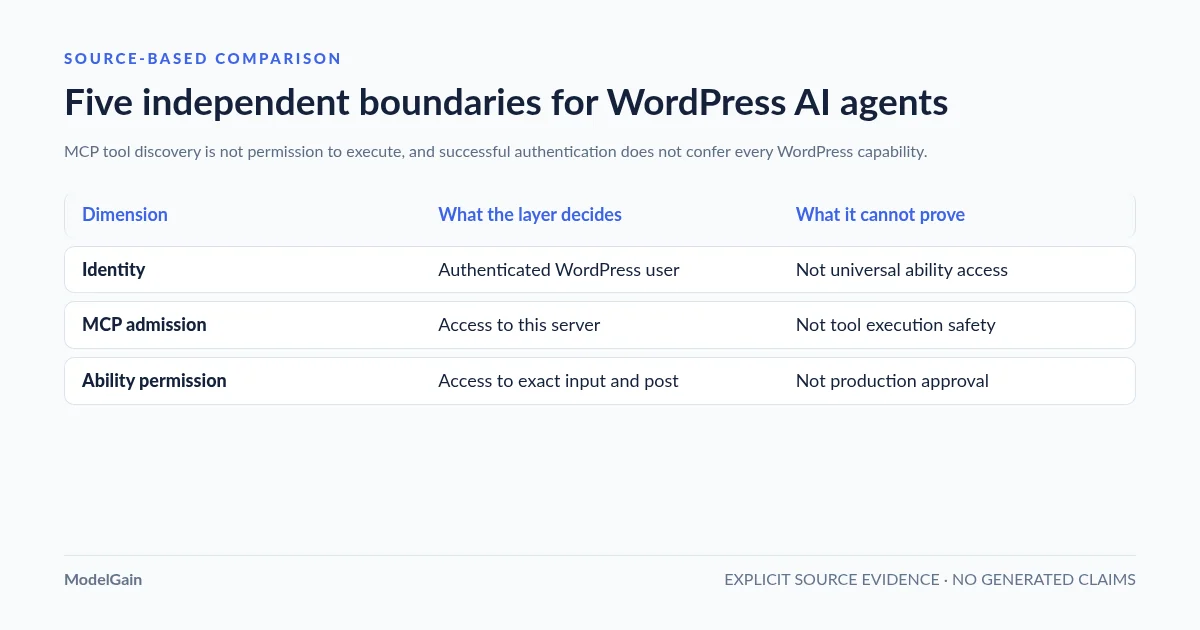
In a standard Abilities/MCP implementation, permissions are enforced at several different stages. Treat them as defense in depth; do not collapse them into a single toggle.
| Layer | What it answers | What it does not prove |
|---|---|---|
| Authentication / WordPress identity | Who does WordPress believe the API request is from? | That the user is allowed to run every registered Ability. |
| MCP transport / server gate | May this user access the chosen MCP server at all? | That every tool on it is safe to invoke. |
| Ability exposure | Has this Ability been explicitly made available to MCP discovery? | That the current caller has permission to execute it. |
| Ability permission callback | May this user perform this operation against this resource and these inputs? | That the operation is reversible, idempotent or approved for production. |
| Execution and workflow gate | Do validation, approval, rate limits and side-effect controls permit the change now? | That the agent should hold an Administrator credential or the result is automatically correct. |
The official MCP Adapter transport-permissions guide describes the server-wide check separately from each Ability’s permission callback. The current Adapter’s default server uses a WordPress user with the read capability for its meta-tool gate by default (filters or custom server configuration can change it). That is an entry gate, not a universal authorization for modifying content. The default server’s execute-ability tool checks the target Ability’s permissions after exposure and server checks.
Different installations may use the built-in REST Abilities endpoints, the official MCP Adapter or a vendor’s custom server. These are not interchangeable permission implementations; verify the code path and version actually serving your client rather than assuming the same authorization behavior on every plugin.
4. Register narrowly exposed Abilities; understand version-specific defaults
Core WordPress ability registration requires wp_register_ability() on wp_abilities_api_init, with a registered category and declared input/output schemas, execution callback and permission callback. See the official PHP API reference. A registered Ability is not automatically accessible to an MCP client. In the official default Adapter server, an Ability must opt into exposure through meta.public or meta.mcp.public; an explicit meta.mcp.public=false overrides a broad public setting for this channel.
The exact meaning of public exposure needs version awareness. The Adapter’s creating abilities guide documents an important distinction: on WordPress 6.9 and 7.0, core REST exposure still requires meta.show_in_rest=true even if the Adapter honors meta.public for MCP; on WordPress 7.1, core begins applying meta.public to REST defaults as well. For an MCP-only tool, use a channel-specific opt-in and make REST exposure an explicit, reviewed decision. Check actual registered metadata and both endpoints after a core upgrade.
To review a specific exposed tool, follow our WordPress MCP public Abilities security and side-effect checklist. It separates discovery from actual execution permissions, examines sensitive read responses and downstream writes, and documents safe staging tests for third-party Abilities.
Here is the essential authorization pattern for a per-post editing Ability. This is a partial implementation example; it intentionally omits schema/registration plumbing and write logic, so it is not a paste-and-run plugin:
// Inside the registered Ability definition:
'permission_callback' => function ( $input ) {
    if ( ! is_array( $input ) || ! isset( $input['post_id'] ) ) {
        return false;
    }
    $post_id = absint( $input['post_id'] );
    $post    = get_post( $post_id );
    if ( ! $post || 'post' !== $post->post_type ) {
        return false;
    }
    return current_user_can( 'edit_post', $post_id );
},
Using current_user_can('edit_posts') alone would only answer whether the user has a broad edit capability, not whether they can modify that specific post. The full Ability must validate inputs and authorization again at the execution boundary, limit permitted statuses/operations, and apply an approval step where appropriate. WordPress WP_Ability::check_permissions() returns true, false, or a WP_Error; if developers call that method directly, they must distinguish an error from a permitted result. It does not automatically validate supplied input first—use validate_input() as documented.
Most importantly, setting meta.mcp.public=true makes a tool available for discovery; it does not make unauthenticated execution safe. Never change a permission callback to always return true to make an integration appear in a tool list. Audit the missing Ability versus MCP discovery failure before adding exposure.
5. Audit side effects before granting Act or Manage
A tool named “get customer order” can be read-only and still disclose personal information; a tool named “save draft” can trigger notifications, revisions, webhooks or external services. Security classification must consider data access and downstream effects, not just whether a method name contains “delete”.
For every candidate Ability, record a single inventory row containing: source plugin and version; exact Ability name; exposure channel (MCP, REST or private); permitted WordPress identity; required capability; object ownership checks; fields accessible; write target; downstream hooks and network calls; idempotency; whether it can be undone; and the required human approval level. MCP annotations such as readOnlyHint, destructiveHint and idempotentHint help clients reason about a tool, but they are descriptive hints, not enforceable server-side permissions.
A practical policy is to allow public reading without a credential; permit clearly scoped read actions via dedicated users; allow draft-only content changes on owned records through audited code; and isolate publish/delete/plugin/user/financial actions behind an explicit human or deterministic approval gate. Do not give a general-purpose agent arbitrary PHP execution to bypass plugin APIs. Do not forward an agent’s user-supplied URL to an unrestricted server-side fetcher, and protect against prompt injection in external page text, including malicious instructions that ask the agent to call unrelated tools.
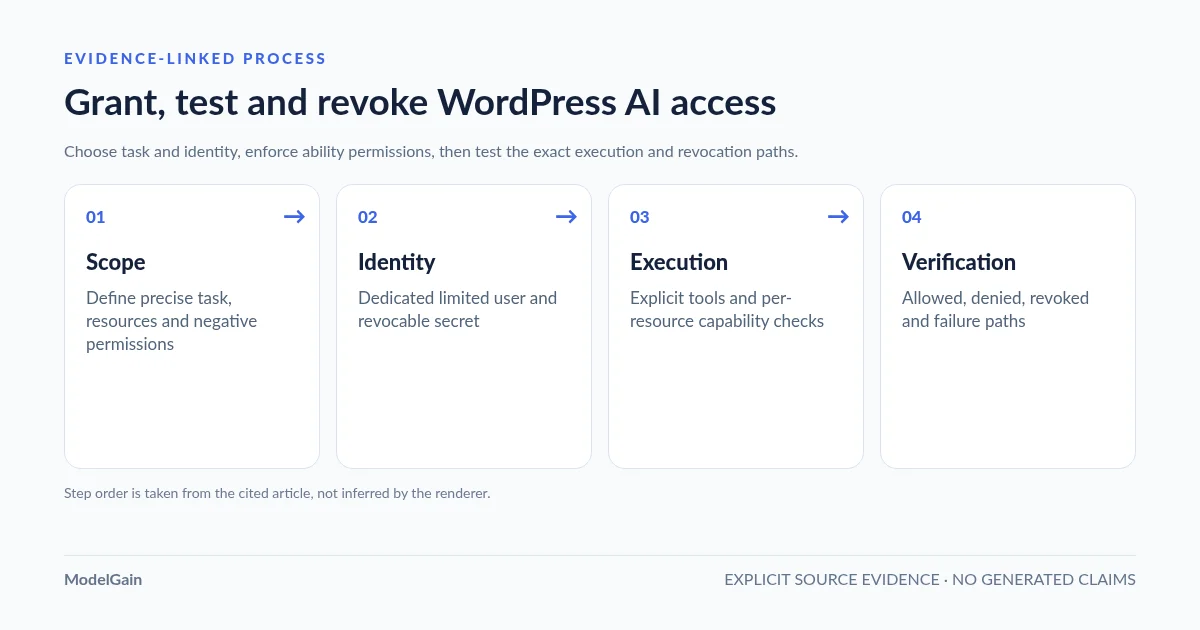
6. Execute four tests before granting production access
- Positive test: using an isolated staging site and the dedicated agent identity, discover the approved tool, pass minimal valid inputs and save one synthetic draft (or perform a non-destructive equivalent). Verify the result at the intended resource.
- Negative test: repeat with a less privileged identity and a post owned by another user. Confirm denial without writing to the database, sending a webhook or modifying cached content. A permission error must not be interpreted as a transient connection fault that justifies switching to Administrator.
- Side-effect test: use a staging mail catcher or fake external endpoint to verify the workflow does not send real email, payment requests, customer exports or public posts. Capture the actual event trail and check whether retries can duplicate changes.
- Revocation and recovery test: revoke the Application Password or disable the integration; demonstrate that the former credential cannot act. Restore the synthetic change using the documented rollback route and verify who can perform that recovery.
Test the real client and transport revision. For HTTP MCP, the official Adapter supports both 2025 session-based and 2026 sessionless protocol lifecycles; confusing these causes connection errors unrelated to authorization. See our WordPress MCP session/version diagnostic. HTTP 200 alone cannot prove a tool was authorized or executed correctly; inspect the request and actual application-level outcome.
7. Investigate permission failures without escalating privileges
| Symptom | First check | Do not do this |
|---|---|---|
| 401 / unauthenticated | Connection points to intended WordPress user; HTTPS and Authorization header reach origin; credentials still valid | Put credentials in a public URL or share an Administrator token |
| 403 / permission denied | Server admission gate, WordPress user role, exact Ability permission callback, object-specific capability | Set callback to __return_true or grant broad manage_options |
| Tool not discoverable | Ability registered? Effective meta.mcp.public? Correct server and authenticated discovery client? |
Expose all Abilities or make REST public without review |
| Tool visible but action refused | Permission callback output, input schema, post ownership and target status | Assume exposure grants execute permission |
| Tool reports success but no change | Actual return, post ID/state, downstream hooks, dry-run mode and idempotency evidence | Retry an irreversible action repeatedly without correlation/idempotency controls |
| Unexpected private content exposed | Scope of result fields, callback checks, REST visibility and logs | Rely on readOnlyHint or an AI prompt as a data-access firewall |
Pay special attention to WordPress upgrades. When exposing abilities through both MCP and REST, the effective public/show_in_rest behavior may change across core releases. Re-run positive and denied tests for both channels after the upgrade. To verify access without modifying data, run capability checks and discovery in an authorized WordPress context rather than executing a production write tool. For general MCP route errors, use our WordPress MCP REST 404 guide instead of adjusting roles.
8. Use a local audit as evidence, not as permission to go live
ModelGain Agent Readiness Audit can collect local, read-only evidence about WordPress, the Abilities API, registered exposure/permission metadata and the presence of the official MCP Adapter. Its Read / Act / Manage profiles are audit applicability modes—not WordPress roles, provisioning tools or remote policy controls. The released plugin performs bounded local checks; it does not create users, grant permissions, execute an MCP tool or connect a remote client. Read the WordPress.org listing for the actual installation and feature scope.
Its reports can help spot missing metadata, unexpected local exposure signals and weak observability evidence before a staged manual check. A passing audit is not a penetration test, a guarantee of safe authorization, or proof of a successful remote authenticated handshake. A rule marked Unknown means evidence was unavailable; do not treat it as a pass. Keep separate records of real allowed/denied/revoked client tests and any production approval.
Frequently asked questions
Can I give ChatGPT or Claude an Administrator Application Password?
Technically, an API credential can authenticate as an Administrator, but that is unnecessarily broad for reading content, generating drafts or invoking bounded tools. Prefer a dedicated limited user; if the client requires OAuth, verify that its provider maps the identity and capabilities correctly. A local audit does not authorize privileged access.
Does meta.public=true mean anyone on the internet can execute the Ability?
No. It opts an Ability into a client exposure policy; WordPress identity, server admission and the Ability permission callback still matter. However, it can change which client channels can discover or call it, and core REST exposure defaults differ across WordPress releases. Use explicit per-channel exposure and test both.
Why can an agent see an Ability but still receive a permission error?
Discovery and execution are intentionally separate. The ability may be MCP-exposed while its per-resource permission_callback correctly denies the caller. Confirm the exact user and resource. Do not eliminate the denial merely to get the agent working.
Does the Read / Act / Manage selector in ModelGain grant WordPress permissions?
No. It controls which local audit checks are applicable. WordPress roles, users, credentials, MCP exposure and the actual permission callbacks remain unchanged.
What is the minimum acceptable production release?
One specifically defined workflow, one limited identity, one reviewed tool surface, evidence that permitted and forbidden actions behave correctly, revocation proof, and a tested recovery path. For write workflows, a separate review gate should precede irreversible operations.
Primary sources and next checks
- WordPress application passwords: identity, creation, HTTPS and revocation.
- WordPress core Abilities API handbook and per-Ability permission checks.
- WordPress MCP Adapter default-server capability/exposure/execute rules.
- WordPress MCP Adapter two-layer transport and Ability permissions.
- MCP-only public metadata and WordPress 6.9/7.0 vs 7.1 REST behavior.
- WordPress roles, object permissions and built-in capabilities.