WORDPRESS
WordPress MCP Missing Session ID: Legacy vs Modern Protocols
WordPress MCP Missing Session ID? Compare 2025 handshake sessions with 2026 stateless requests, then troubleshoot version, header and expired-session errors.
FREE WORDPRESS PLUGIN
Agent Readiness Audit
Audit how AI clients discover and read your WordPress site, and whether relevant structured capabilities are available.
- Install the local audit plugin
- Select Read, Act or Manage profile
- Review findings and next steps
Local, read-only Adapter/version, REST route and Abilities evidence only. Cannot fix missing or expired MCP sessions, negotiate protocol versions, inspect remote client headers, or perform authenticated MCP handshakes.
Seeing “Missing Mcp-Session-Id header” from the WordPress MCP Adapter? Do not add a random session header or disable WordPress security. First identify which MCP protocol revision your client is using. In the 2025-11-25 session-based flow, a successful initialize gives the client a session ID to send on later HTTP requests. In the 2026-07-28 protocol, there is no initialize handshake or Mcp-Session-Id header at all. Sending the new protocol to an older Adapter can make the server complain about a header that the new client should never send.
As verified on November 2, 2026, the official WordPress MCP Adapter 0.7.1 supports both exact protocol revisions, 2025-11-25 and 2026-07-28. The official session troubleshooting FAQ still illustrates the older initialization flow. That example is useful for legacy sessions, not a requirement to attach a Session ID to modern requests. Confirm the active Adapter implementation and the client’s selected protocol before following a generic fix.
Fast diagnosis: record the exact error and HTTP status → identify the client’s protocol revision → inspect the effective Adapter version and any bundled copy → repair the correct legacy session flow or use the modern sessionless request path → confirm read-only discovery without granting new permissions.
What caused this WordPress MCP session error?
Applies when: Separate WordPress MCP Adapter legacy HTTP session errors from modern 2026-07-28 sessionless protocol mismatches, authentication and REST routing.
Quick answer
Identify the protocol version first. WordPress MCP Adapter 0.7.1 serves both 2025-11-25 legacy initialize/session requests and 2026-07-28 stateless requests. Never add a fabricated Session ID to a modern request.
What to do
-
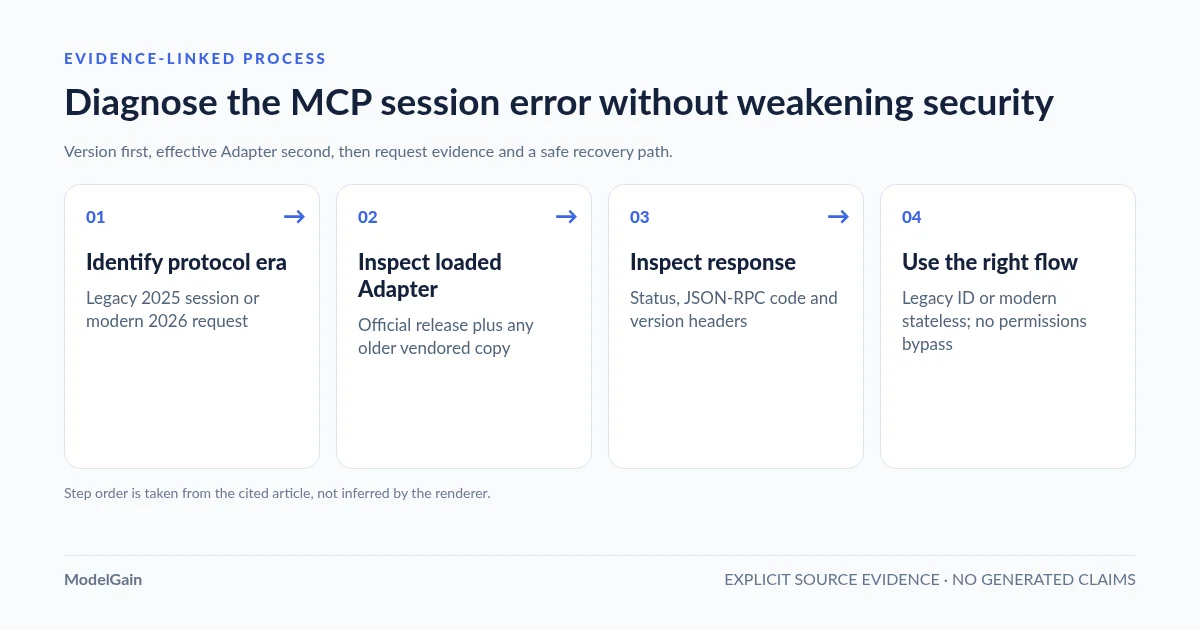
Record the client version and whether the request is 2025-11-25 initialize-based or 2026-07-28 sessionless. This determines whether a Session ID belongs in the request.
-
Check the installed official Adapter version and any vendored older copy. WordPress.org reports 0.7.1 as of November 2, 2026, and dual-revision support began in 0.7.0.
-
Record the HTTP method, status, JSON-RPC error code, protocol-version header and presence of session header. Redact credentials, cookies and session values.
-
Legacy requests should initialize, retain a server-issued session and send the matching protocol-version header. Modern requests should use valid 2026 metadata and no Session ID.
-
Test read-only ability discovery using least-privilege WordPress roles and per-ability server-side permissions. Discovery prompts cannot replace authorization.
Which error or client flow are you seeing?
All paths are listed below. Select a symptom to focus on the most relevant path.
Check old loaded Adapter code or modern request metadata
The 2026-07-28 protocol has no initialize handshake or Session ID. Official Adapter 0.7.0+ supports both eras. Verify the effective loaded implementation rather than just the Plugins screen, including vendored older code. Confirm MCP-Protocol-Version and request-level params._meta. Do not invent a Session ID.
Initialize and capture the server-issued legacy Session ID
For this Adapter's 2025-11-25 HTTP path, initialize without Mcp-Session-Id; capture the response header; send the initialized notification and later POSTs with the same Session ID and negotiated protocol-version header. Use a trusted client transport to retain state.
Reconnect; do not reuse stale sessions
Invalid or expired session can return JSON-RPC -32602, sometimes in HTTP 200. Restart the client and initialize again. The documented default idle timeout is 24 hours and the per-user session limit is 32; inspect exact evidence before changing server limits.
Check MCP-Protocol-Version as well as Mcp-Session-Id
WordPress MCP Adapter issue #411 reports a reproducible empty HTTP 400 on 0.7.1 after successful legacy initialization when the client omits MCP-Protocol-Version on its next request. A valid Session ID alone may not be sufficient. Prefer client/SDK correction rather than weakening WordPress permissions.
Route and method diagnosis is a separate problem
A REST route 404 is not evidence of a missing session. Verify the actual endpoint, HTTP method, registered default server, and host/proxy path. Keep authentication in place.
STDIO does not use HTTP Session IDs
The WordPress Adapter's WP-CLI STDIO transport does not use HTTP sessions. If this error appears, determine whether the client actually invokes a separate remote HTTP helper. Do not add HTTP headers to a pure STDIO connection.
Did this help?
1. Why a missing Session ID means two different things in 2026
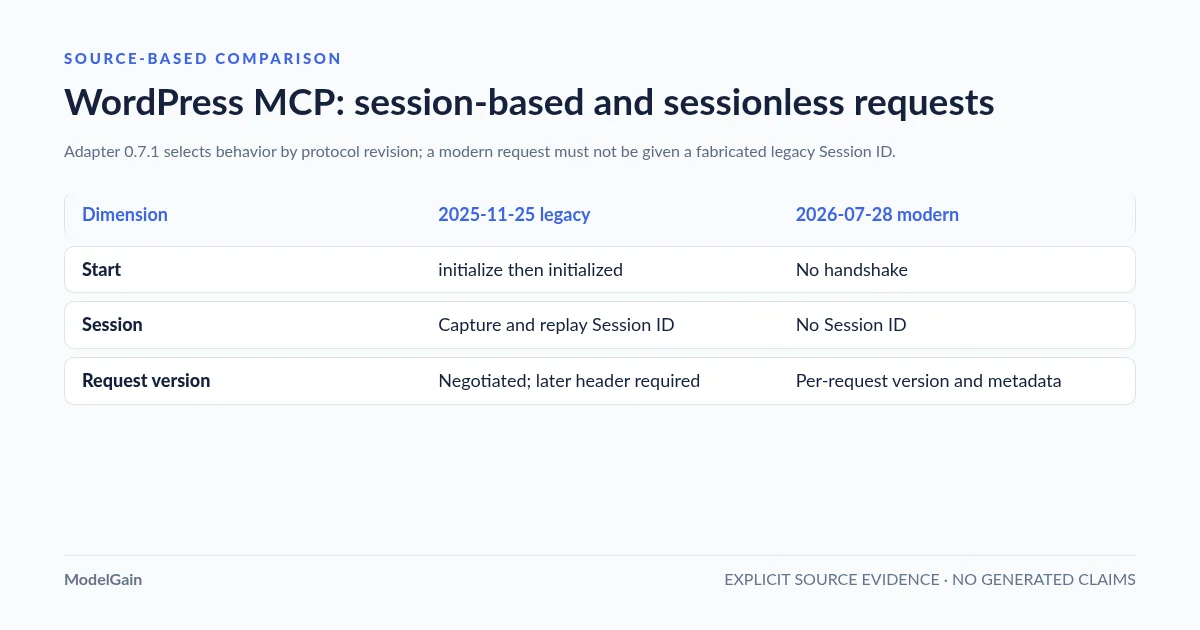
The Model Context Protocol changed its transport lifecycle on July 28, 2026. The MCP release announcement describes the removal of the initialize/initialized handshake and protocol-level Session ID. WordPress MCP Adapter 0.7.0 added dual-revision support, retained in 0.7.1. The Adapter’s architecture documentation confirms the separate paths.
| Question | 2025-11-25 handshake-era client | 2026-07-28 modern client |
|---|---|---|
| How does the client start? | initialize request, then notifications/initialized. |
No initialization handshake. May use server/discover for capabilities. |
| Session ID? | When issued by this Adapter, capture Mcp-Session-Id and reuse it. |
No protocol session or Mcp-Session-Id header. |
| Protocol version? | Negotiated during initialization; this Adapter expects the matching MCP-Protocol-Version header on subsequent legacy POSTs. |
Declared on every request; the body carries client context in params._meta. |
| Adapter behavior | Stateful HTTP session bound to the WordPress user. | Sessionless HTTP request handling, using the selected 2026 schema. |
| Typical failure | Missing/stale ID, changed user, or missing matching protocol header. | Old Adapter or mismatched request version, headers, or body metadata. |
Important nuance: an MCP server implementing the older specification can choose a stateless HTTP mode; the earlier specification did not universally require every server to issue IDs. This article describes how the official WordPress Adapter implements its legacy HTTP path, not a universal rule for all MCP servers. Likewise, newer SDKs may implement automatic fallback to a supported old revision, but client compatibility is not guaranteed merely because the SDK advertises both.
2. Verify which Adapter actually handles the request
Start with the installed and effective version, not only the WordPress Plugins screen. On November 2, 2026, WordPress.org lists official MCP Adapter 0.7.1, requiring WordPress 6.9+ and PHP 7.4+. Version 0.7.0 introduced support for the modern 2026-07-28 revision; 0.7.1 also changed autoloader registration so the installed plugin has a better chance of winning against an older bundled copy.
A particularly relevant WordPress.org support report dated October 2026 described Rank Math SEO 1.0.279 bundling MCP Adapter 0.5.0 while the standalone 0.7.0 plugin was activated. In that reported multisite combination, a modern server/discover request incorrectly returned “Missing Mcp-Session-Id header” because the older code path was loaded. This is a concrete version-shadowing example, not evidence that every Rank Math site or current release is affected. The subsequent 0.7.1 autoloader change matters; do not claim the issue remains unfixed without reproducing it on the exact installed versions.
With authorized WP-CLI access, start with these read-only checks on the correct WordPress installation:
wp plugin get mcp-adapter --fields=name,version,status --format=table
wp core version
wp plugin list --status=active --fields=name,version --format=table
The command output is an inventory, not proof of which vendored PHP classes loaded at runtime. If a site uses bundled integrations, inspect their actual package versions, the plugin’s changelogs and trusted vendor support information. Do not rename plugin directories, edit Composer vendor files or deactivate SEO/security plugins on production to force one class to load. Test version changes on staging and take a recoverable backup first.
If your client uses the modern revision, the required test is whether server/discover is processed as a 2026-07-28 request by the effective Adapter. It is not whether an unrelated browser GET happens to return HTTP 200. If the installed Adapter is genuinely pre-0.7.0, upgrading to a compatible packaged release—or using a client that supports the earlier session-based protocol—is more appropriate than fabricating a Session ID.
3. If your client uses 2025-11-25, follow the actual handshake
The official Adapter’s legacy HTTP flow consists of four operations: initialize, capture the server-issued Session ID, send the initialized notification, then send subsequent requests with the same ID and negotiated protocol revision. Use a current MCP SDK/client whenever possible so it owns this state. The following JSON-RPC fragments show the order, not a copy-paste shell command containing credentials:
// First POST: no Mcp-Session-Id yet
{
  "jsonrpc": "2.0",
  "id": 1,
  "method": "initialize",
  "params": {
    "protocolVersion": "2025-11-25",
    "capabilities": {},
    "clientInfo": { "name": "diagnostic-client", "version": "1.0" }
  }
}
After successful initialization, read the Mcp-Session-Id response header returned by the Adapter. The client should retain that value privately. For its subsequent legacy POSTs, it sends the matching headers:
Mcp-Session-Id: <server-issued-session-id>
MCP-Protocol-Version: 2025-11-25
Content-Type: application/json
Accept: application/json, text/event-stream
Then send notifications/initialized and read-only discovery through the initialized client. Do not use a session string copied from a different WordPress user, site, client or session. An HTTP header is a transport input, not an alternative to the user’s authenticated WordPress permissions. Do not print live Application Passwords or session IDs in issue trackers, screenshots, shell history or analytics.
These details are important because WordPress MCP Adapter issue #411, filed October 23, 2026 against 0.7.1, reports an additional compatibility issue: a legacy client that successfully initializes may receive an empty HTTP 400 when it omits MCP-Protocol-Version on notifications/initialized, even when it sends a valid Session ID. The reporter reproduced a successful notification after adding the matching protocol header. This is a reported current-version behavior, distinct from a missing Session ID. A client’s transport implementation should be fixed or updated; changing WordPress permissions will not address it.
4. If your client uses 2026-07-28, do not add a Session ID
The newer protocol uses server/discover for optional discovery and carries version, client information and client capabilities in each request. The WordPress Adapter’s modern path validates the HTTP protocol headers against params._meta and does not persist a server-side MCP session. Use a client SDK that implements the 2026-07-28 specification correctly rather than changing only the version string in an old initialize payload.
A modern request typically includes MCP-Protocol-Version: 2026-07-28 and the required method-specific headers, for example Mcp-Method and, where applicable, Mcp-Name. Its JSON-RPC body needs the appropriate params._meta client context. The exact headers and metadata vary with the method; consult the current official Adapter architecture and MCP SDK versioning guidance rather than manually guessing a protocol envelope.
If a new-client request to an ostensibly modern WordPress installation produces the legacy “Missing Mcp-Session-Id” error, check the effective loaded Adapter package and any bundled older copy before altering the request. If an updated client can negotiate the previous revision, it may choose the legitimate legacy flow. This is version fallback, not a permanent workaround that makes a 2026 request stateful. An API integration that mixes server/discover with a later initialize session cannot be treated as one coherent connection.
5. Distinguish missing, invalid, expired and incompatible sessions
The same user-facing phrase can obscure different evidence. The following outcomes are grounded in the WordPress Adapter’s documented legacy HTTP behavior; other servers and modern protocol revisions may return different shapes.
| Observed evidence | What it means | Safe next step |
|---|---|---|
HTTP 400 / JSON-RPC -32600: “Missing Mcp-Session-Id header” |
A non-initialize request reached the legacy session path without the required ID. | Confirm protocol revision. For legacy requests, initialize and replay the server-issued ID; for modern requests, investigate old Adapter code or version dispatch. |
JSON-RPC -32602: “Invalid or expired session”, possibly with HTTP 200 |
Session lookup failed, expired, was evicted or belongs to a different context. | Reinitialize through the trusted client; compare exact user/site, inactivity interval and number of concurrent sessions. |
| HTTP 400 with an empty body after a successful initialize | Could be a missing/mismatched MCP-Protocol-Version header as reported in #411. |
Compare request headers against the negotiated revision, not just the presence of Mcp-Session-Id. |
| HTTP 401 or 403 | Authentication, WordPress capabilities, or a security/proxy policy may be the problem. | Review dedicated Application Password, user role, and authorized request logs. Do not grant Administrator permissions just to make a diagnostic pass. |
HTML 404, JSON rest_no_route, or wrong content type |
Likely wrong route/method, missing registered server, or proxy interception. | Use the focused WordPress MCP route/404 guide instead of changing session settings. |
| Works with one client but not another | Clients can negotiate different protocol eras, send different headers or originate from different networks. | Compare client versions and protocol request traces after removing credentials and other sensitive values. |
6. Session lifetime, concurrent clients and hosting layers
The official Adapter’s default legacy HTTP session inactivity timeout is 24 hours, not a guaranteed 24-hour lifetime after creation. Active sessions are tracked against a WordPress user; the default concurrent-session limit is 32 per user, with older sessions subject to eviction when the configured limit is reached. The documented filters are mcp_adapter_session_inactivity_timeout and mcp_adapter_session_max_per_user. Before raising either limit, inspect the underlying cause and resource impact. Do not extend session retention simply to hide a buggy client that fails to reconnect.
WordPress MCP Adapter issue #395 documents a narrow 0.7.1 session-recovery race involving concurrently updated per-user session metadata. It describes a potential loss of legitimate session state, not exposure of credentials or proof that all expired-session incidents arise from a data race. Record timestamps and correlation evidence before attributing an incident to concurrency. Likewise, an older 0.6.0 migration changed multisite session storage scope, causing affected legacy clients to reconnect once after upgrade; it does not mean all 0.7.1 installations continuously lose sessions.
Where a cache, reverse proxy or load balancer is involved, verify that authenticated MCP requests actually reach WordPress with the correct method, protocol headers and protected identity. Do not broadly disable the WAF or turn the MCP endpoint into a public, write-capable API. Session-backed legacy behavior and sessionless modern behavior also have different infrastructure requirements; the official MCP Python SDK deployment guide explains why modern stateless requests avoid session affinity, whereas legacy session storage depends on the server implementation.
The Adapter’s STDIO transport through WP-CLI is a separate path: it does not use HTTP Session IDs. If a user reports this specific HTTP header error during a supposed STDIO-only workflow, verify whether their client is really invoking a remote HTTP bridge.
7. Verify the fix without exposing write access
For a WordPress site you administer, start from a known client version and record the protocol revision, effective Adapter version, failing method, HTTP status, JSON-RPC code and request ID. Remove tokens, WordPress Application Passwords, cookies, Authorization headers and session values from shared logs. Restart or reconnect the client when a legacy session has expired or been evicted.
Test read-only ability discovery first. On the legacy path, complete the legitimate initialization and send the stored Session ID and negotiated protocol header; on the modern path, send a valid modern request without a session ID. The client should receive its expected response and show the permitted discovery tools. A discovery prompt is not an access-control boundary: protect the site using WordPress user roles, ability permission callbacks, and minimum privilege. Do not test destructive actions on production.
If the general endpoint is unreachable, return to our WordPress MCP connection and authentication hub. If the transport works but an ability is missing, use the ability registration and discovery guide. For Abilities API prerequisites, see WordPress Abilities API availability.
Where ModelGain Agent Readiness Audit fits
With wp-admin available, ModelGain Agent Readiness Audit can collect read-only local evidence: whether the official Adapter class/version is detected, whether a relevant REST route is registered locally, and whether Abilities API metadata and bounded permission signals are present. That is useful when deciding whether to investigate the WordPress installation or the remote client.
It does not repair Session ID errors. The audit does not negotiate an MCP protocol revision, create or renew sessions, inspect client-side headers, test an authenticated remote handshake, diagnose load balancer affinity, provide OAuth or change WordPress permissions. A local Adapter/version finding is a lead, not proof that a remote client has negotiated that exact implementation. For broader agent authorization, review the Read / Act / Manage readiness checklist. The official WordPress.org listing provides installation and capability limits.
Frequently asked questions
Do I always need the Mcp-Session-Id header when using WordPress MCP?
No. The official Adapter’s 2025-11-25 HTTP path expects a Session ID issued during initialization. Its 2026-07-28 path intentionally uses no Session ID or initialization handshake. STDIO does not use HTTP sessions.
Why does WordPress still say “Missing Mcp-Session-Id” if my client uses 2026-07-28?
The wrong Adapter code path may be handling the request. Check the effective implementation and bundled plugin versions, and confirm the client’s version header and modern request metadata. A reported October 2026 bundled-copy conflict was addressed in part by an Adapter 0.7.1 autoloader change; current installations need individual verification.
Is the session missing when HTTP 400 appears after a successful initialize?
Not necessarily. GitHub issue #411 reports HTTP 400 on Adapter 0.7.1 when the legacy client sends a Session ID but omits MCP-Protocol-Version on the next request. Compare both headers and the negotiated version.
Should I raise the 24-hour inactivity timeout to fix an expired session?
Usually not as a first response. A trusted client should reconnect and reinitialize when necessary. Investigate version compatibility, failed session storage, concurrency and the actual idle interval before adjusting filters.
Resolution criterion: the same client, over the intended transport and protocol revision, completes read-only discovery without missing-session errors, while WordPress authentication and capability boundaries remain intact. The protocol era determines whether the fix is to supply a server-issued legacy Session ID or to stop sending legacy session traffic altogether.
Primary technical references
- WordPress MCP Adapter architecture: two protocol lifecycles.
- WordPress MCP Adapter default-server legacy HTTP session guide.
- WordPress MCP Adapter troubleshooting: session and transport errors.
- WordPress MCP Adapter: dual-revision implementation #310.
- MCP protocol 2026-07-28 official announcement.
- WordPress MCP Adapter issue #411: missing protocol-version header.
- WordPress.org: bundled older Adapter version report.