WORDPRESS
WordPress Agent Tool Works Without Login: Check Authentication
Does a WordPress AI agent tool work without login? Distinguish public REST data, cached sessions and real unauthorized execution with safe verification steps.
FREE WORDPRESS PLUGIN
Agent Readiness Audit
Audit how AI clients discover and read your WordPress site, and whether relevant structured capabilities are available.
- Install the local audit plugin
- Select Read, Act or Manage profile
- Review findings and next steps
Local read-only Abilities, Adapter and permission metadata evidence only. Cannot verify fresh anonymous MCP/REST execution, inspect remote credentials or cache identity, test real access bypass, revoke tokens or repair a security flaw.
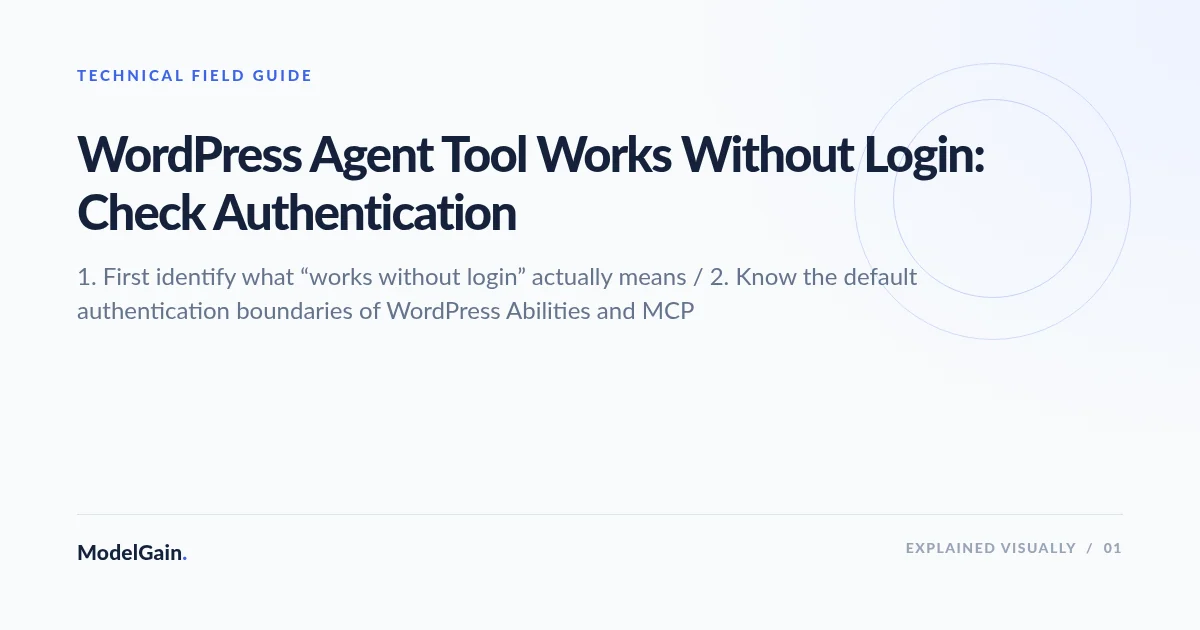
A WordPress AI agent tool appears to work even when you are not logged in. Is that an authentication bypass? Not necessarily. A public webpage, a REST API index, an already-authenticated MCP client, and an anonymously executable custom endpoint can all look similar in an agent interface—but they have very different security implications. The first step is to identify which URL was called, which identity the server saw, and whether any protected action actually ran.
Short answer: WordPress core Abilities REST endpoints require an authenticated user. The official MCP Adapter default server also requires WordPress authentication, in addition to its tool exposure and permission checks. The flag meta.public=true does not waive those requirements. If an unauthenticated request demonstrably performs a protected operation, investigate a separately registered REST route, custom MCP server, authentication middleware, shared cache, or application/plugin permission defect. Never assume that a tool is safe merely because its annotation says read-only.
This is a symptom-specific incident triage guide. For the general exposure-risk inventory, use our WordPress MCP public Abilities security review. For setting up a dedicated user, revocable credentials and access boundaries, use the WordPress AI agent permissions guide.
Did a WordPress AI tool really work without authentication?
Applies when: Distinguish public site content, REST discovery, persistent MCP credentials, custom endpoints, caching artifacts and verified unauthenticated private operations without attempting destructive production requests.
Quick answer
WordPress core Abilities REST endpoints and the official MCP Adapter default server require authenticated users. Public Ability metadata changes exposure, not authentication. Verify exact origin route, fresh client identity and protected operation before declaring an auth bypass.
What to do
-
Record whether this is public HTML, /wp-json/, /wp-abilities/v1, default MCP or a custom REST/MCP route. Identify the exact WordPress site and plugin.
-
From an isolated client with no authorization or stored cookies, check only safe Abilities collection/read routes on staging. Compare response to authenticated behavior.
-
Trace the WordPress user ID, Application Password, OAuth/service account and origin versus edge response. Never disclose authentication headers.
-
Inspect custom REST permission_callback and the Ability's object-level check; use synthetic records only for safe denied-write tests on staging.
-
If a new anonymous request really changes private data, restrict the exact affected route, preserve sanitized proof and verify negative and revocation tests before reopening.
What did the WordPress agent do after you logged out?
All paths are listed below. Select a symptom to focus on the most relevant path.
This may be expected public reading
Published HTML and explicitly public informational APIs can be accessed without a WordPress account. Check for actual private content, not simply an accessible page. A WordPress MCP account is unnecessary for public FAQ reading.
Route discovery is not permission to execute
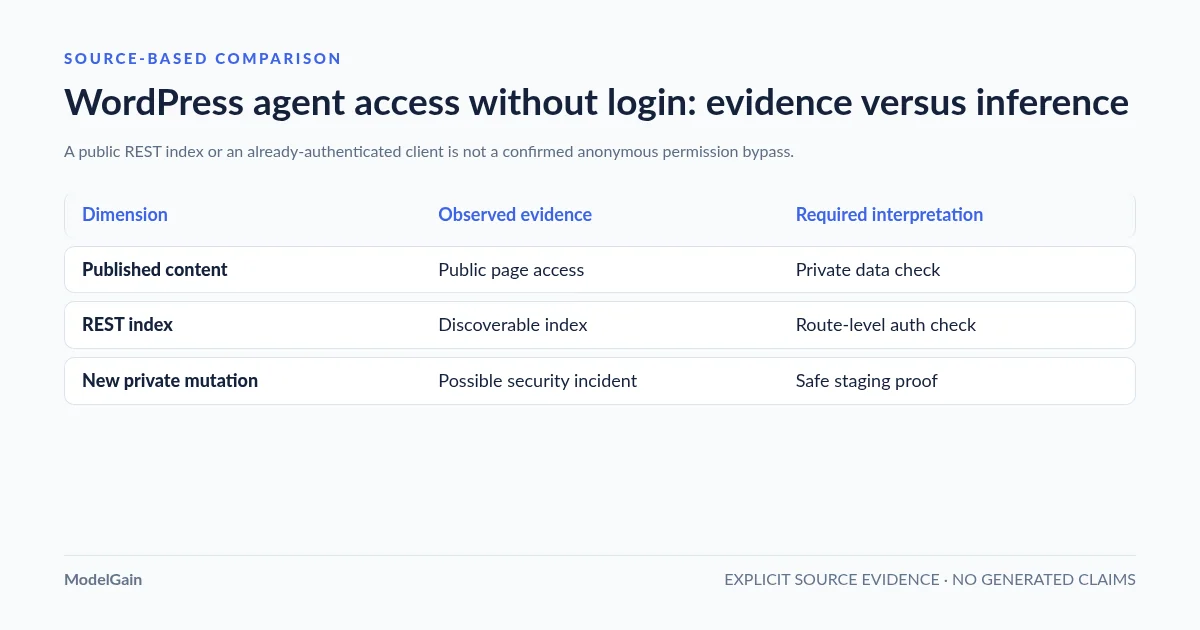
The general /wp-json/ index can be publicly discoverable. Test the specific protected Abilities collection on staging with no credentials; it normally requires authenticated users. Check actual status, content type and origin identity.
Logging out of wp-admin does not revoke API credentials
A remote client or MCP proxy may retain a revocable WordPress Application Password or OAuth token. Identify its WordPress account, revoke only that integration and prove a newly attempted protected read is denied.
Confirm identity and cache before treating it as a bypass
The official core Abilities REST API requires authentication. If a credential-free core collection returns protected data, inspect any proxy/SSO-injected identity, caching, custom rest_authentication_errors hook and version. Do not fetch private records from production.
Inspect the custom route's own permission callback
A separately registered REST route may intentionally allow anonymous access with __return_true for harmless public information. For private reads and writes, this is not sufficient; trace the exact callback, data scope and execution path on staging.
Distinguish remembered UI from a new successful call
An MCP client may retain old tool names even after an API credential is revoked. Check whether a NEW authenticated request succeeds using the revoked identity, and distinguish origin and CDN cache responses. Do not infer access from an old tools/list snapshot.
Treat verified anonymous private mutation as an incident
Restrict the affected route or integration without globally disabling WordPress REST. Preserve a redacted reproduction with synthetic data, effective user identity, timestamp and code versions. Notify maintainers privately and retest denial, allowed access, revocation and side effects on staging.
Did this help?
1. First identify what “works without login” actually means
| Observed result | What it proves | Correct next check |
|---|---|---|
| A published article or product page is readable | Public content is available by design | Check only whether private or unpublished data appeared |
/wp-json/ lists routes or namespaces |
The REST API index is discoverable | Test authorization for the specific protected route; an index is not execution |
| The agent still lists or calls a tool after you log out of wp-admin | The client has some usable connection or stored metadata | Check a fresh client, its Application Password/OAuth, cookies and real origin logs |
An unauthenticated request to core /wp-abilities/v1/abilities succeeds with protected data |
A deviation from the documented core authentication expectation, if reproducible at the real origin | Verify actual request identity, caching, custom REST auth filters and effective plugin/code versions |
| A custom REST route returns public information | That route may intentionally allow anonymous access | Inspect its permission_callback, returned data and whether sensitive inputs are accepted |
| A fresh, cred-free client changes a private record | Potential access-control incident if the server-side change is verified | Restrict the affected route, preserve minimal logs and reproduce safely on staging; escalate to maintainers |
Record the actual HTTP request rather than relying on a chat transcript or tool name. A front-end agent may silently reuse a browser session. An MCP proxy can hold its own service credential after you log out of WordPress. Cached tool schemas can remain visible after a connection is revoked even though new execution fails. Check both the client’s identity and the server’s returned result, not the user’s perception of being “logged out”.
2. Know the default authentication boundaries of WordPress Abilities and MCP
The official WordPress Abilities REST reference says that all Abilities REST endpoints require an authenticated user, with per-Ability execution additionally restricted by permission_callback. The namespace is /wp-json/wp-abilities/v1/. An Ability may be registered in PHP but invisible in REST, and core rejects an unauthenticated user at the REST gate even if the Ability’s own callback is permissive.
The official MCP Adapter default server exposes discovery/get-info/execute meta-tools to authenticated WordPress users with the configured capability (typically read) and then checks MCP exposure and the target Ability’s permissions. Its HTTP endpoint is typically /wp-json/mcp/mcp-adapter-default-server. A custom server, proxy or other vendor’s plugin can have materially different authentication, routing and permission logic. Confirm what you have actually installed, including its active version.
WordPress 7.1’s unified public metadata affects client exposure, not the authentication rule. As of WordPress 7.1, meta.public=true supplies the default for meta.show_in_rest, unless an explicit REST-specific value overrides it. On WordPress 6.9/7.0, REST exposure still requires a separate meta.show_in_rest=true. Neither version makes the core Abilities REST endpoints anonymous merely because an Ability is marked public.
3. Reproduce the result using a fresh unauthenticated client
Work only on a WordPress installation you administer. Start with an isolated staging clone, synthetic records and read-only requests. Do not send an unauthenticated request to a known write or destructive /run endpoint in production just to prove a point. If you suspect a live exposure of real private data, contain it and preserve minimal evidence rather than downloading customer records.
Run these credential-free, read-only requests from a terminal that has no stored cookies or authorization configuration. Replace the domain with the exact staging site you control:
# Public REST API index; may be accessible anonymously by design.
curl --disable --silent --show-error --dump-header - --output /dev/null \
  'https://staging.example.com/wp-json/'

# Core Abilities collection; an unauthenticated request should be refused.
curl --disable --silent --show-error --dump-header - --output /dev/null \
  'https://staging.example.com/wp-json/wp-abilities/v1/abilities'

# A named WordPress REST endpoint can have a different permission policy.
# Inspect its source definition before testing it. Do not probe a write URL.
--disable prevents curl from loading its default configuration, including credentials that might otherwise be hidden in a local .curlrc. These example requests supply no explicit Authorization header or cookie jar. Still check your proxy, SSO and network for injected authentication and examine the effective WordPress user ID in safe server-side diagnostic logs. An HTTP 200 to a generic REST index does not imply unauthorized tool execution. An HTTP 401/403 is usually consistent with enforcement; an upstream 200 HTML login page is not proof that the API returned data.
Repeat the same read-only test using the real production hostname only if required to compare cache/CDN behavior, and do not enumerate private data. Collect the status, final URL, response Content-Type, Cache-Control, redirect chain, a server-side correlation ID and whether the body is an actual JSON API response. Avoid publishing raw cookies, bearer tokens, Application Passwords, IP-identifying log entries or private content.
4. Rule out six common false positives before calling it an incident
- Existing API identity: logging out of the WordPress dashboard does not revoke the connection’s independently generated Application Password. A logged-out browser and a still-authenticated MCP proxy can exist simultaneously.
- OAuth/service session: an MCP client may have received a separately authorized token. Check the provider’s account-to-WordPress-user mapping and the actual outbound request, not just wp-admin’s login screen.
- Remembered tool schema: the client may display its previously discovered tool list without performing a new
tools/listcall. A tool button remaining visible is not evidence the next execution is allowed. - Public-content retrieval: an agent can read public WordPress HTML or ordinary REST post endpoints without a private login. That is expected unless your content policy says otherwise.
- Cache/proxy confusion: a CDN or Nginx cache may return a cached response after authorization changes. Check origin versus edge readback and cache-bypass handling on staging without exposing private responses. A reported HTTP MCP caching concern (#270) is a reason to verify your exact release and proxy rules, not proof that your site is currently leaking data.
- Wrong endpoint or environment: a similarly named tool may be implemented by a custom REST route, an independent MCP server, a browser extension, a WordPress test installation or a direct PHP operation. Verify the absolute URL, actual site, loaded plugins and route registration owner.
If the fresh, credential-free core Abilities REST collection returns protected information, capture a redacted response and check any custom rest_authentication_errors filters, reverse-proxy rewrites and third-party authentication integration. The WordPress REST FAQ documents authentication filters; a broken custom filter can inadvertently widen access, and globally disabling all REST access can also break WordPress administration.
5. Separate custom REST route permissions from Ability permissions
A custom WordPress REST route created through register_rest_route() may intentionally allow anonymous calls through permission_callback => '__return_true', as documented for genuinely public endpoints in the official REST handbook. That callback is appropriate only when the entire route and its response are intentionally public and safe. It is not a workaround for a write or private-data API.
By contrast, an Ability’s meta.public is exposure metadata, not permission to execute. An Ability’s permission_callback decides whether its real operation is allowed. A flawed custom server or vendor adapter might call the execution callback directly, bypass a capability check, or register a separate REST endpoint with a permissive callback. You must trace the actual route handler and the exact execute path to identify which boundary is responsible.
For sensitive actions, the permission check should be resource-specific: current_user_can('edit_post', $post_id) rather than just current_user_can('edit_posts'). Verify site ownership, post status, record-level scope, input validation and downstream effects inside the server-side code. The core permission method can return WP_Error as well as booleans; do not treat a truthy PHP error object as authorization.
6. Run a safe denial-and-revocation acceptance test
| Test case | Evidence required | Acceptable interpretation |
|---|---|---|
| Fresh anonymous REST collection request | No credentials; status and JSON response classification; effective server-side identity | Protected core collection denies unauthenticated access |
| Authorized limited-user discovery | Identified user and intended server; allowed tool list | Only intended exposure visible in that channel |
| Restricted-user object test on staging | Synthetic target post owned by another user; denied operation; no write | Permission callback blocks the actual object |
| Revoked Application Password | Before/after authenticated read; specific credential revoked | Previously working integration cannot perform a new authenticated operation |
| Cached versus origin output | Cache-control and route behavior with sanitized sample data | No protected output replayed to anonymous sessions |
| Downstream effects | Staging mail catcher, webhooks, queues and audit trace | No forbidden side effect occurred before denial |
For revocation, remove the specific Application Password under the dedicated user’s WordPress profile, then re-run a benign authenticated read with the former credential from the same integration. If the client can still perform a new protected action, check whether it actually switched to a different OAuth token, cookie or service account; do not assume that WordPress ignored the revocation. The definitive acceptance condition is no new successful privileged operation under the revoked identity, verified against the origin and the correct route.
7. What if a protected action really runs anonymously?
If you can reproduce an unauthenticated private read, write or destructive operation with synthetic data and prove the origin processed it, treat the finding as a potential security incident. First use the narrowest reversible containment mechanism: disable the vulnerable integration’s specific Ability or custom route, revoke affected credentials if their scope is uncertain, and apply a scoped block for the affected endpoint when appropriate. Avoid disabling the whole WordPress REST API indiscriminately or turning off unrelated production features.
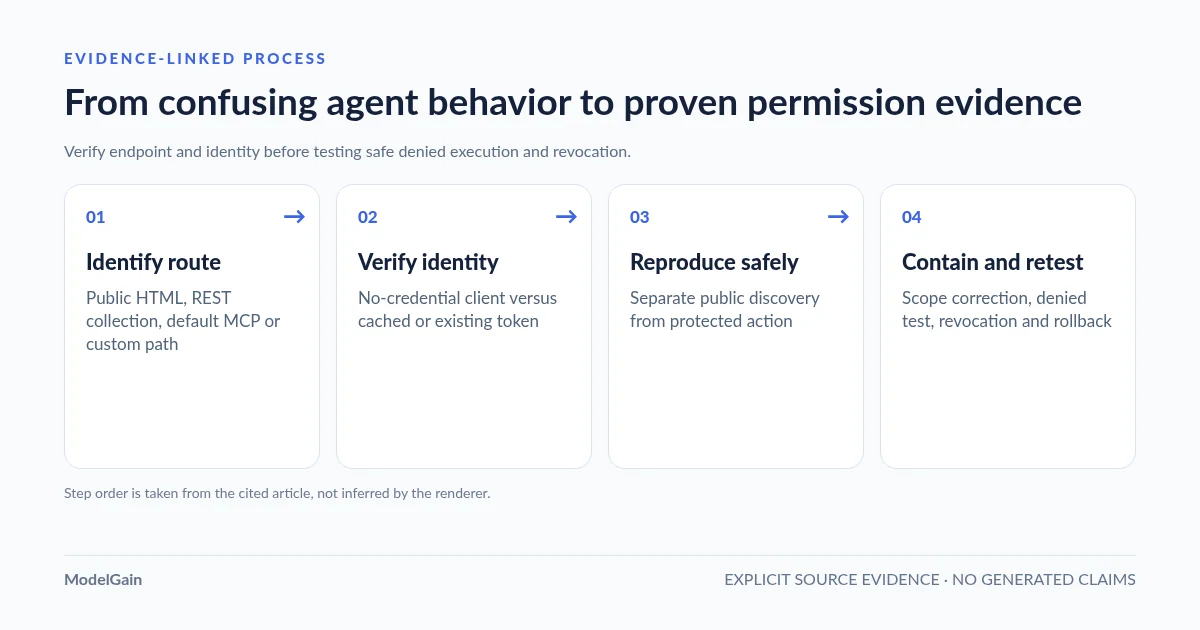
Preserve the affected URL, request method, sanitized input class, time, plugin/core versions, response status, evidence of the intended versus actual identity, and the verified resource change. Check whether private data was exposed or an external notification/webhook ran. Notify the responsible plugin maintainer privately with a minimal reproduction and a clear distinction between confirmed behavior and suspected cause. Apply a supported fix in staging, then repeat the anonymous denial, authorized positive, limited-user negative and revocation tests before removing containment.
GitHub discussion about REST permission callbacks provides context: WordPress Abilities API issue #68 argued for making explicit permission callbacks mandatory, citing historical REST plugin vulnerabilities. That discussion is design evidence, not proof of a vulnerability in a current WordPress core release. Likewise, the MCP Adapter’s older HTTP 500 error-shape report (#104) describes incorrect status/error formatting for unauthenticated requests in an earlier version; it does not show that the underlying unauthenticated execution was allowed. Verify current code and avoid replaying old bug reports as active CVEs.
8. Where the Agent Readiness Audit plugin fits
The released ModelGain Agent Readiness Audit provides local, read-only evidence about the site’s discoverability, Abilities API, registered metadata, MCP Adapter and selected safety/observability signals. Its product page explains the Read / Act / Manage audit profiles and limits. It can help identify what to inspect, but those profiles are not WordPress roles and do not modify the permission model.
The plugin cannot prove that an anonymous external request can execute a real Ability, inspect all client credentials or dynamic authorization paths, revoke an integration, fix a vulnerable endpoint or certify security. It does not replace the credential-free and revoked-credential staging tests described above. Treat Unknown as missing evidence rather than assuming safety or a confirmed flaw.
FAQ: WordPress agent tools and anonymous access
If an Ability has meta.public=true, can anonymous visitors execute it?
Not through the documented core Abilities REST endpoints or the official default MCP Adapter merely because of that flag. Those surfaces require authentication. The Ability’s own permission check also applies. Separate custom REST routes and custom servers must be inspected independently.
Why does Claude or another MCP client keep working after I sign out of WordPress?
Signing out of the interactive dashboard does not revoke an Application Password or OAuth integration. Check the actual remote connection and test a new permitted operation after revoking its credential, rather than relying on the browser’s session state.
Does HTTP 200 from /wp-json/ mean my site has an authentication bypass?
No. The REST API index can be public. Verify the specific protected route and whether it returned sensitive data or performed a forbidden change using a genuinely anonymous request.
Should I set permission_callback='__return_true' to make a tool work?
Only a separately reviewed, intentionally public, harmless custom REST endpoint should use an unrestricted callback. Never do this to expose private data or a write-capable tool. For a protected Ability, preserve real capability and object-level checks.
Can a local read-only WordPress audit confirm an anonymous execution vulnerability?
No. It cannot replace an authorized staging reproduction through the actual client, effective server route and no-credential/denied paths. Use local metadata as context and collect execution evidence separately.
Official documentation and incident references
- WordPress Abilities REST authentication and execution documentation.
- Official MCP Adapter default-server security model.
- WordPress 7.1 public metadata: exposure is not authorization.
- WordPress REST route permission callbacks and intentionally public routes.
- Application Password identity and revocation.
- HTTP caching report (#270), historical error-format report (#104) and permission-callback design issue (#68).