WORDPRESS
WordPress Is Running an End-of-Life PHP Branch: Triage the Real Risk
PHP EOL does not always mean a host stopped patching. Compare extended-support coverage, fees, compatibility and migration risk before you pay.
FREE WORDPRESS PLUGIN
PHP Security Monitor
Identify the PHP version serving your WordPress admin request, review potentially matching PHP CVEs after consent, and prepare a host-support report.
- Install on WordPress 6.9+ with PHP 7.4+
- Open Tools → PHP Security and review the web runtime
- Opt in to Check now, then review evidence and the host report
Version evidence only; an advisory match is not proof of exploitability or compromise. Cannot patch PHP, verify backports or provide continuous protection. External checks share server IP/PHP version after consent; optional WP-Cron checks and email require separate consent and are not guaranteed.
Short answer (checked November 20, 2026): paid PHP Extended Support can be a sensible temporary bridge when a production WordPress site cannot move to a maintained PHP branch yet. Pay for it only when the provider identifies the exact legacy runtime, documents the security maintenance it supplies, states which sites and packages are covered, and gives you a clear end date. A recurring fee does not automatically mean your WordPress plugins, theme, custom code, or every server node are secure.
The decision is not simply “upgrade now” versus “keep paying.” You need to know what the provider is maintaining, what the service excludes, how long the bridge will last, and whether the total cost is lower than resolving the compatibility problem. Start with the PHP Security Monitor product page if you need to identify the PHP runtime serving your WordPress admin request; use the checks below to evaluate the host’s actual support offer.
PHP end of life and paid hosting support are different things
When a PHP branch reaches end of life (EOL), the PHP project stops publishing normal security fixes for that branch. The interpreter does not suddenly stop running, and WordPress may still execute on it. What changes is who, if anyone, is responsible for fixing new PHP vulnerabilities.
As of November 20, 2026, PHP 8.1 is already beyond upstream support, while PHP 8.2 is still receiving security-only fixes until December 31, 2026. PHP 8.2 has not reached EOL yet. Check the official PHP supported-versions table before acting; dates and branch status change.
The distinction is current, not theoretical: the PHP project published security releases for PHP 8.2.36, 8.3.37, 8.4.28 and 8.5.13 on November 19, 2026, alongside the PHP 8.6.0 release. That upstream release cadence is what a vendor-maintained legacy branch must explicitly replace after its PHP project support ends. See the PHP 2026 release archive and PHP 8 change log.
| PHP branch | Upstream position on November 20, 2026 | What a site owner should verify |
|---|---|---|
| PHP 7.4 | Upstream EOL since November 28, 2022 | Whether the exact hosting package still receives vendor security fixes |
| PHP 8.0 | Upstream EOL since November 26, 2023 | Whether the provider’s paid or distribution maintenance covers this branch |
| PHP 8.1 | Upstream EOL since December 31, 2025 | Whether an extended-support service is active for every affected site |
| PHP 8.2 | Security-only support through December 31, 2026 | Plan the next supported runtime; do not describe 8.2 as already EOL |
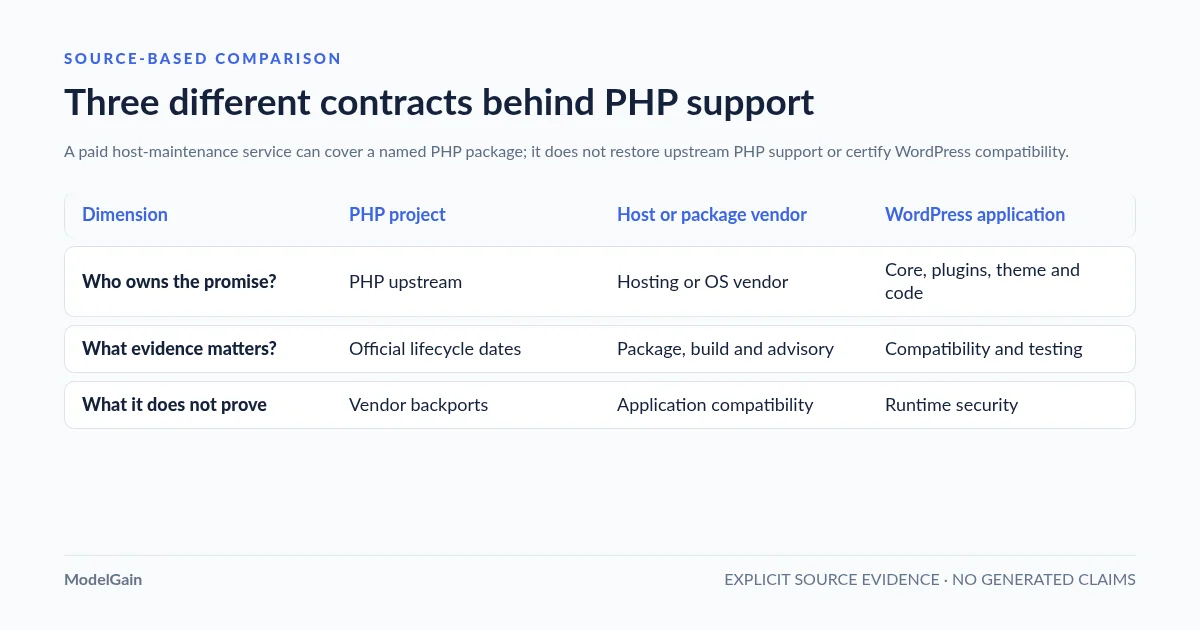
A hosting company can continue maintaining a legacy package after the PHP project stops maintaining that branch. It may backport a security fix, distribute a patched package, or buy maintenance from a specialist vendor. That can reduce the risk of remaining on the old branch for a limited period. It does not make the branch upstream-supported again, and it does not prove that the package serving your particular website has received every relevant fix.
The scanner reports zero CVEs, but PHP is end of life: should you still upgrade?
Yes—keep an upgrade or documented vendor-maintenance plan. A PHP vulnerability scanner returning zero version-matched advisories and the PHP project ending support for a branch answer different questions. A clean-looking advisory feed is not a contract to fix the next vulnerability. Nor does it establish that unreported vulnerabilities, unsupported hosting configuration or WordPress plugins are secure.
For example, a WordPress site running PHP 8.1 on November 21, 2026 is already on an upstream-EOL branch (support ended December 31, 2025), even if a current scan has no matching records. PHP 8.2, by contrast, remains in security-only upstream support until December 31, 2026; it is not EOL as of this article’s review date. Read the official PHP support table for the precise branch and date rather than inferring support from the number of CVE hits.
Separate three evidence layers before making a change:
- Advisory evidence: did the check complete with fresh source data, no unknown records, and zero applicable matches within the retrieved dataset? No scan, a failed fetch or stale provider data is not a zero-result verdict. Our zero-finding and feed-freshness guide explains this distinction.
- Lifecycle evidence: does the exact upstream PHP branch still receive security releases today? The PHP unsupported-branches register answers this independently of any particular scanner.
- Vendor/package evidence: if upstream maintenance has stopped, has the actual hosting vendor documented security maintenance or a CVE-specific backport for the package and web worker serving your domain? A package being selectable in the control panel is not a patch record. See how to verify a vendor-maintained PHP build.
Decision: if the branch is EOL and the provider has no documented security maintenance for the installed package, prioritize migration even when the advisory counter reads zero. If the provider has evidence-backed extended support, use it only as a defined bridge while you test a maintained PHP branch. If compatibility prevents an immediate switch, preserve a working rollback, test themes and plugins on staging, and set a migration review date. Do not suppress a lifecycle warning, downgrade the scanner’s freshness rules, or pay for a service merely to turn its dashboard green.
What should a PHP Extended Support fee actually buy?
A meaningful extended-support service should describe continued security maintenance for named PHP branches or packages. Depending on the provider, that can include security analysis, backported fixes, rebuilt packages, updates through the host’s package channel, and a defined period during which the provider will maintain the old runtime.
It should not be assumed to include WordPress core maintenance, plugin or theme updates, custom-code repairs, compatibility testing, malware cleanup, incident response, or a guarantee that the whole website is secure. Those are separate services unless the contract explicitly includes them.
Provider policies are materially different. These public examples show why you must read the exact plan rather than treating “PHP Extended Support” as a standard industry product:
| Provider example | Published service model | What to notice |
|---|---|---|
| DreamHost | Its published add-on pricing lists $5/month for one site, $10 for 2–4 sites, $15 for 5–19 sites, and $25 for 20 or more sites. | Pricing is based on the number of sites. DreamHost’s help documentation says pricing varies by account and usage, and that Dedicated Server plans include the feature at no additional cost. |
| IONOS service terms · US pricing | Its US pricing page lists version-specific monthly fees, including $7.81 for PHP 8.1 and $15.62 for PHP 7.4 or 8.0. | The supported versions and availability depend on the hosting contract and system architecture. The amount is not a universal PHP market price. |
| GoDaddy Web Hosting (cPanel) | GoDaddy describes a paid add-on delivered with CloudLinux for sites using PHP branches that have reached EOL. | Confirm the exact hosting product, package family, branch coverage and current account charge; do not infer coverage from the product name alone. |
For a simple cost check, multiply the recurring charge by the number of billing periods you expect to need it. At DreamHost’s published 5–19-site tier, six months costs $90 in add-on fees. That buys time; it does not remove the future migration, compatibility work, or testing cost. If a provider bills per site, calculate the total for every affected domain rather than looking only at the first invoice.
Also separate an extended-support fee from a PHP rollback. A WordPress.org support question describes a site that failed after a PHP 8.4 upgrade and asks whether the owner must buy extended support just to return to the previous version. The forum response explains that reverting the PHP version is normally a separate hosting-control-panel operation; the exact procedure depends on the provider. Read the PHP upgrade and rollback discussion. A rollback can restore availability, but it does not create security maintenance for an EOL branch.
A second WordPress.org discussion shows the other side of the problem: a site owner running WordPress 6.2.6 and PHP 7.4 tried to move to PHP 8.3 to avoid an extended-support charge, but the site returned a fatal error. The replies recommended a staging copy and testing the theme and plugins before changing production. This is one reported case, not a measure of how often upgrades fail, but it illustrates why the bridge decision must include the cost of resolving the compatibility blocker. Read the PHP 7.4 to PHP 8.3 compatibility discussion.
When is paying for extended support a reasonable decision?
Treat the service as a time-limited maintenance bridge, not as a permanent upgrade strategy. Paying can be reasonable when all of the following are true:
- The site has a real compatibility blocker: a critical plugin, theme, integration or custom workflow fails on the maintained PHP version.
- The provider confirms that the specific legacy branch and package used by your site receive security fixes, rather than merely remaining selectable in a control panel.
- The service covers every affected domain, web worker or hosting node, and its scope and end date are documented.
- The fee is lower than the operational cost of an untested immediate migration, and the site owner has a funded plan to remove the blocker.
- A named owner and review date are assigned. The next decision is based on tested compatibility and current package evidence, not on an automatic renewal.
Do not treat the fee as sufficient evidence when the provider cannot identify the package or branch, cannot explain what security fixes it supplies, or offers no maintenance end date. A dashboard badge, an invoice line, or the continued availability of PHP 7.4/8.1 is not a patch record.
The practical rule is straightforward: pay only for documented coverage while you prepare the exit; migrate when the site can run on a maintained, compatible branch. If the provider cannot document the coverage, treat the support status as unverified and escalate the question before relying on it.
Ask your hosting provider these questions before you pay
- Which exact PHP branch and package are covered? Ask for the package family and build serving the domain, not only the PHP version shown in the control panel.
- What does the fee include? Confirm whether it covers security fixes, package rebuilds, deployment, support response, or only continued access to an old runtime.
- Which sites and server components are included? Confirm every domain, PHP-FPM pool, container, node and package family that can serve the site.
- How are security fixes documented? Ask for the vendor advisory or changelog, the affected branch, the fixed package/build and the date the fix reached your environment.
- When does maintenance end? Get the final support date, renewal rules, notice period and any per-site or per-account billing unit.
- Does the service include application compatibility work? Unless the contract says so, assume plugin/theme updates, custom-code changes, staging and regression testing remain your responsibility.
- What is the supported migration target? Ask which PHP branches the host currently maintains and which versions it supports for your hosting product.
When a host says it has backported a particular CVE, ask for the package-specific evidence. Some vendors keep the upstream PHP version string while changing the package release that contains the fix. The correct comparison is between the active package/build and the vendor’s security notice—not a version string in isolation. Our guides explain why a PHP warning can remain after a host patch and how to verify a PHP patch for a specific vulnerability.
A current example is CloudLinux’s November 19, 2026 security-update notice, which lists separate alt-php and ea-php package families. The notice is evidence for the packages and branches it names; it does not prove that another host, distribution or package family has the same fix. Ubuntu documents its own backported security-update model. Always match the vendor notice to the package family and release that actually serve your site.
Do not confuse PHP maintenance with WordPress compatibility
Three separate questions need three separate answers:
- PHP lifecycle: does the PHP project still publish security fixes for this branch?
- Host maintenance: does the operating-system or hosting vendor maintain the exact package serving this site?
- Application compatibility: do this WordPress core version, plugins, theme and custom code work on the target PHP branch?
WordPress.org currently recommends PHP 8.3 or newer, while the WordPress compatibility matrix records compatibility by WordPress release and PHP branch. PHP 8.6.0 was released on November 19, 2026, but the current WordPress 7.1 compatibility page lists PHP 8.5 and does not list PHP 8.6. Do not select the newest PHP release for production merely because it is the newest upstream branch. Check the WordPress requirements and WordPress 7.1 compatibility matrix alongside your actual plugin and theme requirements.
If an upgrade breaks a critical workflow, restore service through the host’s supported rollback path, then reproduce the failure on staging and update or replace the incompatible component. Do not turn a temporary rollback into an indefinite security exception. Use the WordPress PHP staging and rollback checklist and the PHP compatibility preflight. For the specific PHP 8.2 deadline, follow the separate PHP 8.2 end-of-life migration guide.
Where PHP Security Monitor fits
ModelGain PHP Security Monitor helps answer one part of the investigation: which PHP version and SAPI are serving the WordPress admin request, and what advisory or lifecycle evidence is available after the administrator opts in to an external check. It can prepare a host-support report so you can ask a more specific question.
The plugin does not inspect your hosting invoice, identify every package across all nodes, verify a vendor backport, patch PHP, test theme/plugin compatibility, or certify the website as secure. An advisory match is not proof of exploitability, and an empty result is not proof that no vulnerability exists. The published plugin requires WordPress 6.9+ and PHP 7.4+; sites below those requirements can use WordPress Site Health and their host’s own diagnostics instead. Read the official WordPress.org listing for current requirements and behavior.
Should you pay for PHP Extended Support or move the site?
Applies when: A WordPress site is running an upstream EOL PHP branch, or an upgrade is blocked by a critical plugin, theme or custom workflow. The owner must decide whether a paid host-maintenance service is a defensible temporary bridge.
Quick answer
Pay only when the provider documents security maintenance for the exact PHP package and affected sites, states the price and end date, and the owner has a migration plan. A fee or control-panel label alone does not prove patch coverage or WordPress compatibility.
What to do
-
Record the PHP version and SAPI serving the WordPress admin request. Do not substitute a CLI version or a hosting-panel default for the actual web runtime.
-
Confirm the PHP branch, package family, covered sites, billing unit, included security maintenance, service end date and any migration assistance.
-
Ask for the vendor security notice, affected CVE or advisory, exact fixed package/build and confirmation that it serves every relevant site and node.
-
Calculate recurring fees for every affected site and set a named review date. Test the maintained PHP target on staging before changing production.
What evidence and migration path do you have for this EOL PHP deployment?
All paths are listed below. Select a symptom to focus on the most relevant path.
Use it only as a time-limited bridge
Keep the provider’s package/build evidence, covered sites, billing terms and end date. Assign an owner and review date, and continue the compatibility work needed to move to a maintained PHP branch.
Ask for evidence before relying on the fee
Request the exact package family/build, vendor advisory or CVE coverage, affected domains/nodes, maintenance end date and billing unit. Until those are documented, classify the security coverage as unverified.
Prioritize a supported and compatible runtime
Choose a PHP branch maintained by the PHP project and supported by the host and application stack. Test on staging, validate business-critical paths and prepare a rollback before production.
Restore service, then resolve the dependency
Use the host’s supported rollback path to restore availability if necessary. Reproduce the failure on staging, update or replace the incompatible component, and use verified temporary maintenance only if the provider can document it.
Did this help?
Make the decision: pay for a bridge or move to a maintained PHP branch
Use this final check before accepting or renewing an extended-support charge:
- Verified package-specific security coverage and a defined end date: a short bridge can be justified while the site is tested and prepared for migration.
- Only a fee, control-panel label or old PHP version string: the coverage is not verified. Ask the provider for the package, advisory and maintenance terms.
- No documented maintenance after upstream EOL: prioritize migration to a maintained PHP branch that is compatible with the site.
- The upgrade breaks a critical component: restore availability, reproduce the issue on staging, fix or replace the incompatible component, and keep the security decision open until a supported target is ready.
Do not pay indefinitely for a compatibility problem that has no owner or exit date. Do not force an untested PHP upgrade onto a revenue-critical WordPress site either. Make the temporary support contract, application test plan and migration deadline part of the same decision.
Frequently asked questions
Does PHP end of life mean the website will stop working?
No. An EOL PHP interpreter can continue to run. The PHP project has stopped maintaining that branch, so future security fixes must come from another documented source or the site must move to a maintained branch.
Does PHP Extended Support make an old branch officially supported by PHP?
No. It is a separate maintenance commitment from a hosting provider, operating-system vendor or specialist. It may supply security fixes for named packages, but it does not change the PHP project’s upstream lifecycle status.
Does an extended-support fee include WordPress plugin and theme updates?
Do not assume so. The fee normally concerns the PHP runtime package. Confirm application maintenance, compatibility work, staging and migration assistance separately in the provider’s contract.
Do I need to buy extended support just to roll back a failed PHP upgrade?
Not necessarily. Changing back to a previous PHP version and purchasing ongoing security maintenance for an unsupported branch are different operations. Check the provider’s rollback procedure and whether it charges separately for keeping that old branch patched.
Can PHP Security Monitor verify that my host has backported a fix?
No. It can show the PHP version/SAPI serving the admin request and available upstream advisory/lifecycle evidence after consent. Package-specific backport verification must come from the provider’s package records and security notices.
Official sources and related guides
- PHP: Supported Versions and PHP: Unsupported Branches
- PHP 2026 release archive and PHP 8 change log
- DreamHost PHP Extended Support and pricing · DreamHost service terms
- IONOS PHP Extended Support terms · IONOS US pricing · GoDaddy PHP Extended Support
- CloudLinux: PHP security updates across all versions, November 19, 2026
- WordPress.org support: PHP update creates a critical error · WordPress.org support: PHP 7.4 to PHP 8.3 upgrade blocker · r/webhosting: question about a PHP Extended Support charge
Related ModelGain guides: PHP 8.2 support deadline · Host patch and backport evidence · Verify a PHP security fix · Stage and roll back a PHP upgrade · PHP Security Monitor.