WORDPRESS
WP-Cron Runs Late on a Low-Traffic WordPress Site: Find the Trigger
WP-Cron tasks run late on a quiet WordPress site? Separate low traffic, missing cron triggers, blocked loopbacks and failed callbacks before changing jobs.
FREE WORDPRESS PLUGIN
Queue Health for Action Scheduler
Inspect overdue and failed Action Scheduler jobs, runner signals, and likely hook ownership before changing the queue.
- Install the diagnostic plugin
- Open Tools → Action Scheduler Health
- Review runner and hook evidence
Requires active Action Scheduler. Read-only: cannot rerun/delete tasks or repair missing tables. Queue signals alone do not prove a business outcome.
Your WordPress site is quiet overnight, then scheduled posts, update checks or background jobs run late the next time someone visits. Is WP-Cron broken? Not necessarily. WordPress’s default scheduler checks for due events when WordPress receives a request. A task scheduled for 09:00 may not be triggered until a real request arrives at 14:00 on a low-traffic site. But a missing replacement scheduler, a blocked loopback, and a failing callback produce similar symptoms for different reasons.
Fast answer: record the exact event’s due time and hook, compare it with actual execution evidence, and check whether the website receives uncached WordPress requests at the relevant times. If the scheduled event exists but never runs, check the built-in trigger, DISABLE_WP_CRON, loopback access and any host-managed replacement in that order. If the event runs but the business task fails, investigate the owning plugin or job rather than repeatedly forcing the whole queue.
For a low-traffic site where delayed Action Scheduler jobs are the visible symptom, the read-only Queue Health for Action Scheduler product can help inspect overdue jobs and runner signals. It is not a generic WP-Cron repair tool and requires Action Scheduler to be active; the same distinction applies to the related product card on this page.
Why a WordPress event can be scheduled but late
The WordPress Plugin Handbook explains that WP-Cron is request-driven, unlike a continuously running operating-system clock. It stores a timestamp for a future callback, but the scheduled time does not itself cause a PHP process to start. A qualifying WordPress request checks what is due, then WordPress attempts to spawn a cron run.
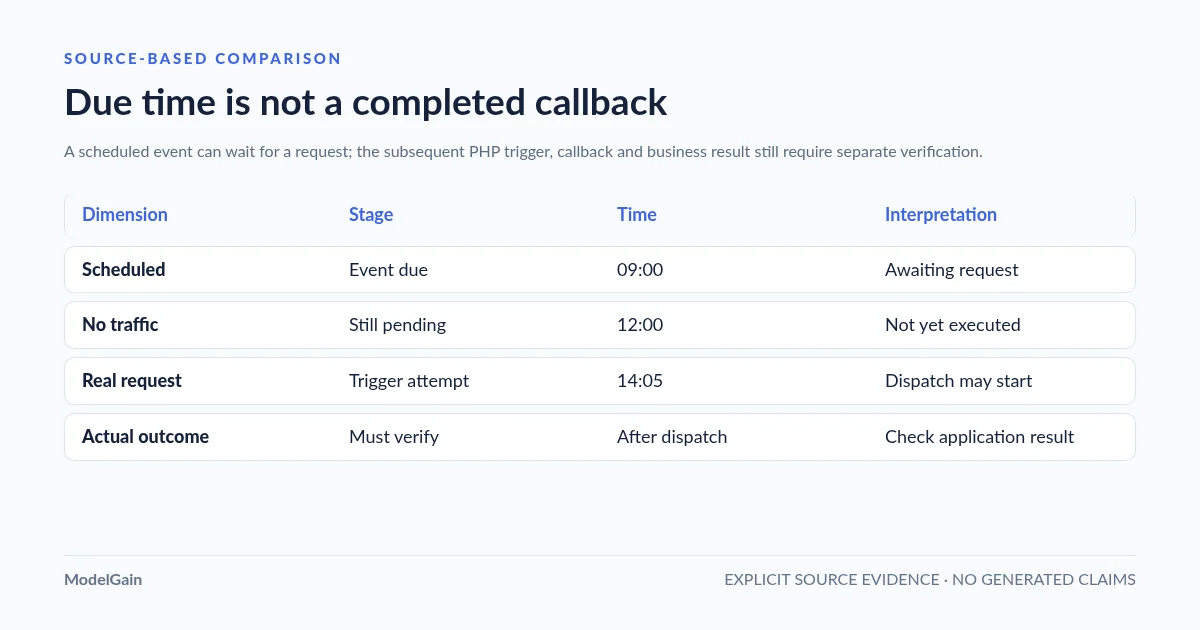
Consider this illustrative timeline, not a measured production incident:
- 09:00: a plugin event becomes due. The site has no traffic, and no external scheduler is configured.
- 12:00: there is still no qualifying request. The due time has passed, but no PHP callback has executed.
- 14:05: a visitor requests a page that reaches WordPress. WP-Cron may now attempt to dispatch the overdue event.
- After dispatch: the event might complete, be delayed by its callback, or fail for an independent reason. A later timestamp in the event list is not by itself proof of a successful business operation.
That is why a missed time window on a truly low-traffic site is not proof that a plugin malfunctioned. It is also why scheduled, dispatched, executed and business outcome confirmed must be separate checks. For the precise meaning of WordPress’s A scheduled event has failed Site Health notice, see our named-hook Site Health diagnostic. A Site Health notice does not report every callback’s success or failure.
First distinguish low traffic from a broken trigger
Record the domain and WordPress installation, the event’s hook name, next scheduled time with timezone, recurrence, and its expected effect. Ask whether any relevant PHP-backed WordPress requests arrived during the interval. A site can show a busy CDN dashboard while WordPress itself receives few requests if a reverse proxy serves most pages from cache; a cached edge response does not necessarily bootstrap WordPress or trigger its cron check.
Then look for the strongest evidence:
- Due event + no requests + execution after a real visit: consistent with a traffic-dependent delay. Document the observation and decide whether the task needs a clock-based external trigger.
- Due event + many normal WordPress requests + no execution: investigate a disabled spawn path, blocked loopback, malformed cron state or server/application errors. Low traffic alone no longer explains the evidence.
- Event appears to run + expected email, payment, API update or published post missing: investigate that callback’s own logs and external outcome. Do not replay it without checking whether it already performed any side effect.
- One hook late while unrelated tasks complete: the problem may be an isolated plugin callback rather than a site-wide scheduler outage.
WordPress’s loopback documentation explains the HTTP self-request involved in spawning cron. If the server cannot make that request, a visitor reaching WordPress still may not produce the expected cron execution. A 403, connection refusal or timeout needs a diagnosis of the specific request path; do not globally disable firewall or HTTPS verification to make a health indicator green. Our WP-Cron 403 guide and loopback timeout guide cover these separate errors.
Inspect the cron event without triggering business actions
When an authorized operator has WP-CLI access to the correct WordPress installation, the following command lists scheduled hooks and their due times. Listing does not deliberately execute a due callback, although loading WordPress itself can run normal bootstrap code:
wp cron event list --fields=hook,next_run_gmt,next_run_relative,recurrence --format=tableUse the official WP-CLI event-list reference. The output may include many events that belong to plugins or extensions. Identify the one associated with the missing feature; do not treat every overdue timestamp as the same incident. Compare a first read-only observation with a second one after a normal trigger opportunity and confirm what actually happened in the application.
Do not use wp cron event run --due-now as a read-only test. It executes callbacks and could send messages, charge customers, publish content or call external APIs. Likewise, a manual HTTP call to wp-cron.php is an action, not passive inspection. Replaying old jobs can duplicate business side effects even if the dashboard previously looked stalled.
Check DISABLE_WP_CRON and the replacement as one system
The DISABLE_WP_CRON constant suppresses the default page-load cron spawning. On managed hosting that runs an appropriate external scheduler, this may be entirely intentional. The defect is disabling the built-in trigger without verifying the external replacement. A checked option in the hosting panel is not proof that the replacement currently reaches the correct site and runs its due tasks.
Ask the host or site administrator to verify these exact facts before changing configuration:
- Is
DISABLE_WP_CRONenabled in this installation, and if so, what replaces it? - Is the external scheduler a real hosting cron, a managed service, a WP-CLI command, or an HTTP request to the site’s
wp-cron.phpendpoint? - Which canonical domain and installation does it target, at what interval, under which identity, and when did it last execute?
- Did the scheduler reach the application, and did the specific callback produce the intended result?
- Has a recent migration changed the path, site URL, SSL configuration, PHP handler, network route, or hosting user?
The WordPress system task-scheduler guide documents using the host’s scheduler to request wp-cron.php on a dependable interval. A hosting provider may instead use WP-CLI for many general tasks. Choose an architecture compatible with the callbacks you actually need: PHP Security Monitor, for example, intentionally skips PHP CLI/phpdbg execution rather than mistakenly checking the command-line PHP version as the site’s web runtime. Its dedicated missed-security-check guide explains that product-specific boundary.
If you enable an external scheduler, test it against the right site and carefully review any existing built-in or host trigger. Avoid creating multiple independent runners that process the same side-effecting queue without a verified reason. A five-minute host schedule may be suitable for some workloads, but the appropriate interval comes from the application’s business requirement and host constraints, not from a universal WordPress rule.
How to distinguish WordPress cron from Action Scheduler
WooCommerce and many other plugins use Action Scheduler for their own pending, running, complete and failed jobs. WordPress’s cron mechanism can initiate queue processing, but the individual Action Scheduler actions have separate due times, ownership and logs. A failed or late action_scheduler_run_queue event and a failed payment-renewal action are not interchangeable diagnoses.
If the problem involves WooCommerce or another Action Scheduler-powered feature, inspect the oldest past-due actions, recent completions, runner activity and the owning hook. Follow our Action Scheduler runner-versus-callback guide. Queue Health for Action Scheduler can surface read-only runner and queue indicators, but it does not make WP-Cron run, process jobs, resend notifications, repair missing queue tables or prove a transaction succeeded. When Action Scheduler is absent, this product does not address the generic low-traffic WP-Cron problem.
Conversely, when a scheduled blog post is the missing outcome, the important hook is the post-publishing path. Our missed scheduled-post guide handles that workflow. When many unrelated callbacks are late, go back to the shared trigger before installing an additional queue plugin.
Which type of WP-Cron problem is actually happening?
Use this bounded decision guide based on observed evidence. It does not access your website, execute events or configure hosting.
Find where the scheduled WordPress task stalled
Applies when: For a low-traffic WordPress site with delayed WP-Cron jobs or posts. This is a diagnostic decision aid, not an execution tool or a substitute for checking the application's actual outcomes.
Quick answer
Separate a due timestamp from a real PHP trigger, dispatched callback and confirmed task outcome. If there were no qualifying WordPress requests, traffic-dependence can explain the delay. If normal requests arrived but no event ran, investigate built-in spawning, replacement cron and loopback. If the callback ran, inspect the owning feature before any replay.
What to do
-
Capture the relevant WordPress installation, event hook, due time in UTC, recurrence, and expected business result. A read-only wp cron event list can show due hooks, but not whether the business task succeeded.
-
A cached CDN hit does not necessarily enter WordPress. Compare actual uncached origin WordPress requests with the time when the event first became due.
-
Check whether DISABLE_WP_CRON is enabled and whether the host has a real replacement that reaches the correct installation. Inspect loopback/HTTP failures if normal requests do reach WordPress.
-
When an event dispatches but the feature fails, distinguish the plugin's own error, an Action Scheduler job and a WordPress post-publishing callback. Do not bulk-run due jobs or clear queues.
-
Confirm an authorized schedule fires without a public visit, and that its associated user-visible work completed. Confirm external state before rerunning payments or notifications.
Which observation best fits the site's delayed task?
All paths are listed below. Select a symptom to focus on the most relevant path.
Likely a request-driven timing limitation
The default WordPress scheduler needs an incoming WordPress request to trigger due work. If deadlines matter, ask the host to implement and verify an appropriate clock-based replacement that targets this site. Confirm an actual due callback executes on time without a new public visit, then verify the business result.
Inspect the trigger or loopback path
Check DISABLE_WP_CRON, the presence and last run of any replacement scheduler, and the loopback result. A replacement entry configured for another domain or an HTTPS request blocked by security rules will not execute the intended event. Do not weaken sitewide access rules or blindly clear queued events.
Investigate the task owner and actual outcome
A dispatching WP-Cron event can call an application task that still fails. Identify its owner, inspect its logs or Action Scheduler history where applicable, and check for any partial side effect before authorizing a retry. Queue Health only assists if Action Scheduler is involved.
Collect one more read-only observation
Record the hook and UTC due timestamp, use the site's appropriate WP-CLI event list if permitted, and ask the host for traffic, replacement scheduler and loopback evidence. Compare a second observation after a natural trigger. Do not use manual due-now execution as a passive test.
Did this help?
Verify the correction on the real user workflow
A repair is not complete when the warning disappears. For a true low-traffic problem, document at least one due event that executes at the intended interval under the approved replacement scheduler without depending on a new public visit. For an event with external effects, verify the application-level outcome through its authoritative state—published post status, a redacted notification log, a queue completion or an external service acknowledgement.
If only one plugin hook fails, require the owner to check that callback’s actual error and dependencies. If a loopback was blocked, verify the narrow firewall/routing correction and confirm the expected self-request works without broad access changes. If a host uses PHP CLI for an event needing the live web PHP runtime, require a separately verified web-context execution path instead of overriding that application’s protective guard.
For a paid subscription or another potentially irreversible action, check the external payment or transaction system first before authorizing a re-run. Do not bulk-clear scheduled events, delete the WordPress cron option, suppress Site Health or silently reset consent to make graphs look healthy.
Hosting-support request: low traffic, late jobs and actual executions
Our WordPress site [domain / environment] has scheduled hook [hook name] due at [UTC time], but the expected feature [outcome] is delayed. We recorded [actual WordPress traffic/visit evidence] and [last observed execution or action status].
Please confirm whether default WP-Cron spawning is enabled, whether a host-managed replacement exists, its actual target and last successful run, and whether loopback or PHP errors prevent execution. We need a before/after observation of this named event and its application outcome. Please do not bulk-replay jobs with possible payment or notification effects; redacted evidence is sufficient.
Frequently asked questions
Can WP-Cron run without any visitors?
Not reliably through the default request-driven mechanism alone. A correctly configured host or external clock-based scheduler can trigger due events independently of public traffic; the exact method needs to be compatible with the site’s callbacks and permissions.
Will changing DISABLE_WP_CRON to true make the website faster?
It changes the default cron-spawning behavior; it does not provide a replacement scheduler or measure performance. Do not disable default cron without first verifying that the intended external runner is working.
Why does an event’s next scheduled timestamp keep moving while the task still fails?
A recurrence being rescheduled is not proof that the action’s side effect succeeded. Look for callback logs, the feature’s own state and any external acknowledgement before deciding whether the problem lies in dispatch, execution or the business operation.
Should I install Queue Health for a missed scheduled WordPress post?
Only when Action Scheduler is genuinely part of the failure. Ordinary WordPress scheduled post publication uses its own workflow. Queue Health is a read-only Action Scheduler diagnostic, not a universal cron tool.
Official references and related guides
- WordPress Plugin Handbook: request-driven WP-Cron
- WordPress Plugin Handbook: host scheduler integration
- WordPress: loopback requests and cron dispatch
- WP-CLI: read-only event list
- WordPress core: Site Health scheduled-events test
- WordPress.org support: scheduled actions and low traffic
- WordPress.org support: past-due actions accumulating
- ModelGain: named scheduled-event failure
- ModelGain: Action Scheduler runner evidence
- ModelGain: PHP security-monitor scheduled checks
Bottom line: on a quiet WordPress website, a due event can remain pending until the next request reaches PHP. Before declaring WP-Cron broken, compare due time, real WordPress traffic, dispatch, callback result and business outcome. Fix the specific failing layer—trigger, loopback, replacement scheduler or job owner—and verify the corrected path without replaying unrelated production work.