WORDPRESS
Action Scheduler Not Running Even Though WP-Cron Is Enabled
Action Scheduler not running although WP-Cron is enabled? Diagnose missed triggers, blocked loopbacks, stalled queue runners, and failing WooCommerce jobs safely.
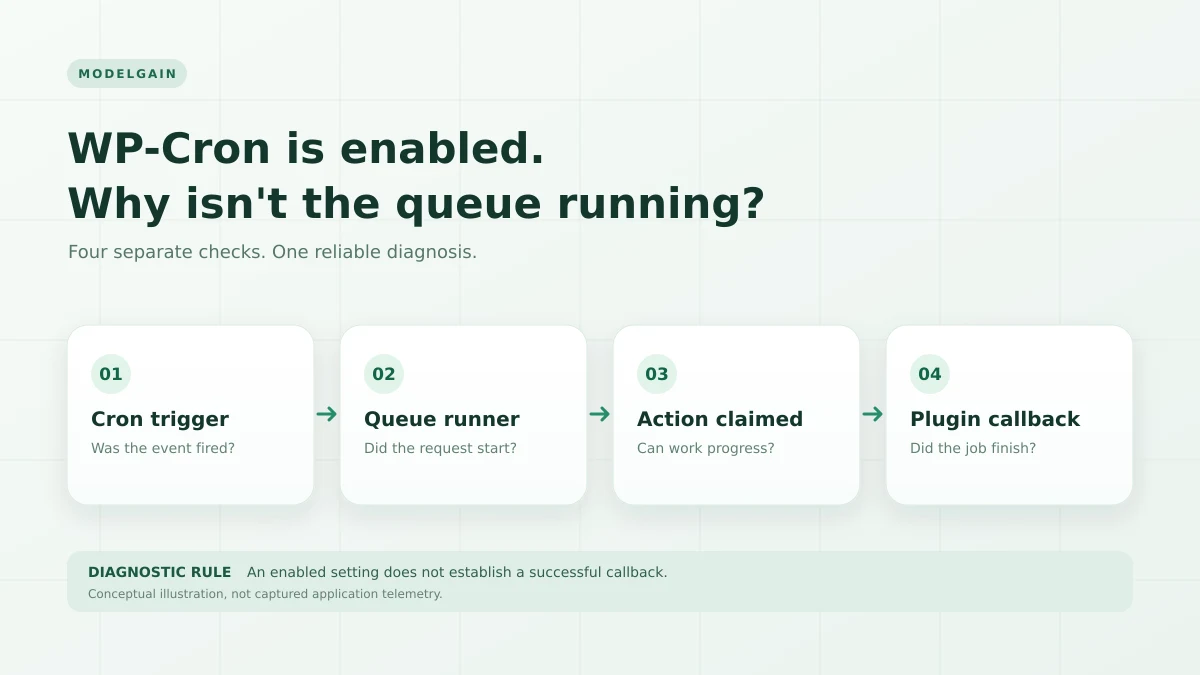
WP-Cron being enabled does not prove that Action Scheduler is processing jobs. If WordPress says cron is active but WooCommerce scheduled actions stay pending, troubleshoot the chain in order: cron trigger → queue runner → individual action → application callback. This is usually faster, and safer, than changing cron settings or bulk-running overdue jobs.
This guide is for a site where scheduled actions are actually late, not one that simply has future-dated pending jobs. Start by noting the oldest overdue action, the latest completed action, and the affected hook or group. If you’re new to the interface, see our guide to past-due versus failed actions first.
Find the failing Action Scheduler execution gate
Applies when: WP-Cron appears enabled but overdue Action Scheduler tasks are not completing.
Quick answer
Treat cron triggering, queue-runner startup, job processing and application callbacks as separate checks. An enabled WP-Cron setting confirms none of them on its own. Collect queue and execution evidence before tuning concurrency.
What to do
-
Record scheduled times, last successful completions and whether past-due jobs keep aging.
-
Check WP-Cron events, loopback/HTTP behavior and Action Scheduler logs without invoking potentially non-idempotent jobs in production.
-
After a focused fix, verify that due jobs complete over time and that any business workflow affected is functioning.
What does your evidence show?
All paths are listed below. Select a symptom to focus on the most relevant path.
Investigate the scheduling trigger
Check site traffic dependence, real cron configuration, WP-Cron spawn behavior and server restrictions. Verify the actual trigger rather than only a constant's value.
Inspect the Action Scheduler runner
Check runner logs, loopback and async requests, lock behavior and available resources. A running WordPress cron event does not prove the queue runner started.
Find the first failing hook
Review the action's error and associated plugin or external dependency. Do not rerun a payment, email or sync job without checking for duplicate side effects.
Did this help?
Quick diagnosis: which part stopped?
| What you observe | Likely investigation | Next safe check |
|---|---|---|
| WP-Cron shows enabled, but unrelated scheduled WordPress events are also late | Traffic-dependent triggering, disabled replacement cron, or blocked cron spawn | Compare due WP-Cron events, real server-cron configuration, and Site Health |
| Other WP-Cron events execute, but Action Scheduler completes nothing | Missing queue trigger, async loopback failure, or queue runner blockage | Inspect action_scheduler_run_schedule, action logs, and HTTP/PHP errors |
| Some actions complete, but one hook repeatedly fails | Plugin callback error, unavailable dependency, or action-specific data | Read that action’s log and identify the owning integration |
| Completed jobs accumulate slowly while pending jobs grow faster | Throughput, long-running callbacks, host resource limits, or contention | Compare backlog age and completion rate over an observation window |
1. Confirm the backlog is real
Open WooCommerce → Status → Scheduled Actions, or Tools → Scheduled Actions on installations exposing the standalone screen. Review Pending, Complete, Failed and In-progress separately. Record these five facts:
- The oldest pending action’s scheduled date; check it against the site’s configured timezone.
- The newest completed action and its time.
- The hooks and groups represented among overdue jobs.
- Any recent failure message or PHP fatal linked to the same hook.
- Whether the backlog and oldest-action age grow after normal site activity.
A pending action scheduled tomorrow is not stuck. One old pending action is also not sufficient evidence that the entire runner failed. Conversely, jobs that keep aging with no recent completions merit investigation even if an admin dashboard merely reports “WP Cron: ✔”. WooCommerce’s scheduled-event troubleshooting guide specifically recommends comparing the recent activity of WP-Cron and Action Scheduler.
2. Know the four separate execution gates
Action Scheduler normally asks WordPress to trigger its queue through a recurring cron event. It can also initiate background processing near the end of an admin request, and operators can configure alternative runners. The critical distinction: having a scheduled event is not the same as successfully executing the callbacks inside the queue.
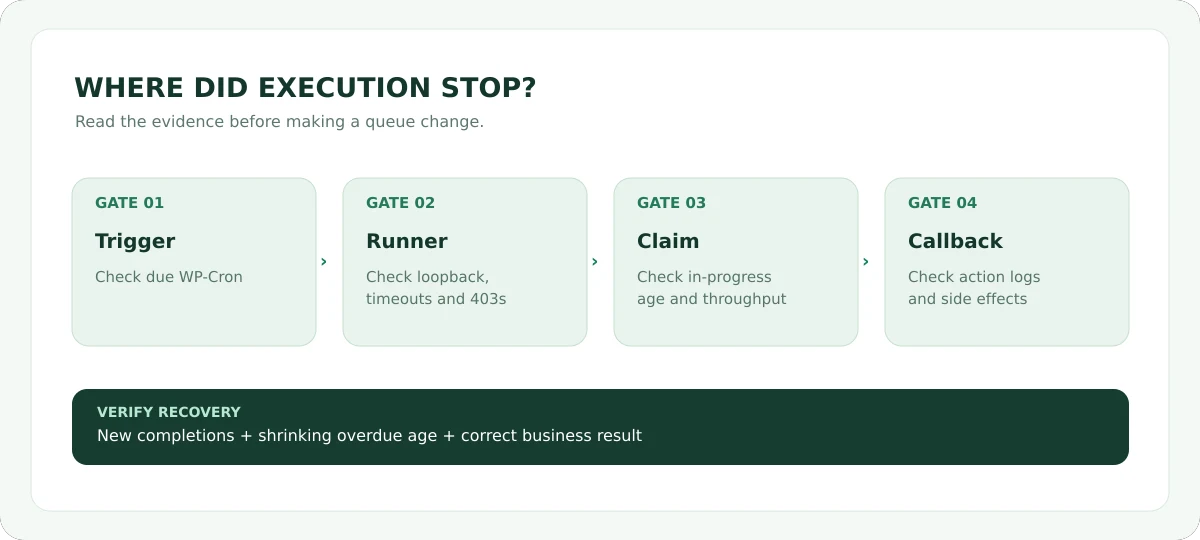
The Action Scheduler FAQ says the default initiation methods include WP-Cron and an administrative-request shutdown hook, but Action Scheduler itself is not technically dependent on WP-Cron. That explains why a site may occasionally process jobs when someone opens wp-admin while its unattended queue remains unhealthy.
3. Check WP-Cron’s execution, not only its enabled flag
First examine Tools → Site Health for loopback or scheduled-event warnings. In a hosting panel, check whether a server-level cron has intentionally replaced the traffic-triggered WordPress cron. If DISABLE_WP_CRON is true, that is not automatically a defect: a correctly configured system cron may be doing the triggering instead. Conversely, a false or absent flag doesn’t prove the underlying HTTP requests succeed.
If you have WP-CLI access, the following reads scheduled events without deliberately running them:
wp cron event list --fields=hook,next_run_relative,recurrence --format=tableLook for the action_scheduler_run_schedule hook and compare other overdue cron events. If that hook is missing, investigate whether Action Scheduler is loaded and scheduling its runner; don’t add an arbitrary duplicate cron event. If many unrelated WP-Cron hooks are overdue, focus first on the cron trigger and server configuration.
Do not substitute wp cron event run --due-now for this read-only check: it executes all due callbacks and can have business effects. On a WooCommerce store, those can include messages, synchronization and payment-related work.
4. Test the site’s internal HTTP route and async runner
WordPress commonly spawns cron by making an HTTP request back to the site. The queue runner may also make asynchronous loopback requests to continue processing batches. A firewall, CDN rule, Basic Auth on staging, security plugin, DNS mismatch, PHP-FPM exhaustion, or hosting restriction can interfere with those requests while ordinary visitors see a working homepage.
Inspect the server-side evidence: Site Health loopback results, WordPress and PHP logs, firewall responses and relevant web-server access logs. Pay attention to 401 and 403 denials, cURL error 28 timeouts and repeated 5xx responses. A successful public homepage request is not an adequate loopback test because the server may resolve or route its own hostname differently.
A WordPress.org support case includes a WP-Cron spawning request returning HTTP 403; another WooCommerce support case identifies cURL timeout and internal-request failures. These are real user reports, not diagnoses of your particular site. Before relaxing security controls, confirm the exact request, origin and block rule with your host.
5. Is the runner alive but one action failing?
If the latest completion is recent, the runner has processed something. Inspect whether failures cluster around a single hook. The failed action’s log, the application log and the plugin or integration behind the callback matter more than the total number of queued actions. One broken plugin callback might throw a fatal error or repeatedly time out without making the scheduler library itself defective.
If the job appears in progress for an unusually long time, investigate claims, execution duration, and host limits rather than assuming the job simply never started. For payment, subscription, email, import, and webhook jobs, rerunning may duplicate side effects if the previous attempt partially succeeded.
You can inspect the Action Scheduler WP-CLI command surface without processing jobs:
wp action-scheduler status
wp action-scheduler action list --help
These subcommands are available only where the Action Scheduler WP-CLI integration is loaded. Consult the official WP-CLI reference and your installed version’s help. Commands named run, clean, delete, cancel and create change queue state; they are not read-only diagnostics.
6. If the queue runs but cannot catch up, measure capacity
A backlog is not always a stopped runner. Suppose 30 jobs arrive each minute but your site completes only 10 in that interval: the count and oldest pending age will increase even with functioning WP-Cron. Compare completions and arrivals for the same observation window before making a configuration change.
The Action Scheduler performance guide explains that web-runner processing has conservative request-time, memory and concurrency thresholds. Long-running callbacks, external API delays, database locking and limited PHP workers can all reduce throughput. WP-CLI is an officially supported alternative for large queues, but do not blindly raise concurrency or apply --force to a production store.
For a severe backlog, prepare a recovery window, capture the affected hooks and job dependencies, and coordinate with the host or the relevant plugin vendor. The official WP-CLI documentation cautions that filtering runners by hooks or groups can change ordering when actions depend on each other.
7. Choose a fix only after identifying the failed gate
| Confirmed failure | Targeted response | How to verify it worked |
|---|---|---|
| Traffic-triggered cron does not fire frequently enough | Use a correctly configured server cron per your host’s guidance | WP-Cron events run without relying on a browser visit |
| Loopback is blocked | Fix the exact firewall, authorization, networking or DNS condition | The internal request succeeds and subsequent jobs actually complete |
| One callback fails | Repair the responsible plugin, dependency or job data after reviewing logs | That hook’s newly executed work completes with correct business outcomes |
| Insufficient throughput | Profile slow work; consider managed WP-CLI processing and hosting capacity | Oldest overdue age decreases and sustainable completion rate exceeds arrival rate |
Do not mass-delete overdue actions or blindly force-run batches. On an e-commerce site, capture a usable database and file recovery point before operational changes; verify any renewal, notification or order-side effects with the integration owner. The right remedy depends on the failed stage.
Where ModelGain Queue Health fits
ModelGain Queue Health for Action Scheduler is a read-only diagnostic companion. It summarizes queue-health signals, overdue and failed actions, runner indicators, and possible hook ownership; it can help package a privacy-conscious support report. It is not a cron replacement, a queue processor, or an auto-repair tool. An inferred callback owner is a lead for investigation, not proof of the cause.
Use its report alongside the built-in Scheduled Actions logs and your host’s actual request logs. If you need to install it, check the official WordPress.org listing for the current release and compatibility requirements. Our companion guide explains how to interpret overdue versus failed actions without destructive cleanup.
Frequently asked questions
Why do jobs run only when I visit wp-admin?
Action Scheduler can initiate processing from the admin-request shutdown hook as well as WP-Cron. That pattern suggests inspecting the unattended trigger path, but does not establish the cause without logs.
Is DISABLE_WP_CRON always the cause?
No. It may be intentionally enabled when an external server cron reliably invokes WordPress. Check whether that replacement actually runs. If neither automatic trigger works, pending jobs will age.
Should I manually run every pending WooCommerce action?
No. Some actions have monetary or irreversible side effects, and earlier attempts may have partly succeeded. Diagnose the hook, review logs, confirm idempotency and dependencies, and follow the owning plugin’s recovery process.
Can Action Scheduler work without WP-Cron?
Yes. The project’s official FAQ documents alternative queue initiation. The important question is whether your configured runner reliably executes due actions, not whether one particular trigger mechanism is enabled.
Does a successful HTTP loopback response prove that jobs finished?
No. It verifies only that the request reached and returned from some layer. Check action completion timestamps, logs and the business effect the callback was supposed to produce.
Primary documentation and real-world reports
- Action Scheduler FAQ — default initiation methods and alternatives to WP-Cron.
- Action Scheduler WP-CLI reference — query and execution command families, with ordering cautions.
- Action Scheduler performance — batching, resource limits and throughput.
- WooCommerce scheduled-events guide — distinguishing WP-Cron failure from runner failure.
- WordPress Plugin Handbook: Cron — page-load-based scheduling semantics.
- WordPress.org support: HTTP 403 cron spawn — a real loopback-blocking report.
- WordPress.org support: cURL timeout — a real timeout investigation.