WORDPRESS
CloudLinux PHP CVE Still Flagged? Verify the Patched Build
CloudLinux PHP still flagged after an update? Verify the exact alt-php, ea-php or native RPM, CVE fix, repository and active web worker.
FREE WORDPRESS PLUGIN
PHP Security Monitor
Identify the PHP version serving your WordPress admin request, review potentially matching PHP CVEs after consent, and prepare a host-support report.
- Install on WordPress 6.9+ with PHP 7.4+
- Open Tools → PHP Security and review the web runtime
- Opt in to Check now, then review evidence and the host report
Version evidence only; an advisory match is not proof of exploitability or compromise. Cannot patch PHP, verify backports or provide continuous protection. External checks share server IP/PHP version after consent; optional WP-Cron checks and email require separate consent and are not guaranteed.
Your WordPress dashboard still reports an older PHP version. Your host says CloudLinux has patched it. Both observations can be true—but neither is enough to close a specific CVE warning. The decisive evidence is the full installed CloudLinux package release, the vendor notice for that CVE, and the PHP worker actually serving your domain.
Quick answer: first identify whether the domain uses CloudLinux alt-php, cPanel ea-php, native operating-system PHP, or a different vendor’s runtime. Then compare the exact installed RPM with the CloudLinux November 19, 2026 security release notice. Finally, confirm the correct web workers have loaded the fixed build. A PHP version string or a successful yum command cannot establish all three facts.
This guide focuses on CloudLinux’s real fixed-build evidence and update-channel differences. If you first need to interpret a PHP advisory’s SAPI or configuration prerequisites, use our CVE applicability guide. For a general vendor-backport dispute spanning Ubuntu, cPanel, CloudLinux and other hosts, see why a PHP scanner can keep flagging a patched host.
Which CloudLinux PHP package serves your website?
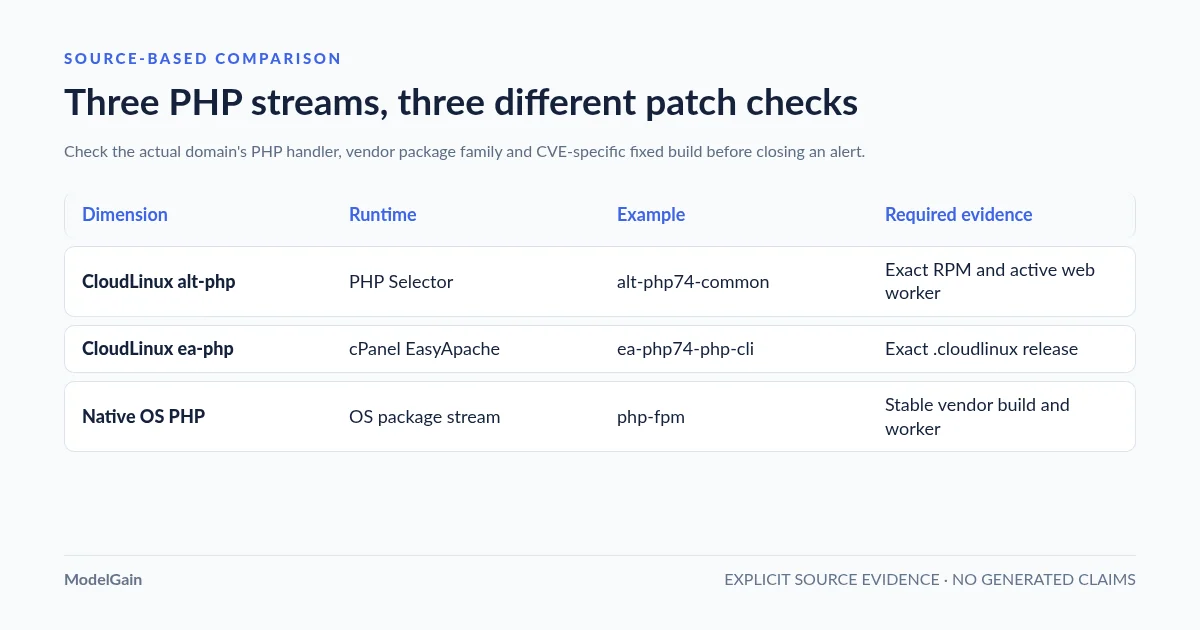
CloudLinux has several PHP package families. They are not one interchangeable update stream:
- alt-php: CloudLinux PHP Selector versions, typically used to offer accounts a choice of PHP branches. The RPM family includes packages such as
alt-php74-common. On CloudLinux OS 10, the ALT-ELS repository supplies these packages rather than the older OS 7–9 route. - ea-php: cPanel EasyApache 4 PHP builds on CloudLinux, supplied through the
cl-ea4repository. An example isea-php74-php-cli. cPanel’s internal PHP and the PHP serving your WordPress domain can be different. - Native PHP: operating-system PHP packages such as
php-fpm, maintained as a separate package stream. A CloudLinux announcement that alt-php has been fixed does not mean every native PHP build is already in stable repositories. - Other providers: Remi, a container image, a custom compiler, Plesk or another runtime vendor can supply PHP on a CloudLinux-based server. CloudLinux’s RPM thresholds must not be applied to those binaries without matching provenance.
Check CloudLinux’s package-component documentation and PHP Selector command-line documentation if you manage the machine. On shared hosting, ask support which family and binary handle this domain. WordPress Site Health reports the PHP runtime seen by its current request; the shell’s php -v might describe a different interpreter.
The November 19, 2026 fixes: real package examples
The PHP project released 8.2.36, 8.3.37, 8.4.28, and 8.5.13 on November 19, 2026. CloudLinux then published fixed packages for its alt-php and ea-php families, including older end-of-life PHP branches whose upstream version number stays the same.
As verified against the CloudLinux package-status knowledge base and the November release notice on November 21, 2026, these are useful illustrative fixed builds from that particular release:
- alt-php 7.4: PHP
7.4.33with package release7.4.33-84. A scanner that expects a new upstream PHP 7.4 version can misread this backport. - alt-php 8.1: PHP
8.1.34with package release8.1.34-43. This is a vendor-fixed release for that batch, not renewed upstream support for PHP 8.1. - ea-php 7.4: the vendor build is
7.4.34-2, with the applicable full RPM release ending in.cloudlinux.2. The upstream PHP project did not publish PHP 7.4.34; the exact vendor package identity matters. - ea-php 8.1: the vendor build is
8.1.35-2, with the applicable full RPM release ending in.cloudlinux.2. This is a CloudLinux package release, not an upstream PHP 8.1 release. - alt-php / ea-php 8.4: the fixed maintained-branch build is
8.4.28-1for the supported CloudLinux OS combinations.
These examples describe the published release thresholds, not a claim about your server. For ea-php, verify the entire installed RPM name, epoch/version/release, architecture and OS family rather than copying a short package-version example. A higher release number from an unrelated repository or an older October fix does not automatically establish coverage for the November CVEs. Consult the same notice again before using these values after future vendor updates.
Critical distinction: native PHP was not on the same schedule
The current November CloudLinux security notice reports fixed alt-php and ea-php builds available in their stable repositories. But, at the time of this review, the notice describes native PHP security builds for CloudLinux OS 8, 9 and 10 as beta or in gradual rollout, not yet generally available in stable. The CloudLinux OS 7 PHP 5.4 TuxCare ELS package has a separate fixed release and advisory.
This matters when a hosting provider says only “CloudLinux updated all PHP versions.” Ask whether that statement is about the package family serving the website and whether its exact fixed release is available in the host’s enabled production repository. Do not infer a native PHP fix from the alt-php or ea-php table.
See CloudLinux’s native-PHP rollout section and its November release status history for the latest rollout state. If the build for your native PHP stream remains unavailable, require an explicit provider remediation or supported-version migration plan; do not declare the host patched merely because other package families are complete.
Verify the installed RPM without changing the server
For an authorized administrator of a CloudLinux RPM-based system, the following examples are read-only. Run only the commands for the package family that actually serves the affected website; a “package is not installed” result is a routing clue, not proof of safety.
rpm -q alt-php74-common
rpm -q alt-php81-common
rpm -q ea-php74-php-cli
rpm -q ea-php81-php-cli
rpm -q alt-php84-common
rpm -q php-fpm
The installed package must meet the applicable CloudLinux fixed-build threshold for the specific CVE and OS. Compare the exact output with the vendor notice; do not compare strings lexicographically or substitute the upstream version alone. You can then inspect the installed RPM’s changelog:
rpm -q --changelog alt-php74-common
rpm -q --changelog ea-php74-php-cli
Find the relevant CVE ID or security-update reference in that changelog, or request a package-to-CVE mapping from the vendor. A changelog entry for CVE-2026-109618 and CVE-2026-109619 proves those October fixes were addressed by that build; it does not prove the same package also includes November’s CVE-2026-115560 or CVE-2026-129289. Absence of a short CVE string is not definitive either: some package records use advisory identifiers, so confirm the corresponding release notice and package lineage.
CloudLinux provides a general RPM/CVE verification guide and separate October PHP2Shell package documentation. Use October examples only for those named October CVEs; the November release has its own new package floors.
Why “No packages marked for update” can be misleading
There are two different problems to investigate if the control panel still shows a vulnerable version after an update:
- Repository and package mismatch. The relevant alt-php, ea-php or native stream may not be the package family updated. On cPanel CloudLinux systems, the
cl-ea4repository matters for CloudLinux EA-PHP. CloudLinux OS 10 receives ALT PHP through the TuxCare ALT-ELS channel. Ask the provider to show the enabled repositories, package candidate and actual RPM installed for the affected domain. - Security-only update filtering. CloudLinux documents that the older CloudLinux and
cl-ea4repositories do not supply the UpdateInfo metadata expected by someyum --securityordnf updateinfoworkflows. A “no security updates” result is therefore not a substitute for the official fixed-build table, normal package-upgrade checks, relevant changelog or the correct OVAL advisory channel.
CloudLinux also documented a November 19 mirror-list incident, now resolved. If a host saw mirror timeouts or “nothing to do” during a rollout, request a fresh repository and installed-package readback rather than relying on the older failed update attempt.
CloudLinux’s documented regular updates use yum for CloudLinux OS 7 and dnf for newer RPM-based releases. For example, the official November notice lists yum update 'alt-php*' for OS 7 and dnf upgrade 'ea-php*' for newer cPanel systems. These are production changes: the hosting administrator should check the exact repository, available build, maintenance window and restart plan before applying them. Do not install another PHP tree blindly just to make a version warning disappear.
One domain, one CVE, four evidence outcomes
A useful decision needs the same domain, runtime, CVE and timestamp throughout. Keep the final status narrow:
- Verified fixed and loaded: the web handler maps to the correct package family, the installed full build meets the CVE-specific vendor fix, and the hosting operator confirms every relevant worker loaded it.
- Not yet fixed: the relevant package is older than the vendor’s fixed build, or the actual web worker is still serving an unfixed binary.
- Fix not yet available in this stream: the current vendor notice identifies the actual package family as beta, staged or not released for production; request a time-bound remediation or migration plan.
- Unknown: a required package, repository, advisory, handler or worker link cannot be demonstrated. Do not silently turn unknown into “false positive.”
Can you verify the CloudLinux fix for this CVE?
Applies when: A PHP version or scanner warning conflicts with a CloudLinux hosting provider's claim that an alt-php, ea-php or native PHP runtime has been patched. This aid does not inspect your server or replace a vendor advisory.
Quick answer
For the exact CVE and WordPress domain, identify the live web PHP handler, the matching installed package and repository, the vendor-fixed release and confirmation that workers are running it. Without that chain, the result is unknown—not a false positive.
What to do
-
Record PHP_VERSION and PHP_SAPI from the affected WordPress request. Ask the host whether that request is served by CloudLinux alt-php, cPanel ea-php, native OS PHP or an unrelated vendor.
-
Request the exact RPM name, version, release, architecture, OS and repository. For an administrator with RPM access, use read-only rpm -q and rpm -q –changelog commands for the actual package family.
-
Compare the installed package to CloudLinux's CVE-specific November release notice. Do not confuse an October PHP2Shell backport with a November CVE fix, or alt-php/ea-php stable availability with native PHP rollout.
-
Ask the provider to verify that the fixed package is loaded by every PHP worker/pool serving the affected domain. Retest the application after the patch; a CLI PHP version is not the same as the active web handler.
Which evidence do you actually have for this domain and CVE?
All paths are listed below. Select a symptom to focus on the most relevant path.
Documented fix for this CVE and runtime
Retain the installed RPM version/release, vendor advisory and web-worker restart evidence with the domain and timestamp. A scanner may still report the old upstream PHP version after a backport. Verify new advisories and other pools separately; this does not establish that the site was never compromised.
Relevant package or worker is not yet fixed
Use the CloudLinux security notice to select the correctly scoped fixed package and arrange an administrator-approved update and worker restart. Do not rely on a separate CLI PHP update or another package family's version.
Native PHP requires a separate release or migration
At the November 21, 2026 review, CloudLinux lists some native PHP fixes as beta or staged even though alt-php and ea-php releases are stable. Verify the current vendor status for your OS and package stream, then require a time-bound supported remediation or upgrade plan.
Unknown — request the missing evidence
Ask the host for the domain's actual PHP binary/handler, package name and complete RPM release, repository, matching CVE advisory and worker restart proof. Treat the alert as unresolved until those facts are provided; a version-only match is not an exploitability verdict, and an unsupported assurance is not a patch certificate.
Did this help?
What to ask a shared-hosting provider
Shared-hosting customers often cannot run RPM queries themselves. The most efficient request is an exact, small evidence bundle rather than a demand for unrestricted server access:
Our WordPress domain [domain] reports PHP [version] / SAPI [value] and a potential match for [CVE ID]. Please confirm whether this domain uses CloudLinux alt-php, cPanel ea-php, native PHP or another provider’s build.
Please provide the exact installed PHP package name and complete RPM release for this web handler, the OS and repository, and the CloudLinux notice or package changelog showing the fix for this CVE. Please confirm when the fixed package was installed and when every affected PHP web worker was restarted or reloaded.
If the installed package is still below the November 19, 2026 fixed release, or native PHP has not reached stable, please give the remediation plan and expected supported build. No credentials or private raw logs are needed.
After the provider completes the change, retest the same domain through its web interface, confirm the worker mapping and check representative application paths: login, forms, critical scheduled jobs and checkout, where relevant. Our WordPress patch verification checklist covers the post-change acceptance process. For end-of-life PHP branches, a vendor backport can reduce a specific security exposure without restoring upstream support or plugin compatibility; use our PHP EOL and extended support guide to plan the longer-term upgrade.
Where PHP Security Monitor fits
ModelGain PHP Security Monitor is a free WordPress plugin that helps you record the PHP version and SAPI serving the administrator request and, after explicit consent, check for potential upstream version-range CVE matches. It can provide a timestamped host-support report and a trail of what the WordPress side observed. Get it from the official WordPress.org listing.
It does not audit installed RPM packages, detect which CloudLinux channel a domain uses, validate vendor backports, restart PHP workers or establish exploitability. A version-range warning may persist despite a genuine backport. Treat the plugin’s output as useful input for the package-evidence process above, not an automatic patched/unpatched verdict. External checks share the observed server IP and PHP version with the data provider only after user consent.
Common questions
Does PHP 7.4.33 mean my CloudLinux site is vulnerable?
Not by itself. A CloudLinux alt-php 7.4 package can retain PHP 7.4.33 while its package release advances to 7.4.33-84 for the November 19 update. Confirm that this full package is installed, covers the exact CVE, and serves the domain. An unrelated vendor’s PHP 7.4.33 build cannot inherit that conclusion.
Does CloudLinux’s November notice mean native PHP on every server is patched?
No. The November notice distinguishes stable alt-php and ea-php fixed packages from native PHP builds still listed in beta or rollout for CloudLinux OS 8, 9 and 10 at this review date. Confirm the current native-package release status and the actual installed build before closing a warning.
Is an October PHP2Shell patch enough for the November CVEs?
No. CVE-2026-109618 and CVE-2026-109619 were part of October’s release. November 19 brought different security fixes, including CVEs with new package build floors. Match the target CVE to the right vendor notice and installed package.
Will upgrading the CLI PHP package repair the WordPress site’s web runtime?
Not necessarily. The WordPress request may run under a different PHP-FPM pool, Apache, PHP-CGI or LiteSpeed handler than the command-line interpreter. Verify the actual handler and its deployed package, not only php -v.
Official sources and related reading
- CloudLinux: November 2026 PHP fixes, exact package floors and native/alt/ea rollout
- CloudLinux support: installed package examples and verification commands
- CloudLinux status history: November PHP security release
- CloudLinux: October PHP2Shell backports and security-metadata limitations
- CloudLinux OS component and PHP-selector documentation
- PHP project: upstream branch support lifecycle
- Red Hat: why a security backport need not change the upstream version number
- ModelGain: resolve a general host-versus-scanner PHP patch disagreement
- ModelGain: interpret CVE-specific handler and configuration prerequisites
- ModelGain: verify WordPress after a PHP security update
Bottom line: CloudLinux publishes concrete fixed-package evidence. A reader can verify that evidence only by connecting the exact CVE to the actual package family, installed full RPM release, and live web worker for the domain. Use vendor advisories to resolve a version-only alert—not to dismiss every future PHP warning.