WORDPRESS
Rank Math IndexNow 403 Forbidden: How to Find the Actual Cause
Rank Math shows “403 Forbidden” in Instant Indexing → History? First check whether that code came from an IndexNow submission , your website’s public ke
Rank Math shows “403 Forbidden” in Instant Indexing → History? First check whether that code came from an IndexNow submission, your website’s public key URL, or a WordPress admin request. A Rank Math History 403 usually means the IndexNow endpoint could not verify the submitted ownership key. It does not, by itself, tell you to regenerate the key or disable a firewall.
This walkthrough follows the actual Rank Math screens: Instant Indexing → History → Settings → Check Key, then a public GET test and one controlled submission. It is intended for website owners using Rank Math SEO’s built-in IndexNow integration, not Rank Math’s separate Google Indexing API plugin. The menu names below follow Rank Math’s documented flow; they may vary by plugin version or dashboard mode.
Rank Math IndexNow 403: locate the failed request
Applies when: You use Rank Math SEO's built-in IndexNow module and see 403 Forbidden in its submission History or while opening Check Key.
Quick answer
Open Instant Indexing History to identify the rejected submission, then Settings → Check Key to test Rank Math's actual public key URL. Do not rotate the key or disable security controls until you know whether the problem is the IndexNow API, a blocked TXT GET, a wrong response body or a different WordPress admin request.
What to do
-
In Rank Math SEO → Instant Indexing → History, note the rejected URL, HTTP response and time. Check Advanced Mode if the Instant Indexing settings are not visible.
-
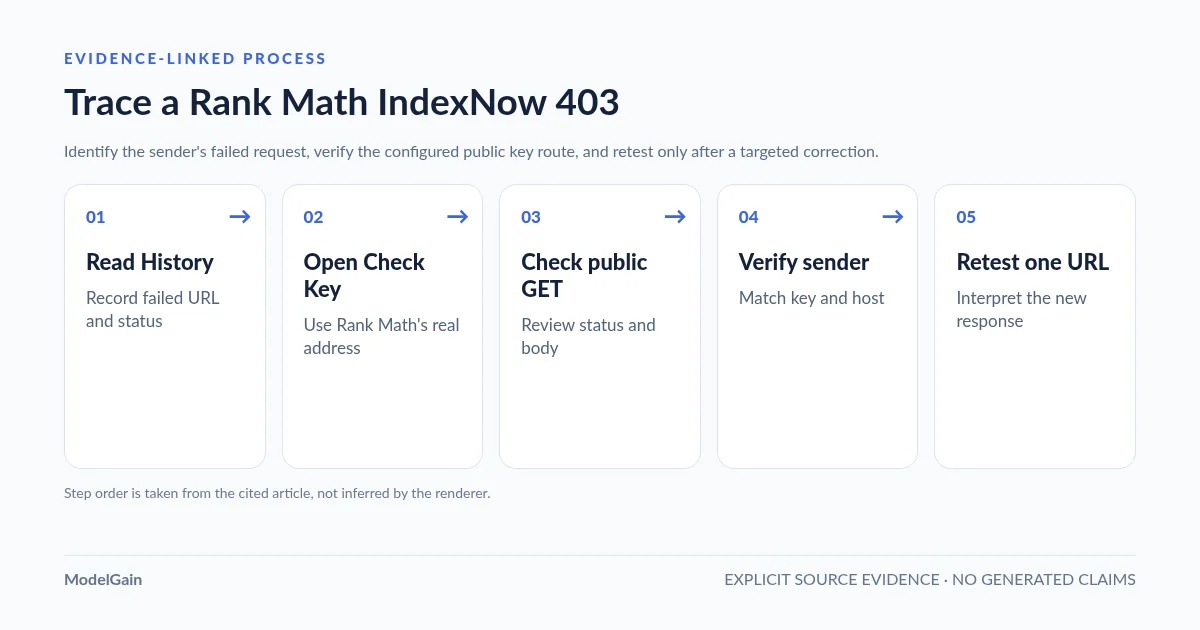
Copy Rank Math's actual key URL and fetch it anonymously with GET. Inspect status, redirects and body. An HTML homepage or bot challenge is not valid key text.
-
After the verified cause is corrected, submit one eligible changed URL through Rank Math and interpret 200 versus 202 versus 403. Neither 200 nor 202 guarantees indexing.
Where are you seeing the 403 or unexpected response?
All paths are listed below. Select a symptom to focus on the most relevant path.
History 403 is an IndexNow API response
Compare the sender's configured key and keyLocation with the actual public key text, host and eligible paths. The API rejection alone does not identify a CDN or WordPress security rule.
Inspect the specific blocked public key GET
Record the exact response and correlate it with Cloudflare, security plugin or origin logs. Only change a narrowly verified rule; do not turn off your WAF globally.
Repair the key route, not the key by default
Rank Math may serve the TXT key virtually. Determine whether the intended route is missing, redirected or rewritten to HTML before uploading a file or rotating a key.
Check which sender and key the endpoint received
Compare the configured key, the fetched body, host and custom keyLocation. Multiple IndexNow senders or stale caches can create a mismatch despite a working browser Check Key.
Did this help?
Where to click in Rank Math, and what to record
Keep this investigation read-only until you know which component is failing. In the WordPress dashboard, first make sure Rank Math SEO → Dashboard → Modules → Instant Indexing is enabled. If Instant Indexing settings or History are missing, check whether Rank Math is in Advanced Mode; Rank Math documents that the full Instant Indexing controls require it. Missing menu items do not, by themselves, prove that an IndexNow request failed.
- Open Rank Math SEO → Instant Indexing → History. Find the recent attempt that shows HTTP 403. Record the time, submitted URL and the displayed response. This is the sender’s record of the submission request, not an HTTP test of your public key file.
- Open Rank Math SEO → Instant Indexing → Settings. Record the configured API key and the key location without changing them. Rank Math commonly serves the key from a dynamic route, even when no physical TXT file exists in the hosting file manager.
- Click Check Key. This opens the key URL Rank Math expects to serve publicly. Record its actual hostname, path, response status and whether the page shows only the expected key text.
- Identify any second IndexNow sender. A separate IndexNow plugin, hosting integration or automation may submit with a different key. The 403 must be attributed to the sender that actually made that request.
| Evidence | What it proves | What it does not prove |
|---|---|---|
History shows 403 |
The logged IndexNow submission was rejected | That your CDN or WordPress admin is blocking the key |
| Check Key opens expected TXT | Your browser can fetch matching text at that address | That the rejected request used the same key, host and path |
Check Key returns 404 or homepage |
The public route did not serve the required plaintext | That rotating the key will repair a rewrite or redirect |
Check Key gets a 403 or challenge |
That particular public GET was blocked | Which security layer blocked it without corroborating logs |
Test Rank Math’s actual Check Key URL, not a guessed TXT filename
Copy the URL opened by Rank Math’s Check Key control. It may resemble https://example.com/YOUR-KEY.txt, but use the exact configured address. Testing /indexnow.txt, a URL invented from another plugin’s settings, or a WordPress filesystem path can send you down the wrong troubleshooting branch.
From a terminal, substitute the address copied from your own dashboard. The first command records the HTTP status and redirect headers without following redirects; the second requests the actual body. Both use a public, unauthenticated GET:
# Replace the placeholder with Rank Math's actual Check Key URL.
KEY_URL='https://example.com/YOUR-KEY.txt'

# Inspect the first HTTP response and any Location header.
curl --silent --show-error --dump-header - --output /dev/null "$KEY_URL"

# Inspect the actual public response body.
curl --silent --show-error "$KEY_URL"
Expected result: HTTP 200 with the same plaintext key shown in the active Rank Math settings, for the correct website host. A 200 that returns your homepage HTML, a login page or a bot-challenge document is not a valid ownership-file response. A 301/302 is a redirect that needs separate inspection. An HTTP HEAD test alone is insufficient; some WordPress routes handle HEAD differently from GET.
Avoid posting your full key, the URL containing that key, HTTP cookies or server logs into public support threads. The key text is intended to be accessible at its verification location, but sharing unrelated admin information and diagnostics publicly is unnecessary. For an independently verified public-route 404, use our WordPress IndexNow key-file 404 troubleshooting guide. If the address serves the homepage, see key URL redirects to homepage.
Which correction actually matches your Rank Math symptom?
The safe sequence is History response → Check Key URL → public GET body → sender key and host → one retest. Distinguish these outcomes before editing your site.
Case A: Rank Math’s Check Key returns 404, a redirect or HTML
Rank Math normally generates and serves its IndexNow key dynamically. First determine whether the expected WordPress route is being intercepted by a CDN redirect, server rewrite, cache, hosting document root or another plugin. The absence of a physical .txt file is not automatically a fault for a virtual handler. Rank Math’s own 403 troubleshooting instructions document a manual key-file option when the built-in route cannot be served, but that is a specific remediation, not the default for every 403.
Keep a working backup and decide which layer should own the key route before creating files, resetting permalinks or changing a key. A catch-all homepage redirect requires a routing correction; regenerating the same type of key does not necessarily address it.
Case B: The key URL returns 200, but the text is wrong
Compare the body with the current Rank Math API key, not the value from an earlier setup screenshot. Look for stale edge caching, another SEO/IndexNow sender, or a virtual route serving an old key after a change. A public HTTP 200 establishes reachability, not ownership validation. The more detailed IndexNow key-content mismatch guide covers the key, host and keyLocation checks.
Case C: The key URL gets a 403 or a security challenge
Here the error is from your website’s GET endpoint, not necessarily the same response shown in the IndexNow History tab. Correlate the timestamp, URL and response with Cloudflare Security Events, an installed security plugin’s logs or the origin access log. If a confirmed rule is the cause, make the narrowest key-path adjustment available. Do not disable the entire WAF or security plugin in production merely to test a hypothesis. Follow our Wordfence and Cloudflare key-block diagnosis for the evidence-first path.
Case D: The key URL is correct, but History still shows 403
Revisit the sender, not just the file. Check whether Rank Math and another IndexNow plugin are both active, whether Rank Math’s configured key agrees with the publicly fetched text, and whether the submission uses the expected host and keyLocation. On websites using www, subdirectories, staging domains or custom key locations, confirm which hostname and eligible directory scope the outgoing request actually declares. For a non-root location, consult our keyLocation scope guide.
A real Rank Math support discussion describes recurring submission 403 even after a host checked robots and server rules. Rank Math support asked the reporter to use Check Key and verify that the URL displayed the actual key without redirecting. This supports the diagnostic order; it does not establish a universal fix or prove that a particular plugin version is defective.
Should you use Rank Math’s Change Key button?
Use Change Key only after testing the current configuration and confirming that regeneration is warranted. The option exists under Rank Math’s Instant Indexing settings and Rank Math documents it as a possible recovery step. After changing the key, save settings, invalidate the relevant key URL’s cache, open Check Key again, and verify that the publicly served text matches the new value before testing a submission.
A key rotation can leave another active sender, an edge cache or a manually managed file serving the previous key. That is why changing the value first can turn one visible failure into several. If you cannot identify which layer currently publishes the TXT route, prioritize diagnosis over rotation. Rank Math’s own documentation describes both its automatic virtual serving behavior and the fallback option of a manually hosted key file.
Retest in Rank Math History: what 200, 202 and 403 mean
After correcting the verified fault, use Rank Math’s Instant Indexing → Submit URLs interface to submit one genuinely changed, eligible URL, then inspect the new response in History. Avoid repeatedly resubmitting the entire site. The official IndexNow response specification defines these outcomes:
| IndexNow response | Interpretation | Recommended next action |
|---|---|---|
200 OK |
Submission received successfully | Stop retrying; check eventual crawl/indexing separately |
202 Accepted |
Submission received; key validation pending | Do not call this a verified indexing success; observe validation |
403 Forbidden |
Key could not be validated | Compare the actual sender key, public file and host |
422 Unprocessable Entity |
URL and host/key scope do not agree with the protocol | Check submitted URL, keyLocation and directory scope |
429 Too Many Requests |
Rate limit or abuse protection | Stop repeated requests and follow rate-limit guidance |
Even HTTP 200 from the IndexNow API means the notification was accepted, not that Bing has indexed or ranked the page. Search engines decide whether and when to crawl independently; measure discoverability and indexing in the relevant webmaster tools rather than treating the submission history as an SEO performance report.
How ModelGain IndexNow Health Check can narrow the problem
ModelGain Health Check for IndexNow provides an independent diagnostic path when the SEO plugin only shows a generic failure. Its diagnostic key and test flow are separate from Rank Math’s own IndexNow key and submissions. A successful independent test can suggest a sender-specific configuration problem, but it does not prove that Rank Math is defective or automatically repair its key file.
Use the diagnostic plugin as a second observation, not as a replacement for Rank Math’s normal submission workflow. Its current distribution and limitations are documented on WordPress.org. The related general IndexNow 403 guide explains protocol-level failures across multiple WordPress integrations.
Rank Math IndexNow 403: frequently asked questions
Why can I open Check Key but still get 403 in History?
The two screens test different requests. Check Key checks public reachability from your browser; History records the sender’s IndexNow API response. Confirm the actual key and keyLocation used in the failed submission, not just a guessed browser address. A response from an old cache or another active IndexNow integration may account for the difference.
Do I need to upload a physical key TXT file?
Not necessarily. Rank Math documents dynamic key-file serving. A real file is an option when the intended route is not working and the ownership method is understood. Verify the active key URL first; a file uploaded to the wrong document root or hostname may change nothing.
Is a Rank Math 403 the same as a Cloudflare 403?
No. A Rank Math History 403 refers to an IndexNow submission response. A Cloudflare-branded 403 returned when fetching YOUR-KEY.txt is an access-control response on your own site. Only the latter justifies investigating the exact WAF event.
Does changing my Rank Math API key fix every 403?
No. It cannot correct an unrelated homepage redirect, incorrect public host, blocked request or competing sender by itself. Changing the key should follow a specific diagnosis and include a fresh Check Key verification.
Will IndexNow notify Google?
IndexNow is not Google’s general indexing API. Rank Math’s IndexNow integration and its separate Google Instant Indexing plugin are different products with different eligible use cases. Do not confuse an IndexNow submission status with a Google indexing result.