WORDPRESS
IndexNow Key URL Blocked by Wordfence or Cloudflare? Check the Evidence
IndexNow key URL blocked? Distinguish Wordfence, Cloudflare and origin 403 errors from IndexNow API failures before changing security rules.
Is Wordfence, a WordPress security plugin, or Cloudflare blocking your IndexNow verification key URL? A site-owned KEY.txt request that receives HTTP 403 or a browser challenge is a different problem from an IndexNow submission that returns 403. Identify which request failed—and which security layer acted—before allowing anything through your firewall.
IndexNow requires search engines to retrieve an ownership-verification text file from the host submitting changed URLs. If a firewall, bot challenge or restrictive server rule prevents that retrieval, ownership checks can fail even when WordPress and the submission plugin are otherwise healthy. But a 403 response alone does not prove a security product is responsible. The IndexNow specification explicitly says its own API may return 403 if the key is missing or its file contains the wrong value.
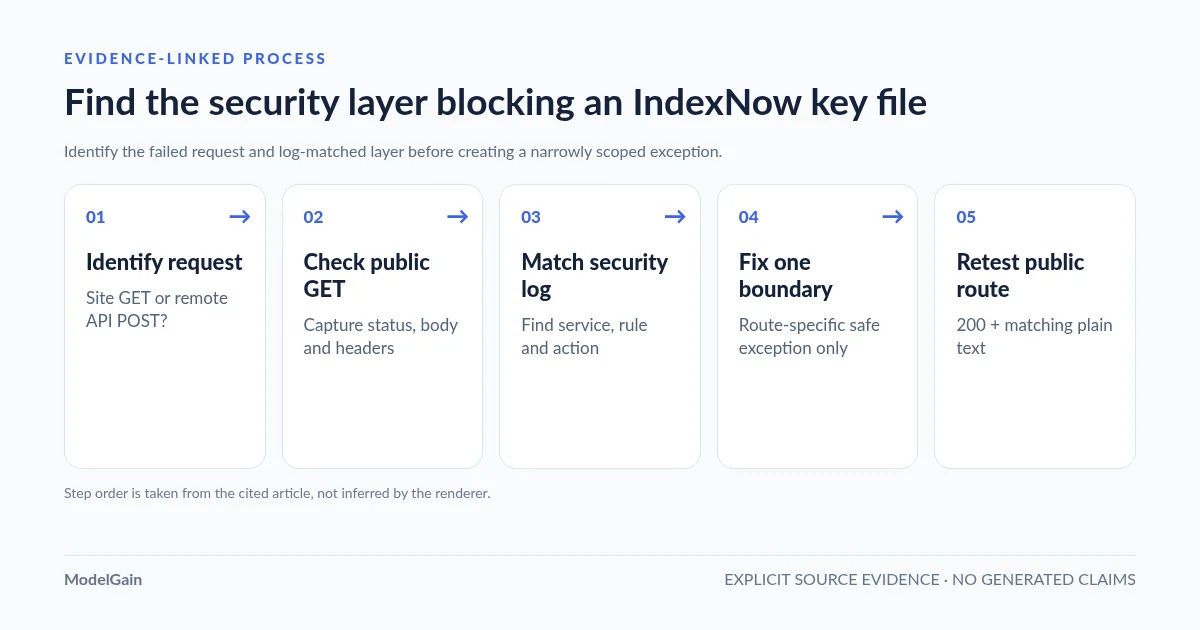
The safe diagnostic sequence is: identify the failing HTTP request → fetch the sender’s exact public key URL → inspect status, body and response headers → correlate with the owning security layer’s logs → make one narrowly scoped adjustment → retest the public key and a legitimate changed-URL submission. The first four checks are read-only and do not require disabling any protection.
Identify the layer blocking IndexNow verification
Applies when: The public key TXT URL appears blocked by a WAF, bot challenge, WordPress security plugin or origin access rule.
Quick answer
First confirm whether an anonymous GET to the actual key-file URL is blocked. An IndexNow API 403 or a wp-admin 403 is a different request. Check the request ID and security logs to identify the responding layer; do not disable all WAF rules or broadly allow TXT requests.
What to do
-
Capture URL, status, response headers, challenge body and timestamp from a public unauthenticated GET.
-
Match the request to Cloudflare, security-plugin or origin logs before changing rules.
-
If a specific verified security rule caused it, use a tightly scoped exception for the owned key path and test normal protection still works.
Which layer actually responded?
All paths are listed below. Select a symptom to focus on the most relevant path.
Review the matching edge event
Use Cloudflare security events to identify the matched rule or challenge and apply the narrowest appropriate adjustment. Do not turn off your site's WAF globally.
Confirm a plugin-level block
Use the security plugin's own logs and the key route's actual handling. Verify that WordPress receives this TXT request before attributing a block to the plugin.
Separate origin restrictions from WordPress
Review web-server rules, file permissions and CDN-versus-origin responses. If the layer is unknown, keep security controls in place and gather more evidence.
Did this help?
First distinguish a blocked key file from an IndexNow API error
There are at least four different HTTP requests that can produce confusing error messages. A screenshot saying “403” usually omits the one detail you need most: which server returned it?
| Failed request | Meaning of 403 or related status | Next evidence |
|---|---|---|
GET https://example.com/KEY.txt returns 403 |
Your own website rejected the key-file request; a WAF, WordPress plugin, host rule or permission problem may be responsible. | Response headers, exact request path, Wordfence Live Traffic or CDN Security Events, origin access/error logs. |
GET /KEY.txt returns 200 but serves a browser challenge or HTML |
HTTP 200 alone is not valid key-file verification; a security interstitial, fallback or cached page may have replaced the key text. | Inspect response body privately and identify which layer served it. |
POST https://api.indexnow.org/indexnow returns 403 |
The remote IndexNow endpoint says the submitted key could not be validated. This does not by itself identify your WAF as the cause. | Inspect the sender’s current key, keyLocation, public GET result and submission history; see our IndexNow API 403 guide. |
| Remote IndexNow endpoint returns 429 | Rate limiting or excessive requests, not evidence that Wordfence blocked the public key file. | Review request frequency and host/shared-IP conditions; do not create a firewall exception for an unrelated 429. |
If your key path instead returns 404, start with our missing IndexNow key route diagnosis. If the URL redirects to the homepage or returns homepage HTML, use the redirect/fallback guide. This article focuses on a key URL demonstrably rejected or challenged by an access-control layer.
Step 1: copy the actual key URL from the active IndexNow sender
Do not guess /indexnow.txt or test a key file installed by a different plugin. In Rank Math SEO, the Instant Indexing settings include a Check Key link, and its History view records outgoing submission statuses. Other WordPress and hosting integrations can use separate keys and routes. The Rank Math support guide explicitly recommends checking whether the advertised key location is publicly accessible.
Copy the full public URL, including the correct hostname, scheme and directory. Keep it local while diagnosing: the IndexNow key is intended to be publicly fetchable, but unnecessarily reproducing key values in shared tickets is not useful. A valid key response should return the sender’s current UTF-8 text, not a login form, access-denied page or CAPTCHA challenge.
Step 2: perform an anonymous GET and preserve the response evidence
Test from a client outside WordPress without an administrator session. Use an actual GET, since some services handle HEAD differently. The following example saves headers and body to local files; it does not change the website or submit anything to IndexNow.
KEY_URL='https://example.com/YOUR-ACTUAL-KEY.txt'

curl --silent --show-error --max-time 20 \
  --dump-header /tmp/indexnow-key-headers.txt \
  --output /tmp/indexnow-key-body.txt \
  --write-out 'status=%{http_code}\ncontent_type=%{content_type}\nredirects=%{num_redirects}\n' \
  "$KEY_URL"

grep -iE '^(HTTP/|location:|content-type:|cf-ray:|server:|x-cache:)' \
  /tmp/indexnow-key-headers.txt
Do not automatically add -L to follow redirects. First record whether the original key path is redirecting, then investigate the final response separately. Avoid posting the downloaded body to support forums because it could contain your verification key; if the response is HTML, inspect it locally for challenge markers.
Record the time, complete request URL (redact the key value in shared notes), HTTP status, response content type and any request identifier such as Cloudflare’s cf-ray. If a WAF event appears to match, that identifier and timestamp help distinguish a real intercepted request from coincidence.
Step 3: find the precise security layer that responded
| Evidence you find | What it supports | Next read-only check |
|---|---|---|
| Cloudflare Security Events shows Block or Managed Challenge for the exact key path and time. | Cloudflare is a supported candidate for the public block. | Read the matching security service, rule identifier and action. Compare with public response metadata. |
| Wordfence Live Traffic shows a blocked anonymous GET to that exact URL. | Wordfence may be rejecting the verification request. | Inspect the rule reason and whether this is an expected policy or a false positive; preserve the event. |
| Origin access or error logs show a 403 for the key path, without a matching edge block. | The origin or application may be responsible, not the CDN. | Inspect web-server location directives, file permissions, plugin access rules and virtual key handlers. |
| Public URL is blocked but an authorized origin-only diagnostic returns the correct key text. | The difference narrows the issue to edge, routing or cache layers. | Compare request host, scheme, path and headers before concluding that a particular edge rule is at fault. |
| HTTP 200 with the correct current key from public GET; no relevant logged denial. | A firewall block is not yet demonstrated. | Use the key-content mismatch workflow and check host/keyLocation. |
Wordfence and Cloudflare can be installed together. Wordfence typically operates in the WordPress/application environment, while Cloudflare can reject or challenge traffic before it reaches your origin. An origin log without a request does not prove the request was never sent; correlate the public client, edge logs and origin logs using available timestamps and IDs. Do not assume an empty Wordfence log rules out every possible host, CDN or network restriction.
A real Wordfence + IndexNow report that was not a confirmed firewall block
A WordPress.org support discussion titled “Wordfence Rank Math InstantNow Indexing” is an instructive caution. The reporter described IndexNow errors and inconsistent keys, but the recurring response was 429, and Wordfence support reported that there was no blocking evidence in Live Traffic. The reply pointed to IndexNow rate limiting and possible shared-host conditions rather than confirming a Wordfence denial. This is evidence of how easily a security plugin can be blamed without a matching security event—not proof that Wordfence can never block an IndexNow key route.
Separately, a WordPress.org Wordfence support case from October 2026 documents a genuine Wordfence rule blocking a different Rank Math REST API endpoint. That example supports checking Wordfence’s precise matching rules, but it was a schema-edit POST, not an IndexNow key-file GET. Do not cite it as proof of a key-file failure.
Step 4: fix a verified Cloudflare WAF block without opening the whole site
Cloudflare’s security feature interoperability documentation recommends locating the actual matching feature in Security Events first. Its Skip action guidance supports selectively bypassing a managed rule or security phase for matched requests. If a documented false positive affects only /YOUR-ACTUAL-KEY.txt, evaluate a narrowly scoped exception for only that exact path and required security feature, not a sitewide allow rule.
Use an exact path match, an appropriate request method and, where relevant, hostname. Avoid blanket exemptions such as every *.txt file, the entire site, all SEO crawlers or all security products. Place the exception in a valid phase/order and keep matching-request logging enabled. A targeted exception is still a reduction in protection for that route; verify the key path has no unintended behavior and retain a rollback path.
Important limitation: Cloudflare’s Skip options reference says the older Bot Fight Mode cannot be skipped with a normal custom Skip rule; Super Bot Fight Mode and specific managed-rule phases have different controls. Even a valid Skip rule does not necessarily bypass every security feature. Choose remediation based on the actual service shown in Security Events, not the name “Cloudflare” alone.
Step 5: fix a verified WordPress security-plugin block
Only after an event identifies the specific plugin and rule should you consider a narrowly scoped supported allowlist or exclusion. Record the rule ID, affected key-file path, HTTP method and time; consult that security plugin’s current documentation for its supported exception mechanism. Confirm the integration really needs unauthenticated GET access and does not expose sensitive administrative functionality on the same route.
Do not globally deactivate Wordfence or another security plugin on production simply to test IndexNow. Broadly disabling a firewall can create a much larger availability and security issue than a failed notification. If the ruleset cannot make a safe route-specific exception, escalate to the host or plugin vendor with redacted request evidence rather than forcing an unsupported configuration change.
What if the origin is blocking the TXT route?
Some IndexNow plugins serve the key as a virtual WordPress route; no matching physical file exists. An Nginx rule that returns 403 for every nonexistent .txt path can prevent the intended WordPress handler from running. Other integrations serve a real file in the public document root. Identify your sender’s implementation first: do not paste an internet-wide Nginx snippet into production when you have not inspected the current server config.
For a proven origin denial, change only the responsible rule or restore the supported physical/virtual key route. Preserve configuration history, run server syntax tests where applicable and verify that other .txt resources and WordPress routes remain correctly protected. A key hosted in a custom directory must also meet the protocol’s directory-scope requirement, explained in our IndexNow keyLocation guide.
Retest: public key, then the actual IndexNow sender
After a targeted change, repeat the exact anonymous GET from outside WordPress. Confirm that the original key URL is directly reachable, returns HTTP 200 and serves the expected current plain-text key; a browser challenge, login HTML, incorrect body or redirect to the homepage is not sufficient. Read the request/security logs again to confirm the previously matching block no longer occurs while unrelated protections remain enabled.
Then use the existing sender for one URL genuinely added, updated or deleted and inspect the remote IndexNow response. Per the protocol, an endpoint 200 means a notification was received; 202 means received while key validation is pending; 403 indicates an invalid/unverifiable key, and 429 indicates rate limiting. A success response does not guarantee crawling, indexing, rankings or traffic. Avoid bulk-resubmitting unchanged URLs just to test a firewall exception.
Independent diagnostics: what our plugin can and cannot establish
Upaccn Health Check for IndexNow is a WordPress diagnostic plugin listed on WordPress.org. It checks the publicly reachable key route that it owns and supports an administrator-triggered limited homepage notification after prerequisites pass. This can help compare general key-route reachability with a separate SEO plugin’s failing route.
It does not read, change or repair Rank Math’s key; it cannot prove which Cloudflare or Wordfence rule blocked another plugin, and its own successful route does not validate a third-party sender. Use the security-event and public-GET workflow above to identify the actual responsible layer. The diagnostic plugin is an additional comparison point, not an automated firewall repair tool.
FAQ
Can Wordfence block an IndexNow key URL?
A WordPress security product can reject public requests, but the mere fact that Wordfence is installed is not evidence it blocked this particular key. Correlate an anonymous GET to the sender’s exact key URL with Wordfence Live Traffic and its matched rule before blaming it.
My IndexNow API shows 403. Should I create a Cloudflare WAF exception?
Not yet. The remote endpoint’s 403 says key verification failed, which can also happen when a file is missing, contains a mismatched key, or uses the wrong host or keyLocation. First test the key URL as a public client, then inspect Cloudflare Security Events for the exact request. Create an exception only for an established false positive.
Does a 200 from KEY.txt mean the firewall is no longer interfering?
Only if the body is the actual expected key. A security interstitial or WordPress fallback may return 200 with HTML. Compare status, final URL and body, then review the relevant security events.
Should I allow all search engine bots through Cloudflare?
No. A named user agent alone is not reliable proof of identity, and a blanket bypass unnecessarily weakens protections. Use exact route evidence and the narrowest applicable documented security exception.
Why do I get 429 instead of 403?
The remote IndexNow endpoint uses 429 for excessive submissions or suspected spam. It is not the same response as your site’s key URL returning 403. Check request frequency and relevant rate-limit conditions separately; an unrelated WAF exception will not necessarily help.
Primary sources and related ModelGain guides
- IndexNow protocol: public key verification and submission response codes.
- Rank Math: testing the public key URL in 403 troubleshooting.
- Cloudflare: identify which security feature blocked a request.
- Cloudflare: scoped Skip rules and Bot Fight Mode limitations.
- WordPress.org: Wordfence and IndexNow 429 without logged firewall blocking.
- WordPress.org: Wordfence blocking a separate Rank Math REST call (not a key URL).
- ModelGain: IndexNow API 403 vs site key-file 403.
- ModelGain: key file loads but validation still fails.
- ModelGain: diagnose key-file 404.
- ModelGain: keyLocation and directory scope.