WORDPRESS
IndexNow keyLocation: Why a Custom Key Path Can Reject URLs
IndexNow keyLocation can restrict submitted URLs. Diagnose 422 invalid key location, check host and folder scope, and fix WordPress submissions safely.
Getting an IndexNow 422 “Invalid key location” error—or seeing some WordPress URLs accepted while others are not? A working key file is only one part of the check. When an IndexNow ownership key lives in a subdirectory, its keyLocation also limits the URL paths that key is allowed to cover.
The official IndexNow protocol gives a concrete example: a key hosted under /catalog/ can authorize URLs under /catalog/, but not URLs under /help/. This is a protocol ownership boundary, not an SEO ranking rule and not a general WordPress permalink restriction. A search engine may reject the submission or decline to consider out-of-scope URLs, even when the key-file URL itself returns HTTP 200.
Recommended default: use the conventional root key at https://example.com/KEY.txt when your integration supports it. If a plugin or hosting design requires a non-root location, inspect the exact outgoing host, key, keyLocation and submitted URLs before changing anything. The protocol expressly recommends the root-key approach for most websites.
Check whether keyLocation covers the URLs submitted
Applies when: IndexNow reports a keyLocation error or accepts some paths but rejects others for a non-root key.
Quick answer
A key under a subdirectory does not necessarily authorize URLs outside that directory. Compare the exact keyLocation host and directory with each submitted URL. Prefer the conventional root-level key when supported by your sender, or split requests according to the protocol's scope rules.
What to do
-
Record key, keyLocation and each submitted URL from the actual integration, not just the form's display values.
-
Verify the TXT response at the exact keyLocation and confirm the contents match the submitted key.
-
Separate eligible and ineligible URLs based on the key file's host and directory; retest a narrow, representative submission.
How is your ownership key published?
All paths are listed below. Select a symptom to focus on the most relevant path.
Validate root-key configuration
Confirm the sender uses the corresponding root-host key and that its public TXT body is correct. A root path should not be guessed from a different active sender.
Check authorization path boundaries
A key at a subdirectory path has limited scope under the IndexNow protocol. Restrict submissions to URLs covered by that directory or use a properly configured root key when supported.
Check cross-host inconsistency
Compare the exact submitting host, canonical hostname and the keyLocation host. Do not assume a file on a different host verifies ownership of the submitting domain.
Did this help?
What does keyLocation mean in IndexNow?
keyLocation is the public URL where an IndexNow-participating search engine can fetch the UTF-8 ownership-key text file. It is optional for the standard root-key arrangement and needed when the key is served elsewhere on the same host. It is not a directory that tells search engines where to crawl first. It defines the verification file and, with a non-root file, the set of URLs authorized by that key.
| Key-file location | Submitted URL | Path authorization |
|---|---|---|
https://example.com/KEY.txt (root) |
https://example.com/blog/post-a |
Within the root key’s host-wide scope |
https://example.com/catalog/KEY.txt |
https://example.com/catalog/item-23 |
Inside /catalog/ scope |
https://example.com/catalog/KEY.txt |
https://example.com/help/shipping |
Outside /catalog/ scope |
https://example.com/catalog/KEY.txt |
https://shop.example.com/catalog/item-23 |
Different hostname; not covered by the example.com key |
https://www.example.com/KEY.txt |
https://example.com/blog/post-a |
Hostname mismatch; verify the exact sender host |
The key file’s parent directory is the critical boundary in a custom-path arrangement. A file at /catalog/KEY.txt is not a license to submit every page on the host. The same principle applies to a site installed in /wordpress/ while its public homepage is /: the installation directory is not automatically the public verification scope. A WordPress plugin’s generated URL and the site’s canonical host must be checked rather than inferred from filesystem paths.
When do you need to set keyLocation?
IndexNow documents two ownership-verification configurations:
- Root key, recommended: publicly serve the exact key text at
https://example.com/KEY.txt. The standard location is derived from the submitted key and host, so the extra parameter is generally unnecessary. - Custom key path: publicly serve the key at a different URL under the same hostname, such as
https://example.com/catalog/KEY.txt, and include that full URL inkeyLocationon each relevant notification. The supported submission scope is limited by that key file’s directory.
A custom root-level filename, for example https://example.com/my-indexnow-key.txt, is still in the host root directory: the directory restriction is root-level even though a sender must declare the nonstandard filename with keyLocation. Distinguish the file’s directory from its basename. Do not assume a custom filename automatically means the key is restricted to a subfolder.
Real error evidence: “Keylocation is not allowed”
A February 2026 XenForo community report recorded an actual error on XenForo 2.3.9: IndexNow error: [422] Keylocation is not allowed, with guidance that the location URL should belong to the host declared by the request. The case is useful because it exposes the parameter-level failure instead of a generic indexing complaint. It does not establish that every WordPress site with a 422 response has the same defect, or that the specific reporter’s installation was fixed in a particular way.
The Yandex IndexNow API reference distinguishes 422 Invalid key location, 422 Invalid url and 403 Invalid key. That specificity matters: a plugin may display only an HTTP status, while the provider’s response reason can narrow the problem to the declared location, the submitted URL, or the key itself. Check the actual endpoint response before deciding which field to change.
Step 1: capture the request fields from the active sender
Identify the integration that is actually submitting the URLs: Rank Math Instant Indexing, another WordPress plugin or a hosting integration. Check its history or request logs where available. A separate diagnostic plugin’s valid root key does not prove that this sender’s custom keyLocation is correct.
Record the values as a local diagnostic set: endpoint, host, key, keyLocation (if present), and sample URLs. Verify the key’s public filename and text separately. Avoid publishing your current key value in screenshots, tickets or browser query-string examples even though the verification file is publicly fetchable. Use placeholders in shared evidence.
Rank Math provides an IndexNow key and Check Key control in Instant Indexing settings and displays submission responses under History. Rank Math also documents an advanced filter for changing its IndexNow key location. A code-level customization changes routing and submission behavior and should be reviewed and tested; it is not a general recommendation to add a filter when an ordinary root key already works.
Step 2: test the exact advertised file, not a guessed key path
An unauthenticated HTTP GET to the actual keyLocation must serve the expected key text. Confirm that you are not seeing a homepage HTML fallback, redirect to an unrelated host, challenge page or missing route.
KEY_URL='https://example.com/catalog/KEY.txt'

curl --silent --show-error --max-time 20 \
  --dump-header /tmp/indexnow-location.headers \
  --output /tmp/indexnow-location.body \
  --write-out 'status=%{http_code}\nredirects=%{num_redirects}\n' \
  "$KEY_URL"

grep -iE '^(HTTP/|location:|content-type:)' \
  /tmp/indexnow-location.headers
Use GET rather than relying only on HEAD. Inspect the stored response body privately and compare it with the current sender key; do not paste the key into a public log. For a missing file follow our key URL 404 guide. For a redirect or a 200 response that contains homepage HTML, follow our redirect and HTML fallback guide. For a readable file containing the wrong key, use our key-content mismatch checklist.
Step 3: check every URL against host and directory scope
Use this local, read-only Python example to spot obvious mismatches before sending any notification. Replace the three example strings with the URLs from your own submission log; no network request is made.
from urllib.parse import urlsplit

key_location = 'https://example.com/catalog/KEY.txt'
declared_host = 'example.com'
submitted_urls = [
    'https://example.com/catalog/item-23',
    'https://example.com/help/shipping',
    'https://shop.example.com/catalog/item-23',
]

key = urlsplit(key_location)
directory = key.path.rsplit('/', 1)[0] + '/'
is_same_host = (key.hostname or '').lower() == declared_host.lower()

for address in submitted_urls:
    page = urlsplit(address)
    same_host = (page.hostname or '').lower() == declared_host.lower()
    # Prefix must include its trailing slash, so /catalog-other is not /catalog/.
    in_directory = page.path.startswith(directory)
    print(address, 'IN_SCOPE' if same_host and is_same_host and in_directory
          else 'CHECK_HOST_OR_PATH')
This is a diagnostic approximation, not an implementation of every URI normalization or verifier rule. It compares hostnames and a literal directory prefix; production validation must also account for URL encoding, ports, scheme, redirects, percent-encoded paths and the engine’s precise host-matching rules. Use the official protocol and live endpoint response as the final authority. Importantly, /catalog-other/ must not be treated as being inside /catalog/ just because the first seven letters look similar.
Step 4: compare a single-URL request with a batch request
IndexNow’s submission format permits keyLocation as a URL parameter for a single changed URL and as a JSON field for a batch. An integration can accidentally send different key locations—or different host and URL values—through its two pathways. Audit both using existing logs or configuration before issuing another request.
This illustrative request body is not intended to be submitted as-is; it demonstrates the required field relationship for a custom key under /catalog/:
{
  "host": "example.com",
  "key": "REPLACE_WITH_YOUR_CURRENT_VALID_KEY",
  "keyLocation": "https://example.com/catalog/KEY.txt",
  "urlList": [
    "https://example.com/catalog/item-23",
    "https://example.com/catalog/item-24"
  ]
}
In a real request, key must be a valid key that matches the file body; the filename and keyLocation must point to the actual public file; and every URL needs to fit the correct host and directory. Never copy the placeholder values into production or repeatedly submit unchanged URLs just to exercise a test endpoint.
Step 5: choose the smallest correction
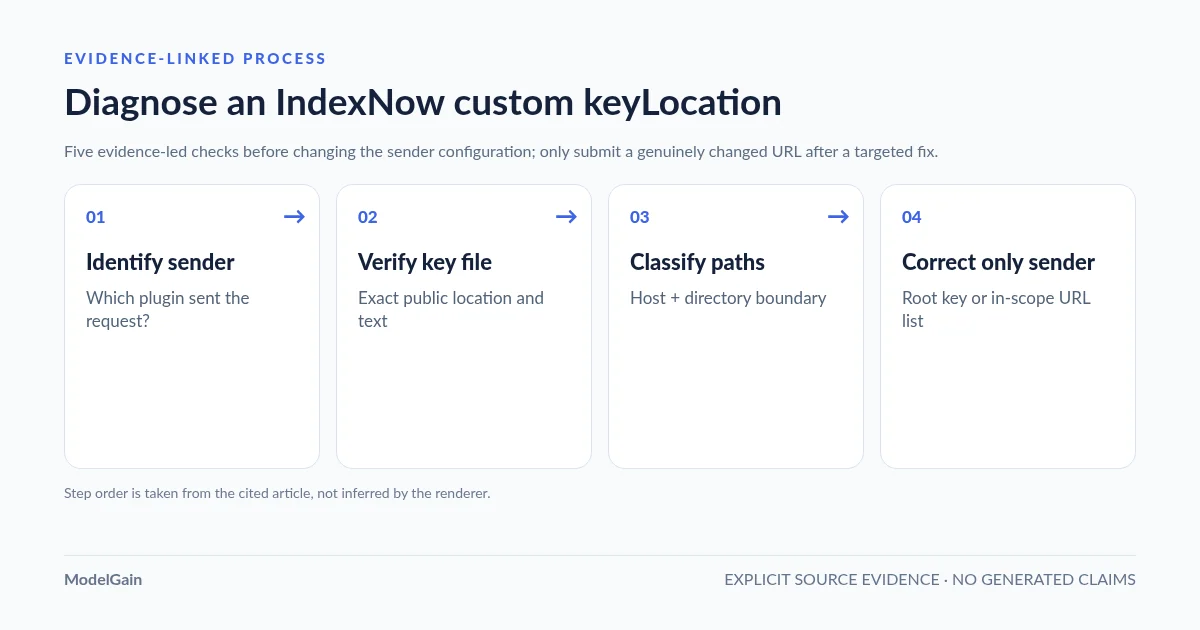
The diagnostic sequence is: identify the active sender → inspect host, key and keyLocation → verify the public key response → classify submitted URLs by directory → correct only the mismatched configuration → retest one genuinely changed URL.
If a sitewide WordPress content feed needs to notify URLs under /blog/, /products/ and /pages/, a single root key is normally simpler than several subdirectory-specific keys. A plugin that serves its key dynamically at the root may already satisfy the protocol without any custom path.
If the sender intentionally uses a non-root key for a section of the website, either submit only URLs within its permitted scope or reconfigure the active integration to use an appropriate root key. For an operational change, preserve the previous settings, fix only the owning sender, and verify the new key route and submission. Do not change the entire WordPress permalink structure, disable the CDN, rotate every key or upload arbitrary .txt files as your first step.
Which HTTP status is relevant?
| Endpoint response | Documented meaning | What to inspect |
|---|---|---|
200 |
Notification received successfully | No new submission is required merely to force crawling |
202 |
Notification received; ownership validation pending | Allow time for validation; do not mark this a hard rejection |
403 |
Invalid or unverified key | Actual key value, public file body, retrievability and host relationship |
422 |
Invalid URL/host relationship or invalid key schema; some endpoints specify invalid keyLocation |
Provider’s response reason, declared host, keyLocation host and directory scope |
429 |
Too many requests | Throttle/retry discipline, not key-file relocation |
For errors that begin with ownership verification but have not yet been localized to path scope, use the broader IndexNow 403 diagnosis. Search-engine receipt is not a guarantee of crawling or indexing; inspect Bing Webmaster Tools separately for search visibility.
Can ModelGain Health Check for IndexNow find this issue?
Upaccn Health Check for IndexNow, available on WordPress.org, provides an independent diagnostic key route and controlled homepage test. It can help you understand whether the site can serve a public IndexNow key and distinguish a shared WordPress routing issue from a sender-specific issue.
It does not inspect or automatically repair another plugin’s keyLocation, and it does not audit every URL in an unrelated plugin’s batch. A successful diagnostic homepage test demonstrates only the diagnostic plugin’s own route and request, not that a custom key under /catalog/ authorizes unrelated paths. That boundary matters more than an impressive-looking green status badge.
Frequently asked questions
Can an IndexNow key in /blog/ submit URLs under /products/?
Under the documented non-root directory rule, no. A key whose file resides in /blog/ authorizes URLs under that directory, not sibling /products/ URLs. A correctly configured root key is the simpler default for a sitewide publisher.
Does keyLocation point to the WordPress installation folder?
Not necessarily. It is the public URL of the key text file. WordPress may be installed in a different filesystem or URL subdirectory from the public homepage. Confirm the actual public file route.
Can a key file be custom-named but still cover the entire host?
Yes, if the file itself is placed at the host root and the sender declares that custom root-level filename correctly. It is the parent directory—not whether the filename contains the key string—that defines the directory scope. The file body still needs to contain the current key.
Why did my IndexNow API return 422 when the key file opened successfully?
The actual endpoint can reject an invalid keyLocation, incorrect host or URL relationship, or invalid key schema. A public GET returning 200 is not enough; check the response reason and compare the submitted fields.
Will relocating my key improve indexing?
No ranking or indexing benefit is established by moving the verification key. The purpose of the change would be to make ownership verification and submission scope correct. IndexNow receipt does not guarantee indexing.
Official documentation and real-world evidence
- IndexNow protocol: key file placement, keyLocation, allowed directories and responses.
- IndexNow FAQ: choosing and exposing a key file.
- Yandex IndexNow API: Invalid key location, Invalid url and Invalid key responses.
- Rank Math: current sender key, Check Key and submission history.
- Rank Math: advanced key-location filter reference.
- XenForo community: real February 2026 422 Keylocation is not allowed error report.
- ModelGain: verify a readable key file against the sender’s actual key.
- ModelGain: diagnose an IndexNow 403 at the correct layer.