WORDPRESS
IndexNow Key File Loads but Verification Fails: Check for a Key Mismatch
IndexNow key file loads but verification fails? Compare the active sender key, TXT response bytes, host and keyLocation before changing WordPress.
Your IndexNow key URL opens and returns HTTP 200, but submissions still fail verification? The next question is not whether the file exists. It is whether the same key appears in the submitting integration, the public key file, and the applicable host and path configuration.
A publicly readable .txt file proves only that a file was served. IndexNow ownership validation also depends on what that file contains and which key the sender actually submitted. The IndexNow protocol explicitly lists a found file containing the wrong key as a reason for an API 403 Forbidden response. Key syntax or URL/host disagreement can instead produce 422 Unprocessable Entity. Do not confuse either code with the HTTP status of the key file itself.
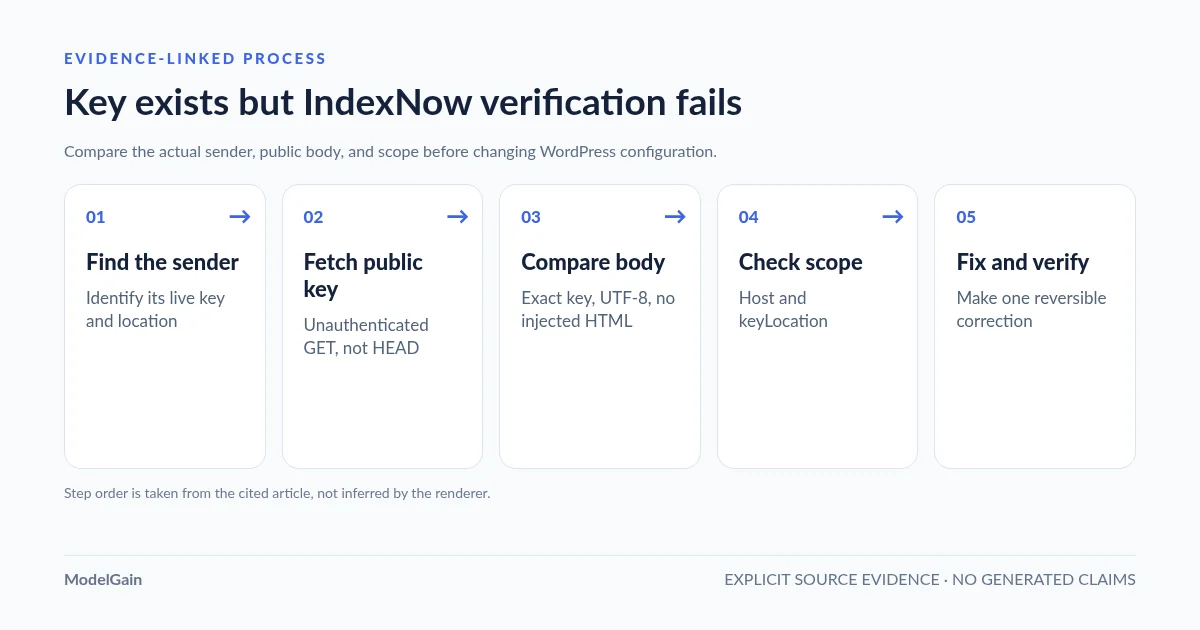
Diagnosis: identify the actual sender → inspect its key and key location → fetch the public file without authentication → compare its content locally → verify host and directory scope → retest a legitimate changed URL only when necessary. The first five checks do not require a WordPress configuration change or an IndexNow submission.
Compare the key that was sent with the key that is served
Applies when: The public IndexNow key URL returns 200, yet the sending integration still reports ownership verification errors.
Quick answer
A successful HTTP GET proves only that something was served. Compare the actual sender's key and keyLocation with the public TXT response, hostname and authorized directory scope. Avoid rotating a working key until the mismatch is located.
What to do
-
Record the sender's current key, keyLocation if present, and the exact host and URLs being submitted.
-
Retrieve the advertised key TXT anonymously, then compare its text to the configured key without pasting secrets into public support threads.
-
After correcting a verified mismatch, test the actual sender with one eligible URL and inspect the endpoint response.
What is inconsistent?
All paths are listed below. Select a symptom to focus on the most relevant path.
Make the served key match the sender
Check duplicate sender plugins, stale caches and the authoritative file or virtual route. Correct the observed mismatch with a reversible change.
Verify host and directory authorization
Inspect the keyLocation host and whether the key's directory covers each submitted URL. A subdirectory key may not authorize URLs outside its permitted path.
Confirm you measured the actual API request
Inspect the sender's precise endpoint and response. A successful public fetch does not establish that the same key, host or URL was used for the failing submission.
Did this help?
Quick answer: HTTP 200 is not the same as a validated key
| What you observe | Likely boundary | Best next check |
|---|---|---|
Key URL: 200 + plain text; IndexNow API: 403 |
Key validation failure: investigate stale sender values, file contents, declared location and whether the verifier can retrieve the same response. | Compare the sender’s current key with public response content, not merely the visible page. |
Key URL: 200 + HTML page |
WordPress fallback, caching or a challenge response | Use the homepage/HTML response troubleshooting guide. |
Key URL: 404 |
Missing physical file or inaccessible virtual route | Use the key-file 404 troubleshooting guide. |
IndexNow API: 422 |
Submitted host/URL relationship or invalid key schema | Inspect host, each submitted URL, key syntax and non-root keyLocation. |
IndexNow API: 202 |
Submission received; key validation still pending | Preserve the status and check subsequent legitimate notifications rather than treating 202 as failure. |
Why a readable IndexNow key file can still be rejected
There are several distinct, testable hypotheses. Start with the current sender and compare its values to the live response before changing anything.
1. The plugin’s stored key changed, but the file did not
A real WordPress.org support report about XML Sitemap Generator describes a user whose plugin generated a new IndexNow API key when settings were saved. The key file previously placed in the site root then represented the old value. The report establishes that this sequence happened to that reporter; it does not mean every version of that plugin or every SEO plugin regenerates keys.
Check the sender’s key-generation or configuration-change history and the file’s last deployment time. If an integration was reinstalled, restored from backup, cloned from staging or updated, compare the sender’s current key with the file now publicly served. Avoid rotating the key again until you have located the mismatch.
2. You are checking a different integration’s working key
A site may have Rank Math Instant Indexing, a standalone IndexNow plugin and a host-level or CDN integration. A good response from one plugin’s key URL does not prove that the sender returning the error uses that same key. In Rank Math, review the Instant Indexing settings and History to identify the sender and its submission status. Then copy that sender’s key URL and submitted key, rather than checking a conveniently accessible .txt file.
3. The text looks right but the response bytes differ
The protocol calls for a UTF-8 text file containing the key. A byte-order mark, HTML wrapper, stale banner, error text or additional characters can make the downloaded body differ from the key configured in the sender. A strict byte comparison is a useful conservative diagnostic: if it fails, investigate why. Do not claim that every validator rejects every trailing newline unless you have an actual failing validation response; the protocol does not document identical whitespace normalization behavior across all implementations.
4. The key belongs to the wrong host or directory
For a root-based key, the conventional public location is https://www.example.com/KEY.txt when the submitted host is www.example.com. The bare hostname example.com is a different host; a perfectly readable key file on one does not automatically establish ownership for a submission associated with the other. A custom file under /catalog/ must be declared using keyLocation and is scoped to URLs under that directory according to the IndexNow specification. This is a separate problem from a mismatched text value and can result in a different API response.
Step 1: inspect the actual submission configuration
In the plugin or submission logs, determine the owner of the request and record the following four fields securely: host, key, keyLocation when specified, and one representative submitted URL. In Rank Math, the Check Key control opens the key URL it expects to use. Its History tab can show the submission response. Do not copy an unrelated plugin’s key or assume the address shown in a browser belongs to the plugin generating the error.
Keep values out of public tickets and analytics. A key file is publicly retrievable by design, but reproducing its contents unnecessarily in logs and third-party tools does not improve diagnosis. Note that an IndexNow key is not your WordPress administrator credential or the Google Indexing API service-account key.
Step 2: retrieve the same public key file the sender advertises
Perform an anonymous GET, save the body locally and inspect the response headers. Use the actual key URL from the active sender, not the placeholder shown below:
KEY_URL='https://www.example.com/ACTUAL-KEY.txt'

curl --silent --show-error --max-time 20
  --dump-header /tmp/indexnow-key.headers
  --output /tmp/indexnow-key.body
  --write-out 'status=%{http_code}nredirects=%{num_redirects}ncontent_type=%{content_type}n'
  "$KEY_URL"

grep -iE '^(HTTP/|location:|content-type:)'
  /tmp/indexnow-key.headers
The test intentionally does not use --location: if it returns a redirect, investigate where the original path points before comparing key content. For an explicit redirect or a 200 response containing homepage HTML, follow the redirect-versus-HTML diagnostic guide. If the route is genuinely missing, use the 404 diagnosis. Avoid treating curl -I (HEAD) as definitive for WordPress dynamic routes.
Step 3: compare the downloaded text with the current key locally
If the public response is 200 and should contain only the key, perform an equality check without displaying the key in terminal history. Run the following code on the same trusted workstation where you saved the response body:
python3 - <<'PY'
from getpass import getpass
from pathlib import Path

expected = getpass("Paste CURRENT sender key (input hidden): ")
body = Path("/tmp/indexnow-key.body").read_bytes()
raw = expected.encode("utf-8")

print("Exact key match:", body == raw)
print("UTF-8 BOM present:", body.startswith(b"xefxbbxbf"))
print("Match after trimming surrounding whitespace:", body.strip() == raw)
print("Looks like HTML:", b"x3chtml" in body[:256].lower()
                      or b"x3c!doctype" in body[:256].lower())
print("Body length (bytes):", len(body))
PY
Read the results together. An exact match is strong evidence that this local GET served the expected value. An exact-match failure combined with a trimmed match suggests extra whitespace, while a BOM or HTML marker is direct evidence of additional content. Neither this script nor a browser GET proves the remote search engine fetched the same bytes; caching, network filtering and different routes can make two clients see different responses. The script never prints the entered key.
Validate the key syntax separately: IndexNow specifies 8–128 characters composed of ASCII letters, digits and hyphens. For the usual root-key arrangement, the filename is based on that same key. A filename, sender value and file body that are inconsistent must be reconciled to the same current key; do not guess by editing only one of them.
Step 4: check the declared host and non-root keyLocation scope
Read the values from the outgoing submission, if the integration exposes them. For JSON batch submissions, host identifies the website host, urlList contains the site’s changed URLs, and keyLocation identifies a nonstandard key location when required. A root key on www.example.com is not a blanket authorization for every subdomain or an unrelated hostname.
| Example declaration | What to verify |
|---|---|
host: www.example.com, key at https://www.example.com/KEY.txt |
Sender, key-file host and URL list use the intended hostname. |
keyLocation: https://www.example.com/catalog/KEY.txt |
Submitted URLs belong to the permitted /catalog/ directory, not an unrelated path such as /blog/. |
| Two IndexNow senders on the same WordPress site | Each sender advertises its own valid key file, and the error belongs to the sender you tested. |
If the mismatch is purely host or URL scope, correcting file content is not the right repair. For the exact directory-boundary rule and a safe local path test, read our IndexNow keyLocation guide. For other endpoint errors, use the broader IndexNow 403 error decision tree.
Step 5: make one minimal, reversible correction
Apply the smallest change supported by the evidence: restore the sender’s intended current key file, adjust the sender’s configuration to match the already-valid published key, or correct its declared keyLocation and submission host. For a dynamically hosted key, follow that plugin’s supported settings; do not overwrite its virtual route with an unrelated physical file. Rank Math documents manually placing its own matching key text in a correctly named root file as one plugin-specific fallback, not as a universal repair.
Retest the public route after the targeted change. If an old value persists, investigate the specific key URL cache, proxy or stale deployment before flushing a whole website’s CDN or disabling a firewall. Avoid rotating keys simply because the endpoint once returned 403, and never bulk-resubmit an unchanged sitemap as a connectivity test.
Why 202 on one submission and 403 on another does not prove the fix
A WordPress.org Rank Math thread records a user seeing 202 on a single submission but 403 when submitting many URLs. That is a genuine user report, not a verified explanation of the discrepancy. It may warrant comparing the actual key, host and URL list of both requests, including whether the same sender generated them. The IndexNow response codes define 202 as accepted with key validation pending, 403 as failed key verification and 422 as invalid host/URL relationship or key schema.
Neither an API 200 nor 202 guarantees indexing or improved visibility in Bing. Track crawling and indexing separately in the relevant search engine webmaster tools. IndexNow is also not a general-purpose way to ask Google to index ordinary WordPress posts.
What ModelGain’s IndexNow Health Check can actually diagnose
Upaccn Health Check for IndexNow (WordPress.org listing) creates and tests its own diagnostic key route. It can help separate a host-wide inability to serve a public key from a fault specific to another plugin’s configured key. Its live test is explicitly administrator-triggered and sends a limited notification for the homepage after prerequisites pass.
It cannot inspect, change or repair Rank Math’s private settings or the bytes in an unrelated plugin’s key file. If the diagnostic plugin’s own key works, do not conclude that Rank Math’s sender key matches its public file. Conversely, failures in both routes suggest investigating shared hosting or routing conditions first. Keep the diagnostic’s limited evidence in context.
FAQ
My IndexNow TXT file opens in a browser. Why am I getting 403?
Opening a URL checks reachability, not the submitted key. Check that the public file contains the active sender’s exact key, that no other integration is submitting with a different key, and that host and keyLocation refer to the right site.
Will creating another KEY.txt file resolve a mismatch?
Only if your sender expects that location, filename and content. An extra file for a different key may not change the active submission at all. First inspect the actual request’s key and optional keyLocation.
Does the key file need to contain only the key?
It must be UTF-8 text containing the key, not a website HTML page. A conservative exact-byte comparison is useful for detecting hidden BOMs or extra characters; some implementations may tolerate a normal trailing newline. A whitespace-related failure should be confirmed against the specific sender and verifier behavior rather than inferred from the byte comparison alone.
Is an IndexNow API 202 an error?
No. The protocol describes it as received with ownership-key validation pending. Do not repeatedly resubmit unchanged URLs merely to force an immediate 200.
Should I rotate my IndexNow key after every 403?
No. A rotation changes the sender’s expected value and possibly the public filename, increasing the chance of mismatched deployments. Verify the current key, public bytes and sender route before making a change.
References and related troubleshooting
- IndexNow.org — protocol, host and keyLocation verification, response codes.
- Yandex Webmaster — key file requirements and directory scope.
- Rank Math — how to inspect the active key and submission history.
- WordPress.org support — reported key regeneration leaving a stale file.
- WordPress.org support — a reported 202 versus 403 submission discrepancy.
- ModelGain — diagnose IndexNow 403 from the correct layer.
- ModelGain — find missing IndexNow key routes (404).
- ModelGain — recognize homepage redirects and HTML fallback responses.