WORDPRESS
WordPress Link Checker False Positives on Every Scan: A Triage Guide
WordPress link checker reports false positives on every scan? Verify 403, 429, redirects and source posts before editing working links.
Does your WordPress broken-link checker flag working URLs on every scan? Before deleting links or replacing every reported destination, separate what the scanner observed from what a real visitor can access. A reported HTTP 403 or 429 is not evidence that the article disappeared. Redirects, server failures, inconsistent HEAD responses and URLs outside the plugin’s scan scope need different follow-up steps.
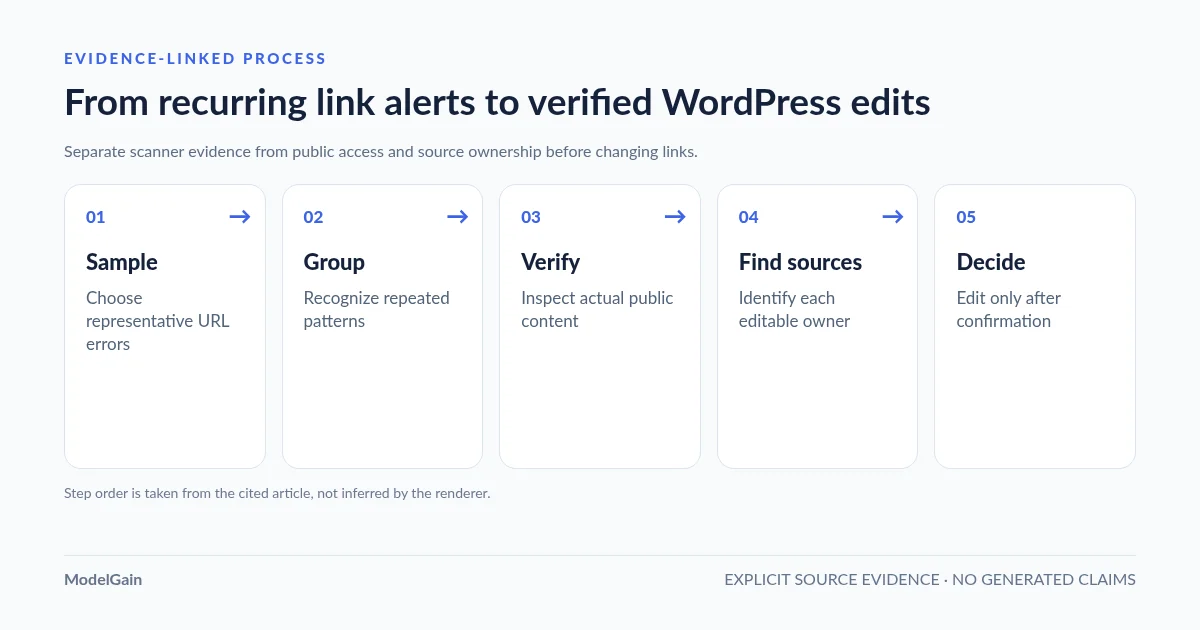
Use an evidence-first workflow: sample the report, group related failures, verify the exact URLs, find their WordPress source pages, then decide whether to edit anything. This guide addresses a noisy report across multiple failure types. If your only symptom is a browser-accessible URL returning 403 to the checker, use our narrower WordPress 403 false-positive guide instead.
What kind of link-checker false positive is this?
Applies when: An administrator's WordPress link-check report repeatedly labels accessible URLs as failures or includes broad ambiguous response classes.
Quick answer
Do not bulk-delete links from a noisy report. Sample representative URLs, separate hard 404/410 from blocked/rate-limited/network results and redirect codes, verify the actual public target and source page, and make only supported edits. Repeated symptoms across one host suggest inspecting that host's access behavior before modifying dozens of posts.
What to do
-
Record the exact URLs, statuses, timestamps and affected hosts; separate 404/410 from 403/429/5xx and 3xx.
-
Compare real visitor access and final content, then identify each editable WordPress source rather than trusting a label alone.
-
Keep working citations, defer uncertain outcomes, or correct verified obsolete links and test the public page.
What does the scanner repeatedly report?
All paths are listed below. Select a symptom to focus on the most relevant path.
Verify who can access the destination
A 403 or 401 establishes denial of this request, not permanent deletion. Compare the identical address without login, inspect the source promise and avoid bypassing destination authentication.
Reduce repeated checks on this host
HTTP 429 usually indicates rate limiting. Record the affected host and timestamp; do not repeatedly rescan or disable security to chase a clean report. Recheck when conditions change.
Treat outages and transport errors as uncertain
5xx, TLS, DNS and timeouts can reflect transient faults or access-path problems. Gather a sample at different times without overloading the site and only edit a citation once its current value is verified.
Interpret the exact redirect response
301/308 can be healthy permanent moves, 302/307 are usually temporary and 304 is cache validation. Verify the final content before changing a WordPress href; don't infer a redirect target from every 3xx code.
Confirm the missing target and relevant replacement
A real 404/410 merits review, especially on important source pages. Find each owner and update only when you have a valid replacement; intentionally removed URLs need not all be redirected.
Separate deduplicated URLs from source pages
Scanner coverage may exclude rendered menu/template links and result interfaces may truncate source previews. Record the actual product version and find stored content owners before treating a row count as a fix count.
Did this help?
A reported status is evidence about one request—not a verdict on the page
Link checks usually run from a server or crawler, which does not share your browser’s login cookies, IP address, locale or network path. A destination might accept a normal browser visit but reject automated requests, answer HEAD differently from GET, send users through a redirect, or rate-limit repeated checks. It is also possible for a link to genuinely return 404. The task is to identify which situation you have before changing a published citation. A scanner that classifies only HTTP response codes cannot, by itself, detect a soft 404 hidden inside a nominally successful HTTP 200 page.
Start by saving one row exactly as the checker shows it: requested URL, recorded HTTP status, check timestamp, source post or referring page, and any redirect Location. Avoid forwarding signed query strings, credentials or sensitive access URLs in public support reports. If one target appears in several articles, keep those source references separate; they may need different editorial treatment.
Different status codes require different decisions
| Observed evidence | What it means | First safe check |
|---|---|---|
| 404 / 410 | The requested address was not found or is gone for this request. This is a stronger missing-target signal, not automatic proof that a suitable replacement exists. | Recheck the exact public address and determine whether the citation has a legitimate replacement. |
| 403 / 401 | Access is denied or authentication is needed. The destination may be available to other users. | Compare the same URL in an ordinary unauthenticated browser; check access rules and source context. |
| 429 | The destination is limiting requests; repeated scans can worsen the condition. | Reduce repeated requests, note the host, and verify later rather than hammering it. |
| 5xx / DNS / TLS / timeout | Server or network failure may be transient or persistent, but its duration is not proven by one scan. | Record time and host; recheck conservatively when the service is stable. |
| 301 / 308 or 302 / 307 | A navigation redirect was observed. The first hop does not prove that the final content is right. | Inspect the verified final destination, chain and actual content before replacing a source link. |
| 304 or other 3xx | Not every 3xx means a navigational redirect: HTTP 304 is cache validation. | Check the exact status semantics; do not invent a replacement URL. |
| 200 OK but wrong content | The request succeeded at HTTP level, but a homepage, login screen or generic error message may not satisfy the citation. | Read the actual destination and compare it with the source’s promise. |
HTTP semantics are defined by RFC 9110. Different plugins may simplify these codes into broad result categories. Do not infer a permanent removal from 403 or 429, or classify a 304 as an ordinary 301 redirect. Google’s crawling-error guidance also distinguishes genuine missing pages from soft 404 responses whose content is effectively unavailable despite an apparent success response.
Five steps when the report looks wrong every time
Sample reported URLs → Group failure patterns → Verify public behavior → Identify source owners → Fix selectively and recheck. Do not scan the entire site again simply to confirm that a noisy report is still noisy.
- Sample reported URLs. Choose representative examples of each distinct status and destination host. Include at least one important internal link and one external reference if both occur. This is a diagnostic sample, not a measured false-positive rate.
- Group failure patterns. Separate hard 404/410 from access denial, 429, temporary server errors and redirect chains. If many URLs from one host fail together, investigate that host’s policies instead of assuming dozens of unrelated pages were deleted.
- Verify public behavior. Open the exact URL while logged out, check its final address and content, and if necessary compare a careful HEAD/GET request using an authorized diagnostic tool. Respect rate limits and access controls; do not bypass logins or disable security measures.
- Identify source owners. Record each WordPress post/page ID reported by the content scanner. If the link is instead owned by a menu, widget, builder template or custom field, investigate that owner separately using rendered-page and configuration checks; v0.1.0 does not report those components as scanned sources. A normalized checked URL and the originally stored
hrefmay differ by fragment, protocol or relative-path resolution. - Fix selectively and recheck. Update a verified obsolete citation, correct an internal navigation error, leave a valid reference unchanged or schedule a conservative recheck for uncertain results. Confirm the public reader journey, not just a change in the scanner’s badge.
Many warnings from one destination host? Investigate the pattern
When a report contains dozens of 403 or 429 results for the same external domain, the common factor may be the destination’s bot protection or request-rate rules rather than simultaneous disappearance of all referenced pages. Check a representative URL, record the time and avoid launching repeated full scans to force a different result. Some servers handle HEAD differently from GET; a normal browser visit may confirm content access while an automated HEAD check remains restricted.
On the other hand, a shared hostname returning multiple verified 404s may reflect a real reorganization or removed documentation section. In that case, locate the original WordPress source pages and construct relevant replacement mappings—not a generic host-level search-and-replace or blanket redirect to the homepage. If the same target is referenced by different content owners, evaluate each citation’s purpose.
For the precise 403 troubleshooting sequence, see why a WordPress checker reports 403 for a working URL. For large-site scan performance, use diagnosing high server load during WordPress link checking. Request-rate tuning and public availability are separate concerns from source-link editorial decisions.
What Upaccn Content Link Health Check v0.1.0 actually reports
ModelGain Content Link Health Check is publicly distributed as Upaccn Content Link Health Check. Its current v0.1.0 version runs a user-started, local, browser-driven scan of HTTP/HTTPS anchor href values found in stored post_content for published public WordPress post types, excluding attachments. It deduplicates normalized URLs while associating their source posts. Discovery and checks run in incremental batches while the administrator keeps the Tools → Content Link Health page open.
Its labels deliberately reserve Broken for hard 404/410 responses. It groups numeric 300–399 responses as Redirect, including 304, without following the destination automatically. It classifies particular restrictions and transient conditions—such as 401/403, 408/425/429, 5xx and network errors—as Retry; other codes may be Unknown. It first sends HEAD, with a bounded GET fallback for certain HEAD 403/405 results. Retry is a diagnostic result, not an automatic background retry loop.
The plugin does not modify source links, create redirects, calculate SEO scores, detect soft 404s inside HTTP 200 response bodies or automatically inspect the final content of redirect chains. It updates its own local diagnostic records while leaving published posts unchanged. It does not crawl arbitrary rendered Bricks/Elementor DOM, menus, templates, post metadata or image/script assets outside stored post content. Its results UI displays up to 100 URL rows and up to five source-post references for a checked URL, with a +N more counter when additional sources are recorded. A visible report is therefore not necessarily a complete export of every site link or source owner.
When you need to find the exact source content, follow our guide to locating the WordPress post containing the outgoing URL. For deciding which confirmed defects matter most, see prioritizing WordPress link repairs by source impact and failure evidence.
Real WordPress user reports: the scanner and browser disagree
In “False Positives for Broken Links EVERY TIME”, a site owner reported that links were initially marked broken but became valid after rechecking; the support discussion considered whether remote websites blocked the scanner. This is a concrete report of unstable repeated results, not proof that every site or plugin has the same problem. It reinforces the need to save exact URLs and compare the first and subsequent checks before editing.
In a WordPress.org review titled “Useful but annoyingly inaccurate”, a user described numerous apparently working links being marked broken because automated requests received Forbidden responses. The user’s estimated error percentage is an anecdote, not an independently measured rate or a claim about the ModelGain plugin.
Another WordPress.org support discussion reported a sudden increase in 403/415 responses even though destinations worked in a regular browser. The case illustrates why the actual status, request method and target-host behavior should be recorded before editing links. These reports concern other installations and tools; they are evidence of a user problem, not a performance benchmark or a defect reproduced in ModelGain’s tool.
A compact decision log beats mass replacement
For each reviewed reference, keep a small table of target URL, source owner, scanner status and timestamp, independent verification result, decision, and final public-page check. This separates the observable request from the editorial action and provides a record if the same external host is flagged again later.
| Evidence | Review decision | Owner |
|---|---|---|
| Public URL works; checker records 403 | Leave link, document blocked request; manually recheck only as needed | Source editor for citation; destination publisher for its access policies |
| Repeated 429 for the same host | Stop repeated checks and schedule cautious verification | Scan administrator; external host controls rate limiting |
| Verified 404 and equivalent new documentation exists | Replace the citation with that verified page and recheck | WordPress post/page editor |
| 301 to the correct final page | Prioritize direct updates of important internal links; retain appropriate historical redirects | Content editor, or host redirect owner if routing is wrong |
| Separate rendered-page audit finds target in a menu or builder template | Locate the owning component instead of editing unrelated posts; not a v0.1.0 scanner source result | Site/template administrator |
A genuinely removed URL with no equivalent replacement can return 404/410 legitimately. Google’s 404 guidance explains that not every missing URL needs fixing. Do not treat every scanner result as an SEO penalty or redirect unrelated content to a generic homepage. The final criterion is whether a relevant reader can follow the published source to the information promised.
Frequently asked questions
Why does my WordPress link checker report false positives every time?
Common possibilities include destination-site bot protection, authentication, rate limiting, unusual HEAD behavior, temporary network failures and redirect classification. Compare individual examples and group by status and destination host; recurring reports alone do not establish the cause.
Does 403 or 429 mean a page was deleted?
No. 403 indicates a request was forbidden and 429 reflects rate limiting. Neither proves a target has been removed. Verify access conservatively and consider the reader’s context before editing the source citation.
Why is a 301 listed as Redirect rather than Broken?
A redirect is a routing response, not automatically a failure. Check the final destination and content to decide whether to update an internal source link. HTTP 304 is cache validation and requires different interpretation even if a checker uses a broad 3xx label.
Can I trust a scanner’s total broken-link count?
It describes what that tool checked, within its scan scope and status rules. Normalized URLs may be deduplicated, source references may be summarized, and builder/menu links may be outside coverage. An unverified count is not the number of unique content edits required.
Will ModelGain automatically recheck or repair all failed links?
No. Upaccn Content Link Health Check v0.1.0 is user-started, local diagnostic software. Its Retry category does not start a recurring background recheck; administrators can manually recheck results. It does not rewrite posts or create redirects.
Primary sources and actual user discussions
- RFC 9110: HTTP Semantics, status codes and redirects.
- Google Search Central: crawling errors and soft 404 behavior.
- Google Search Console: when 404 responses do not require fixing.
- WordPress.org: Upaccn Content Link Health Check release scope.
- WordPress.org: repeated false positives on every scan.
- WordPress.org: reviewer-reported false positives due to Forbidden results.
- WordPress.org: reported 403/415 mismatch between scanner and browser.