WORDPRESS
Broken Link Checker 403 False Positive in WordPress: What to Check Before Removing a Link
Broken Link Checker reports 403 on a WordPress link that opens normally? Compare browser GET, checker methods and access rules before removing it.
Broken Link Checker reports 403 on a WordPress link that opens normally? Compare browser GET, checker methods and access rules before removing it.
Do not delete or replace the link yet. A 403 means the request was refused; it does not establish that the destination page has been removed. Automated checks can receive a different answer from a normal browser because of access rules, bot protection, location, or the HTTP method being used.
This guide helps you decide whether to keep and document the link, investigate a real access problem, or replace a genuinely unavailable destination. Start with the exact URL and the WordPress post containing it, not with a bulk “fix all” command. A recent Broken Link Checker support report describes dozens of apparently working links flagged with 403; that report establishes a real complaint, not a measured false-positive rate for every site.
Is this 403 link really broken?
Applies when: Your WordPress link checker flags a URL as 403 Forbidden, but you need to decide whether to change the link.
Quick answer
A 403 proves one automated request was denied, not that the target page has been deleted. Confirm the exact source and destination, compare anonymous browser GET against the checker request, and change content only when the failure is corroborated.
What to do
-
Save the WordPress post containing the link, the exact destination URL and the scanner's timestamp, status and HTTP method if available.
-
Load the intended content in a private browser window. If useful, compare a bounded HEAD response with GET; document rather than bypass a security block.
-
Keep a working external link, investigate a public URL you own, fix a confirmed 404/410, or retry temporary failures at a respectful interval.
Which result best matches your link check?
All paths are listed below. Select a symptom to focus on the most relevant path.
Keep the link pending corroboration
An automated access denial may be a false positive. Verify the intended page anonymously, document the difference, and avoid bulk unlinking or bypassing the site's protections.
Investigate your own access-control path
A public page you own should be tested logged out. Correlate the blocked request with WAF, CDN and origin logs, then fix only a verified rule or route.
Confirm a stronger not-found signal
A repeatable public 404 or 410 is stronger evidence of missing content. Check the source URL and find a real replacement before changing the post.
Preserve the error and retry carefully
429, 5xx and transport errors are not evidence that a resource was deleted. Reduce request frequency and compare later evidence before editing.
Did this help?
What a 403 report proves—and what it does not
It proves that one request from the checker received an HTTP 403 response. It does not prove that every visitor receives 403, that Google sees 403, or that the link is permanently broken. Conversely, opening the URL once in your own browser does not prove the page is publicly accessible to everyone: you may have an authenticated session, a different IP address, or a different regional route.
| Scanner result | What the evidence supports | Safe initial action |
|---|---|---|
200 to a public GET |
The checker fetched a successful response; the content may still need inspection. | Keep unless the response is a login page, challenge, or wrong content. |
301 / 302 |
The server issued a navigational redirect. The destination needs separate verification. | Inspect the Location; do not call the source link dead. |
401 / 403 |
Access was restricted for that request; the reason remains unknown. | Compare an anonymous browser GET with the automated request. |
404 / 410 |
The requested resource was reported not found or gone. | Confirm the exact address, then repair or replace the source link. |
429 |
The server or intermediary reports too many requests from this client. | Stop rapid retries; retest later at a reasonable pace. |
5xx, DNS, TLS, timeout |
5xx is an HTTP server error; a DNS/TLS/timeout failure may occur before any HTTP response. | Record the details and retry conservatively before editing content. |
WordPress.org support has explicitly explained that outgoing links which return 403 to an automated checker can remain functional for humans, and that a target website’s firewall may be responsible. See the working-outbound-link discussion and the 403 exclusion discussion. Those are user-reported cases and support advice, not proof that every 403 is harmless.
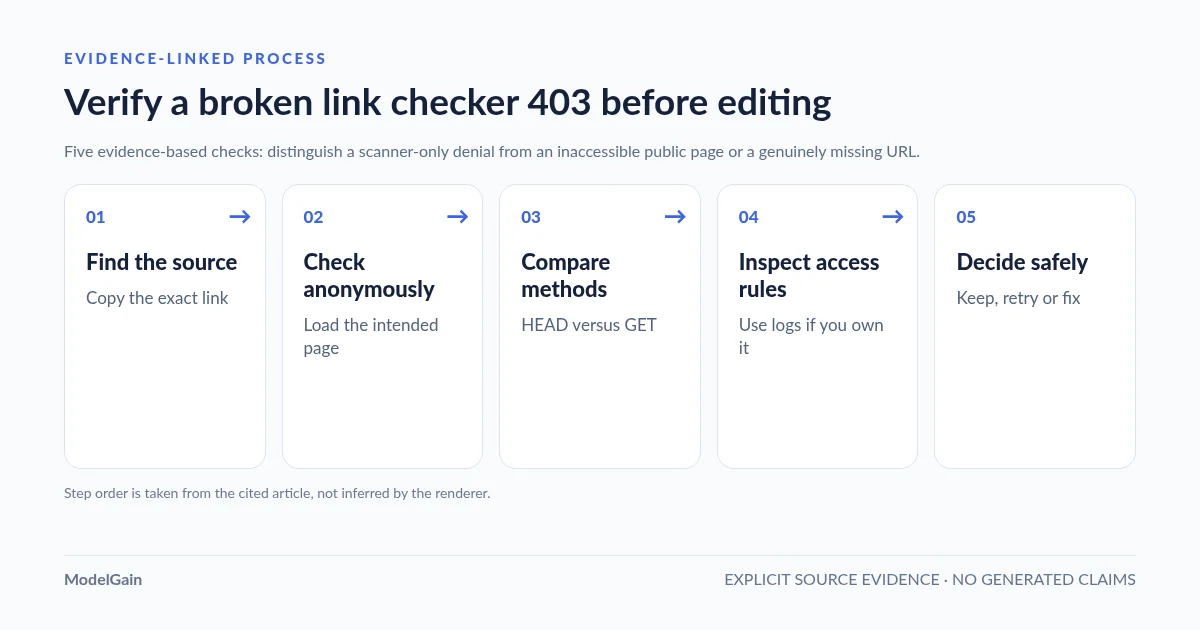
A five-step check before you edit a WordPress post
Confirm source page → Check browser behavior → Compare HEAD and GET → Inspect server/CDN rules → Record an evidence-based decision. Stop as soon as you have enough evidence to choose a safe action.
- Confirm source page. In the scanner’s results, copy the exact destination URL and find the WordPress post or page that links to it. Check the hostname, path, query string and whether the link was entered incorrectly. Do not edit every post mentioning that domain.
- Check browser behavior. Open the exact URL in a private, logged-out browser window. Verify that it displays the intended public content, not merely a 200 login screen or bot challenge. If regional differences matter, record the test location instead of declaring the link universally accessible.
- Compare HEAD and GET. If you have terminal access, make one bounded request with each method. A checker might start with HEAD while a browser uses GET. Different responses are diagnostic evidence; they do not automatically identify the site’s security vendor.
- Inspect server/CDN rules. If you administer the destination, correlate request timestamps, method, IP, URL and any request IDs with the CDN, WAF or origin logs. If the destination belongs to someone else, you generally cannot change its access rules.
- Record an evidence-based decision. Keep a functional link with a note, schedule a limited recheck, or correct a verified mistake. Do not bulk-unlink URLs just because one automated probe failed.
For the terminal check, replace the sample domain with a URL you are authorized to inspect. These commands do not follow redirects, so the initial response remains visible:
URL='https://example.com/guide'

# HEAD: headers only. A checker may use this method first.
curl --silent --show-error --head --max-time 10 "$URL"

# GET: collect response headers without saving the page body.
curl --silent --show-error --dump-header - --output /dev/null --max-time 10 "$URL"
If HEAD returns 403 or 405 while GET returns the intended public page, an automated HEAD-based failure is plausible. If both requests return 403 from the same server, do not infer an anti-bot rule solely from the status. Use the available response body, headers and owner-side logs. WordPress provides safe HEAD and safe GET HTTP helpers for user-controlled URLs; check which method your specific plugin actually uses.
Case 1: An external URL returns 403 to your checker but works for people
This is a common false-positive candidate, especially when the link points to another organization’s documentation, media library, social profile or login-dependent site. The destination can filter automated traffic by IP, request frequency, user agent or other signals. Cloudflare’s 403 documentation lists WAF rules and origin access control among possible explanations; not every external site uses Cloudflare.
Recommended decision: keep the link if an unauthenticated browser opens the intended public resource and there is no contrary evidence affecting your readers. Mark the checker finding as requiring review, ignored, or retried according to the tool’s actual options; record that the automated response differed. If the destination is important to customers, make one later check from another legitimate network before closing the incident. Do not rotate IPs or spoof identities to bypass access controls.
In an older WordPress.org feature discussion, users specifically asked for durable dismissals of 403 findings on sites they do not control. This is a product-design problem: repeating the same automated probe is not new evidence that a once-working link is dead.
Case 2: One of your own WordPress URLs returns 403
An internal 403 deserves higher priority because you can inspect the destination. First distinguish a legitimate private page or admin route from a public article that should be reachable anonymously. Test the exact URL logged out. If the page should be public but fails, check security plugin events, CDN request logs, server permissions and route-specific access rules. A browser success while the scanner is blocked could still mean your own server rejects the scanner’s method or IP.
Recommended decision: do not whitelist all bots, disable your WAF or make private URLs public. If a legitimate check is blocked by a confirmed rule, make the narrowest justified change and test the affected URL again. If customers are also blocked, treat that as a real accessibility incident rather than a link-checker nuisance. The related ModelGain guide to security-layer evidence illustrates how to distinguish edge, plugin and origin blocks for an IndexNow key URL; its key-file-specific remediation is not a universal fix for arbitrary page links.
Case 3: The destination really returns 404 or 410
This is different from a 403. Verify the URL spelling and intended content, then check whether a valid replacement exists. For a moved page, update the source link to the current canonical destination. For content you own, choose appropriate restoration or redirect handling based on the actual change. For a genuinely removed external resource, replace it with an equivalent reliable source or remove the reference when no longer useful.
A brief transient issue can still mislead a one-off scan, but a repeatable public 404/410 from the intended address is materially stronger evidence of a broken link than a scanner-only 403. Prioritize corrections on high-value product, help and conversion pages before older low-traffic references.
Case 4: The response is 429, 5xx, a timeout, or a TLS/network error
These failures need a retry policy, not instant deletion. A 429 calls for less frequent requests and attention to any Retry-After guidance; a 5xx may reflect a temporary origin incident; a TLS certificate or DNS failure may need separate network diagnosis. Record the timestamp, URL and error type so later checks can be compared meaningfully.
Recommended decision: retry at a respectful interval, confirm from another legitimate client only if necessary, then escalate persistent failures. Do not treat a successful later retry as proof that the original tool was defective—it may have observed a genuine temporary outage.
A conservative WordPress link-checking workflow with ModelGain
ModelGain’s Content Link Health Check, distributed on WordPress.org as Upaccn Content Link Health Check (version 0.1.0), is built for this distinction. The plugin labels strong not-found evidence such as 404/410 Broken, HTTP 3xx Redirect, and uncertain outcomes such as 403, 429 and transport failures Retry. Not every 3xx response is a navigational redirect, so inspect the specific status and Location header. This classification is more conservative than treating any non-200 response as a dead URL.
Its local scan finds HTTP(S) anchor links in stored content of published public post types and records which content items—including posts, pages and other public types—contain each URL. It starts with HEAD; for a rejected HEAD response such as 403 or 405, it may issue a bounded GET with a Range header rather than downloading the whole page. Results can be individually rechecked. The initial version is read-only: it does not rewrite links, install redirects, crawl the rendered page-builder DOM, or check image/script/style assets. These limitations matter when your site uses heavy visual builders or when the destination requires authentication.
To try this workflow, install the plugin from its official listing, open Tools → Content Link Health, start a scan (which processes public published content in small batches), and review results by source page. Its current release does not provide a per-post scan-scope selector. Keep your judgment in the loop for ambiguous external 403s. You can browse the other ModelGain WordPress utilities if your incident concerns a different type of site maintenance.
Frequently asked questions
Is a 403 link broken for SEO?
Not automatically. A scanner-only 403 tells you how that request was handled. Search engines and ordinary visitors can receive different responses. Determine who is blocked and whether the intended page is accessible before drawing SEO conclusions. If your own public URL is consistently inaccessible, investigate that separate issue.
Why does the link open in Chrome but fail a WordPress scan?
Your browser may send a GET request with cookies from a different IP, while the checker may start with HEAD from your hosting server. Security policies, authentication, location and temporary rate limits can produce different responses. Compare the requests rather than guessing which difference matters.
Should I ignore every 403 in Broken Link Checker?
No. Some 403 responses are real restrictions that prevent intended readers from reaching content. Keep the result in a reviewable category until you know whether a private page was linked by mistake, the destination blocks automated checks only, or a public page has a genuine access-control defect.
Can I force a link checker to return 200 by changing its user agent?
A changed user agent can affect server behavior but does not prove that the link is healthy, and may violate a destination’s access policy. Prefer accurate classification, owner-side log evidence and respectful follow-up checks over trying to bypass restrictions.
What should I save when asking for support?
Record the source post, destination URL, timestamp, observed method, HTTP response, whether an anonymous browser can load the intended content, and any non-sensitive request ID. Redact session cookies, authorization headers and private customer data before sharing logs.
Sources and verification boundaries
- WordPress.org: reported 403 false positives in Broken Link Checker — direct user experience; the user’s stated error percentage is not independently measured.
- WordPress.org: working outbound links flagged as forbidden — vendor support explanation.
- WordPress.org: discussion of excluding 403 link reports — practical support context, not a universal recommendation.
- Cloudflare: HTTP 403 causes and diagnostic categories.
- WordPress Developer Resources: wp_safe_remote_head() and wp_safe_remote_get().
- ModelGain/Upaccn Content Link Health Check: actual release capabilities and limits.