WORDPRESS
WordPress Link Checker Finds a 301: Should You Update the Source Link?
WordPress link checker found a 301 redirect? Verify the final URL, then decide when to update internal links, fix redirect chains or keep external citations.
WordPress link checker found a 301 redirect? A 301 means the responding server declares a permanent move—not that the link has been proven broken or that the new target is necessarily correct. If the new URL serves the right page, you generally should update internal links you control to point directly to it. For external links, first verify the final destination and prioritize those that now lead to a different page, a long redirect chain, or a security-sensitive location. You do not need to edit every external 301 immediately.
This is a guide to deciding what to edit, not to configuring a WordPress redirection plugin. It distinguishes a checker reporting a redirect from a link that actually lands on an error page. The HTTP 301 standard says the resource has a new permanent URI and suggests future references use it; Google’s site-move documentation advises updating internal links after a move and reducing redirect chains. Neither source says every 301 is an SEO penalty.
Should you update this redirected WordPress link?
Applies when: A WordPress link scanner reports a 301 or another 3xx response, and you want to know whether to edit the source link.
Quick answer
A 301 signals a permanent move, not automatically a broken link. Verify the full redirect chain and final content. Update important internal links you control to the correct final address; change external links based on relevance, access and priority—not the 301 alone.
What to do
-
Save the post or page containing the old URL and distinguish an internal link from a citation to an external site.
-
Record the first Location, follow bounded GET requests to the final page and check whether the final content matches the link's promise.
-
Update verified internal links or important external citations; preserve needed redirects for old bookmarks and inbound references, then recheck the public page.
What kind of redirect did the scanner find?
All paths are listed below. Select a symptom to focus on the most relevant path.
Update the verified source link
If the final public page is right, point important WordPress internal links directly to it. Retain the original server redirect for historical inbound links unless separately reviewed.
Verify before replacing a citation
A one-hop permanent redirect to the correct external document may be acceptable. Prioritize unexpected hosts, wrong content, long chains and important references. Do not blanket-replace.
Do not overwrite temporary routing by default
302/307 indicate a temporary destination. Check whether a campaign, authentication step or regional route is intentional before replacing an existing URL.
304 is not a navigational redirect
304 reuses cached content after conditional validation; 303 and 300 have their own meanings. Inspect the exact status and whether a usable Location exists; do not infer a permanent target from the broad 3xx category.
Check the final response and actual content
A first-hop 301 is not sufficient evidence. Look for loops, 404/410, homepage substitution, login requirements and wrong-domain routes; repair only a verified issue.
Did this help?
Why a working link can appear as “Redirect”
A link checker may request https://example.com/old-guide and receive 301 Moved Permanently plus a Location: https://example.com/new-guide header. A browser normally follows that destination and may display an ordinary page, so the link seems to work. The checker is reporting the initial HTTP response—the redirect itself—not necessarily the last page in the journey.
In the current Upaccn Content Link Health Check, a ModelGain utility, the Redirect label is deliberately separate from Broken. Version 0.1.0 checks the first response without automatically following redirects; it records the available status and target information, but does not show a verified final destination or rewrite content. Because HTTP 3xx also includes responses such as 304 Not Modified, which is not a navigational move, always inspect the actual status and the Location header instead of assuming the label identifies a permanent new URL.
| First status | Meaning for a content link | Editorial decision |
|---|---|---|
301 / 308 |
Server declares a permanent move. A 308 preserves the request method; 301 can historically rewrite a non-GET to GET. | For internal links, prefer a verified final URL; assess external links by destination and priority. |
302 / 307 |
Server indicates a temporary move. A 307 preserves the request method; 302 can historically rewrite a non-GET to GET. | Do not replace the source URL by default; check whether the temporary routing is intentional. |
303 |
Client should retrieve another resource, often after an action. | Review the page’s intended user journey before changing anything. |
304 |
A conditional request can reuse its cached representation. | Not a navigational redirect or a basis for a replacement URL. |
300 or another 3xx |
Needs code-specific interpretation. | Do not blanket-replace with a guessed destination. |
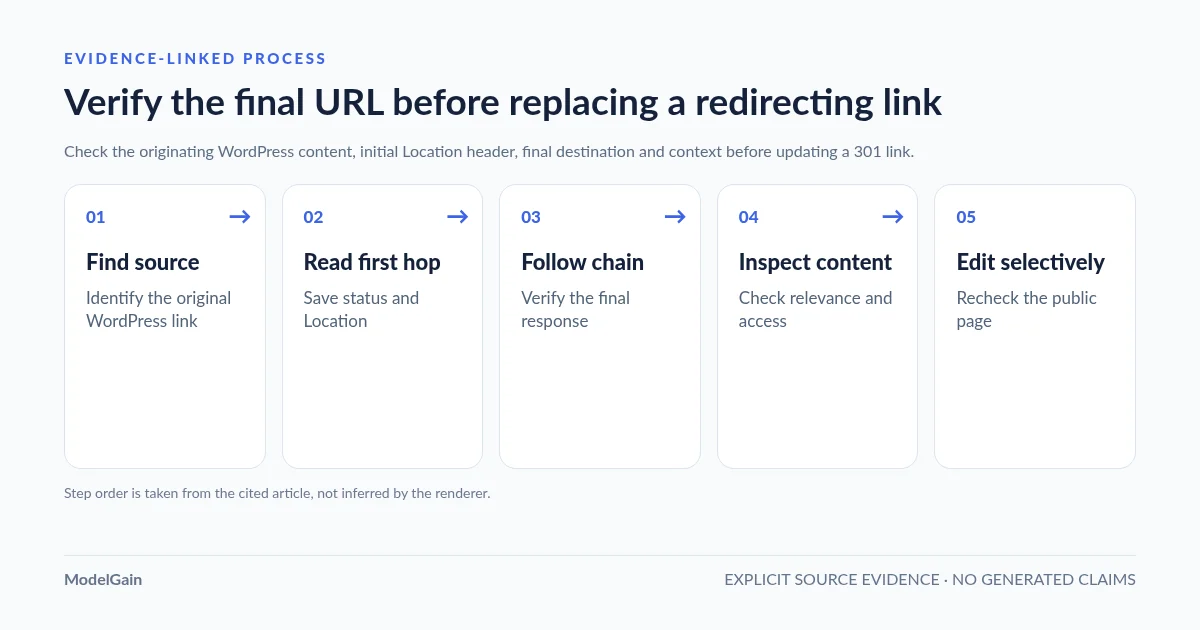
Five checks before replacing a 301 link
Find the source post → Inspect the first Location → Follow to the final page → Verify content and safety → Change only what you own. If you cannot verify the destination, keep the result open rather than bulk-replacing URLs.
- Find the source post or page. Record which WordPress content item contains the outdated URL and whether it points to your own domain. A single redirected URL may appear in many pages; check its actual references before editing.
- Inspect the first response. Record the exact old URL, HTTP status and
Locationvalue. ALocationmay be a relative reference, which a browser resolves against the original request URL. Check the resolved path, scheme, host and query string. Do not assume the checker followed the redirect. - Follow the chain to the end. Use an ordinary browser or a bounded GET to identify additional hops and the final response. A first-hop 301 can lead to 302, a login page, a homepage, 404 or a different domain.
- Inspect what the final URL actually serves. A final
200alone is not enough: verify the correct document or product, anonymous accessibility, language and any relevant section anchor. Avoid replacing editorial citations with a vaguely related homepage. - Make a scoped edit and recheck. When justified, update the source post’s link, not a global WordPress redirect rule. Validate the edited link in the public rendered page and, where appropriate, re-run the link scan.
For URLs you control or are authorized to inspect, compare the first response with a manually reviewed next hop. Unlike curl -I, these commands use GET because some sites treat HEAD differently. They do not follow redirects automatically, limit the downloaded response and permit only HTTP(S) schemes:
URL='https://example.com/old-guide'

# Inspect one GET without following the Location header.
curl --silent --show-error --proto '=https,http' \
  --max-filesize 1048576 --max-time 15 \
  --dump-header - --output /dev/null "$URL"

# Review the Location, then substitute its trusted absolute URL.
NEXT_URL='https://example.com/new-guide'
curl --silent --show-error --proto '=https,http' \
  --max-filesize 1048576 --max-time 15 \
  --dump-header - --output /dev/null "$NEXT_URL"
Check that each Location resolves to an expected HTTPS host and path before continuing. Never run a batch of arbitrary scanned URLs through an auto-following tool: redirects can lead to private or internal network addresses, unintended hosts, or credentials-bearing paths. Avoid replacing an HTTPS citation with plain HTTP without a separately justified reason. Review destination query strings before following or sharing them; they may contain sensitive tokens. If the first response has no usable Location, the chain loops, or the final page is inaccessible, do not call it routine cleanup. The commands above inspect response headers without trying to evade rate limits or access controls.
Internal 301: usually update the link you control
If a WordPress article points to /old-service/, which permanently redirects to your current /services/ page, update the link in the source article to the verified final URL. A redirect is valuable for old bookmarks and external references, but new internal navigation does not need to traverse it. Google advises updating internal links after a site move and keeping redirect chains short.
Do not remove the server redirect merely because you corrected one internal source. Other websites, historical emails and saved bookmarks may still rely on the old URL. Google’s migration guidance recommends keeping redirects for a substantial period—generally at least a year for site moves, and potentially longer for users. Updating the source link and maintaining the destination redirect solve different problems.
This distinction has appeared in a WordPress.org support discussion about HTTP links redirecting to HTTPS. A site owner was concerned that an audit flagged 301 responses from old HTTP URLs to valid HTTPS pages. A WordPress moderator advised ensuring links under the owner’s control point directly to HTTPS, while noting that the redirects themselves were not a major malfunction. This is one support example, not a measured ranking experiment.
Priority: site navigation, important landing pages, product pages and frequently used guides first. After a domain or permalink migration, systematically find repeated old-domain or old-path links instead of making random one-off edits. Check canonical tags, internal references and relevant sitemaps as separate tasks; a redirect report alone does not verify those signals.
External 301: verify relevance before changing the citation
For a link to another organization’s documentation, a single 301 to the correct current documentation page usually still works. It can remain temporarily while higher-impact problems are fixed. Updating it is sensible when the final URL is stable, publicly available and clearly matches the original citation, but a one-hop redirect alone is not an emergency. This is general WordPress content-link guidance, not the menu-by-menu manual of one particular Broken Link Checker plugin.
Prioritize an external correction if the chain ends at a generic homepage instead of the original reference, changes to an unrelated product, moves to an unexpected host, drops from HTTPS to HTTP, introduces a login requirement, or accumulates several hops. In those cases the reader may not get what the anchor text promised—even when the last response is HTTP 200.
If the destination is temporary or clearly tied to authentication, regional routing, campaign attribution or a short-lived download, do not overwrite it merely to eliminate the redirect label. Check the link’s business purpose and the publisher’s official replacement address first. A link-checker’s status label is evidence, not editorial authorization.
What if the 301 leads to more redirects or the wrong page?
A redirect chain is a sequence such as /old → /new → /newer → /current. Each hop can add latency and another opportunity for a change or error. Google’s migration guidance advises redirecting directly to the final destination where possible. Avoid creating a new redirect for every historic WordPress slug change when an existing mapping can be consolidated safely.
For a concrete WordPress example, a 301 Redirects plugin support thread describes a custom-post URL moving through /old/ → ?p=12345 → /new → /new/ before the final 200. Support explained the page-ID and permalink steps and suggested using a verified direct custom URL when the destination is stable. This illustrates why the first 301 is not enough to judge the link’s quality; it does not prove every WordPress redirect plugin creates the same chain.
Common cases require different action:
- 301 → 200, correct page: update important internal sources; lower-priority external references can wait.
- 301 → 301 → 200: consider linking directly to the confirmed endpoint and, if you administer the target, simplifying its chain without breaking old inbound URLs.
- 301 → 404/410: the source link now leads to a missing resource; investigate a legitimate replacement or remove the obsolete citation.
- 301 → homepage or unrelated content: treat this as a relevance failure. Do not assume HTTP 200 means the intended content still exists.
- 301 → different host, downgrade, login or challenge: confirm destination ownership and user accessibility; avoid automated replacement.
Google also warns against sending many unrelated removed pages to a generic homepage, which can be treated as a soft 404. See Google Search Central’s crawling-error guidance. The correct remedy is a relevant destination, not merely reducing the number of status codes.
Where to make the correction in WordPress
In a normal WordPress post or page, open the affected content and update the anchor’s URL. Preserve meaningful anchor text and surrounding context, publish the scoped change, then visit the clean public URL. If multiple posts reuse the same URL, maintain a source-page checklist and recheck each affected context rather than issuing an unreviewed database-wide string replacement.
In page builders, navigation menus or custom fields, the link may live outside regular post content. Identify its true owner before editing it. ModelGain Content Link Health Check currently discovers anchor href URLs stored in published public post types; version 0.1.0 does not crawl the rendered Bricks/Elementor DOM, parse arbitrary menu/custom-field link data, or automatically change links. For sources outside that scope, inspect the native WordPress editor or builder manually.
If your checker reported a 403 instead of a redirect, that is a different diagnostic question. Read our 403 false-positive troubleshooting guide before treating restricted automated access as proof of a deleted page. The ModelGain utility catalog lists other narrow, evidence-first WordPress maintenance tools.
Frequently asked questions
Is a 301 redirect considered a broken link?
No. A 301 describes a permanent move. A link may still lead to an error or irrelevant destination after following the redirect, which is why you should verify the final response and actual content.
Do 301 internal links hurt SEO?
A 301 by itself is not an SEO penalty and does not automatically prove a defect. However, an irrelevant destination or a long chain can harm navigation, crawling and user experience. For site migrations, Google recommends updating internal links and minimizing chains; those are maintenance improvements, not a promise of ranking gains from each edit.
Should I replace every external 301 with the final URL?
Not blindly. Verify the target and prioritize high-value references, chains, wrong-content landing pages and unexpected domain changes. A working, intentional one-hop redirect to the correct citation is usually less urgent.
What is the difference between 301 and 302 in a link checker?
301 indicates a permanent move; 302 indicates a temporary move. Replacing the original URL behind a temporary redirect may defeat the destination owner’s intended routing. The HTTP standard treats them differently.
Can ModelGain’s plugin automatically update redirected links?
No. Upaccn Content Link Health Check version 0.1.0 is a diagnostic tool. It groups observed 3xx responses under Redirect and records source-content references so an administrator can decide what to edit; it does not create redirects or rewrite posts.
Primary sources and product scope
- RFC 9110: HTTP redirect status semantics, including 301, 302, 304, 307 and 308.
- Google Search Central: redirects and canonicalization.
- Google Search Central: site moves, internal link updates and redirect chains.
- Google Search Central: crawling errors and soft 404.
- WordPress.org: Upaccn Content Link Health Check’s actual release capabilities.
- WordPress.org: HTTP-to-HTTPS link audit support case.
- WordPress.org: multi-hop custom-post permalink support case.