WORDPRESS
Bricks Query Loop Pagination 404: Fix Archive Page 2
Bricks Query Loop page 2 returns 404? Check archive main query, Pagination target, posts-per-page counts, and AJAX versus full-page navigation.
Does page 1 of your Bricks Query Loop work, but clicking page 2 on a category, search or post archive returns a WordPress 404? Start with the relationship between the WordPress main archive query, the Bricks loop marked “Is main query (Archive, Search),” and the Pagination element’s “Related Query”. A page can show many posts in a custom loop while WordPress still decides that /category/news/page/2/ is outside the main query’s valid page range. Changing permalinks or clearing cache without identifying that mismatch may hide, rather than fix, the cause.
Fast check: on a staging copy, confirm the affected page is a real archive or search template. In its primary Posts Query Loop, enable Is main query (Archive, Search) and leave Disable Query Merge off. Do this for one primary loop, not every loop on the page. In the separate Pagination element, select the loop that actually produces the results. Then compare Posts Per Page and filters with the current WordPress main query before testing a directly entered /page/2/ URL as a logged-out visitor. This is the official Bricks starting point, but not a promise that a single toggle fixes every installation.
This guide addresses a page-navigation / archive routing symptom, not the different problem of a loop with no results on page 1. If the initial loop is empty, follow our Bricks Query Loop shows no posts troubleshooting guide. For a complex live Bricks template or custom archive implementation, ModelGain WordPress Development offers an implementation service; ModelGain does not have a released plugin that automatically repairs Bricks pagination.
1. Confirm which request actually returned 404
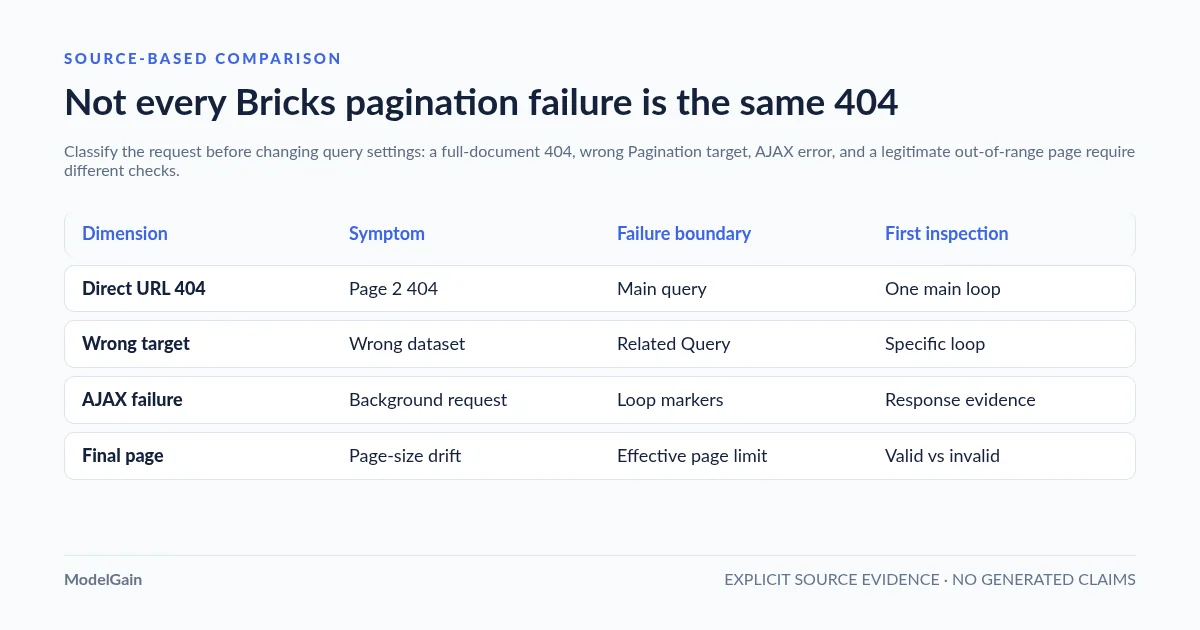
First open the problem page in a private browser window and reproduce the failure once. Record the exact original URL, clicked target, final URL, HTTP status, query parameters and whether AJAX pagination was enabled. In browser Developer Tools → Network, distinguish a failed full-document navigation from a failed background request. A “404” printed by a JavaScript request, a Bricks No Results fallback, and an actual HTTP 404 document are three different outcomes.
The location matters. For a category archive a URL might look like https://example.com/category/news/page/2/; a static landing page using a secondary loop might have a different pagination convention; the site’s front page is a special WordPress query context. Do not assume that /page/2/ is always the correct format for the specific page type or permalink setup.
- Page 1 works; direct
/page/2/returns an HTTP 404: inspect the main archive query and whether WordPress believes page 2 exists. - Direct page 2 works; clicking the Bricks pagination control does not: inspect which Query Loop the Pagination element targets and whether AJAX is enabled.
- Page 2 loads but shows page 1 again or unrelated categories: inspect current query variables, archive context, query merge and Bricks AJAX behavior, not merely the route status.
- Pagination disappears while the grid stays visible: verify the actual total result count, posts per page, pagination target and filters; this is not automatically an HTTP 404.
- Only one post category or a high final page fails: check its filtered count and total pages, then investigate a query-size mismatch or a legitimate out-of-range route.
Preserve the original settings, theme revisions and any custom query code before experiments. Avoid testing random 404 routes on a production commerce site merely to force a failure; use the actual known link and read-only request evidence.
2. Make one loop the archive’s main query
According to Bricks Academy’s Query Loop reference, a primary archive/search listing should enable Is main query (Archive, Search) to keep the loop and WordPress pagination context aligned. The same documentation warns that only one Query Loop on a page should have this setting; if multiple loops are flagged, only the first is used as the archive main query.
On the main listing, do not activate Disable Query Merge by default. That setting tells Bricks not to merge the loop with archive/search query context. It is usually appropriate for a secondary loop such as “Latest articles” in a sidebar or footer, because that loop should not inherit the active category or search request.
These two controls solve different problems. Is main query identifies which Bricks results should represent the main archive listing. Disable Query Merge controls whether a loop inherits the archive’s query parameters. Toggling both indiscriminately, or setting every loop as main, makes the behavior harder to reason about.
For a typical category archive with a post grid plus a sidebar “Related posts” loop, designate the category post grid as the main query, keep its query merge active, and keep the sidebar loop independent. Record those settings before proceeding. The Bricks community discussion about two loops and page 2 illustrates why this matters; importantly, one reported page was actually an ordinary page, not an archive, so the advice must be checked against your page type rather than copied blindly.
3. Bind Pagination to the results it actually controls
Bricks Pagination is a separate element. In its settings, choose the Related Query that produces the visible posts. Bricks Academy describes linking Pagination to a specific Query Loop and recommends meaningful names for loop containers so you can identify the intended target in the control. If your page has more than one loop, a Pagination element pointing at the wrong one can display a valid-looking row of page numbers for a different dataset.
Do not assume “Main query” and the named Bricks Query Loop are always equivalent for your altered setup. In an actual Bricks category pagination 404 support case, the author had already enabled “Is main query” but had changed the number of posts per page. Bricks staff changed the Pagination element to target the specific Query Loop instead of the generic “Main query”; the author confirmed that resolved the error. This is a concrete configuration example, not proof that every 404 has the same cause.
To verify your site, inspect the target loop’s query settings and the number of results it actually produces. If Pagination references another loop or a main query with different page sizing, change only the Pagination target on staging and retest. Do not change every Posts Per Page setting at once: doing so hides the original mismatch and can alter the number of pages across the whole site.
4. Match the total page count to the real archive dataset
WordPress and Bricks may use different query counts if you override Posts Per Page, Offset, category filters or other query arguments on the Bricks loop. WordPress’s main query can judge an archive page number invalid even while a secondary Bricks query has enough results to render that page. A 404 on a later page is then a query-consistency problem, not necessarily a broken permalink.
Use a simple, read-only count: identify the number of published posts matching the archive’s actual filters, the configured page size for the main query (WordPress Settings → Reading or deliberate query customization), and the page size selected in the Bricks loop. The expected number of pages is the ceiling of matching posts divided by the effective page size. For illustration, 23 matching posts at 10 posts/page yield three pages, whereas 23 at 5 posts/page yield five. These are synthetic arithmetic examples, not measurements from a live website.
A Bricks support example of 404 on pages 4–5 was resolved after aligning the per-page limit with the main query’s count. This does not mean every custom archive must share one universal page size; it means that if you deliberately customize the main query, the Pagination element and template must agree on the effective dataset.
Be cautious with manual offset values and custom query hooks. The official WordPress pre_get_posts reference warns that offsets can break pagination. If your site uses a custom pre_get_posts callback, check whether it is guarded with the correct $query->is_main_query() and page-type condition and whether it changes page size, taxonomy constraints or visibility. Never paste a generic PHP “404 fix” into a live child theme before confirming what is already changing the query.
5. Archive, normal page and static homepage are not interchangeable
Archive and search templates have a meaningful WordPress main results query. A standard Page template with a manually added Posts Query Loop is a different context, even if the visual grid looks exactly like an archive. First confirm the actual route’s role under WordPress Settings → Reading and the Bricks template Conditions.
WordPress’s get_query_var() documentation documents a specific exception: paginated content on a static front page may use the page query variable instead of paged. The WordPress front-page template reference makes this distinction explicit. Do not copy a paged-based custom query snippet from a category archive into a static homepage without reviewing how the actual route is parsed.
For a non-archive landing page containing one or more secondary loops, first verify the correct Pagination Related Query and the page’s permalink/URL pattern. The “Is main query (Archive, Search)” option is intended for archive/search contexts, not a universal solution to paginating every page. If the page’s main request cannot resolve page 2 in the desired URL scheme, your template and routing strategy need specific review.
6. Separate a real 404 from Bricks AJAX pagination failures
Bricks also supports AJAX Pagination, Load More, Infinite Scroll and Query Filters. Those interactions update content without necessarily making the same full-document page navigation. Check the Network request: a failed load_query_page call, an AJAX result that repeats page 1, or category-filtered results that expand to all posts are different symptoms from WordPress returning an HTML 404 for /category/news/page/2/.
The official Bricks troubleshooting section warns that performance optimizers removing the loop boundary comments (for example <!--brx-loop-start-abc123-->) can break AJAX features. That is a reason to inspect rendered HTML and the specific optimization step when AJAX navigation fails; it is not a reason to disable all caching for a normal full-page 404.
More recently, Bricks Community reports involving Bricks 2.4.4 describe AJAX pagination losing the current taxonomy filter and displaying posts from unrelated categories. These are version- and context-specific reports, not a cause of ordinary page-2 document 404s. Bricks staff subsequently confirmed on November 3, 2026, that version 2.4.5 addressed the category/tag/term/author archive restriction issue for Load More, AJAX Pagination and Infinite Scroll. If your issue matches that specific symptom, verify the installed version and vendor changelog before considering custom query-signature code or an unsupported downgrade.
7. Test one reversible change, then verify every affected page
On staging, preserve the existing Bricks template and any custom query hook. Build a small acceptance matrix using a category that is supposed to have at least two pages and another category that has only one. Test page 1, page 2, the last legitimate page, and the next out-of-range page. Run those URLs directly, not just by clicking the pagination controls.
For a correctly paginated archive, the valid URLs should load the expected content and the out-of-range page should remain a legitimate 404. Do not try to make all /page/N/ URLs return 200: that creates misleading empty/duplicate pages and can hide real crawl errors. Record which query or Pagination setting changed and what it fixed.
Then test a second unaffected archive or search page, any sidebar secondary Query Loop, mobile and desktop navigation, and AJAX behavior if enabled. A correction that fixes the primary archive but makes a sidebar or filtered result list inherit the wrong terms is not a finished repair. Only after the staging result matches the intended behavior should you apply the smallest corresponding change to production, preserving a documented rollback.
Find your actual pagination failure path
This local decision tool routes you to the next inspection based on your observed symptom. It does not access a WordPress installation, run queries, change permalinks or modify a Bricks template.
Why does page 2 of your Bricks Query Loop fail?
Applies when: Read-only diagnosis of a category, search or post archive whose Bricks Query Loop displays page 1 but page 2 fails. No site changes or requests are made by this guide.
Quick answer
First identify whether the failure is a full-page HTTP 404, a Pagination target mismatch, or an AJAX request problem. For a real archive main listing, designate only one loop as main and do not disable its archive merge. Reconcile the Pagination Related Query and the effective posts-per-page limits.
What to do
-
Record the exact page-1 and page-2 URLs, real HTTP status, whether the request is a full document or AJAX, and which archive or ordinary page template generated it.
-
For the main category/search listing, enable Is main query (Archive, Search) on only one loop and preserve query merge. Secondary sidebar loops should remain independent.
-
Check that the separate Pagination element points to the loop that actually produces the visible results. Generic Main query can differ from a customized named Bricks loop.
-
Reconcile matching published posts, effective posts per page, filters, optional offsets and custom main-query hooks. Treat static homepage page/paged rules separately.
-
Test first, middle and final legitimate pages, plus a deliberately out-of-range URL on staging. The last valid page must work; a genuinely invalid page should stay 404.
Which symptom matches your real request?
All paths are listed below. Select a symptom to focus on the most relevant path.
Audit the main archive query
Confirm the request is a genuine category/search archive. Mark only the primary results loop Is main query (Archive, Search) and leave Disable Query Merge off on that loop. Then bind Pagination to the same result set. Compare page-2 content and a control archive before touching permalinks.
Inspect the Pagination target and page-size mismatch
When a Bricks loop changes posts per page or filters, Pagination set to generic Main query can count another dataset. Try targeting the specific named loop on staging, and compare the actual result count with WordPress Settings → Reading or deliberate pre_get_posts changes. Keep secondary loops independent.
Treat the static page route as a different context
The archive-only Is main query option is not a universal solution for a normal Page. A static WordPress front page may use the page rather than paged query variable. Verify Settings → Reading, the actual route and correct Pagination Related Query before adding custom routing code.
Inspect AJAX transport and Bricks loop markers
Check the failed background request in Developer Tools, including response code, URL, Bricks version and the loop's query ID. Bricks requires its HTML loop boundary comments for AJAX pagination, Load More and filters. An AJAX term filter regression is not the same as an archive document HTTP 404.
Reconcile real versus displayed total pages
Count the actual matching published posts and effective posts per page, including filters, permissions and offsets. The last legitimate archive page should load; an out-of-range page should remain 404. Confirm the pagination control and main query calculate pages from the same dataset.
Did this help?
What to send a Bricks developer or hosting team
A concise evidence pack is more useful than a screenshot of a generic 404. Capture the live page-1 URL and failed page-2 URL, whether each request is a full document or AJAX, actual HTTP status, template type and Bricks version, query mode (Is main query / Disable Query Merge), Pagination Related Query, effective posts/page and active filters. Note whether the issue persists on staging and whether custom pre_get_posts logic, permalink redirects, caches or filters are involved.
Use redacted logs and settings screenshots. Do not publicly share production credentials, customer data, full .HAR captures with cookies, signed API requests or plugin license keys. An external consultant should be able to reproduce the problem on a controlled route without asking for administrative access merely to read the initial evidence.
FAQ
Does “Is main query (Archive, Search)” always fix page 2 returning 404?
No. It is the official first check for an actual archive/search main listing, but the Pagination Related Query, posts/page, changed filters, WordPress main-query limits and custom routing still matter. Bricks has a documented support case where changing Pagination from generic Main query to the specific loop was also necessary.
Should I enable “Disable Query Merge” to fix pagination?
Usually not on the main archive results loop. That option is commonly appropriate for independent sidebar, header and footer loops. On a primary archive, check the original intent before turning it on: disabling merge can strip the category or search context the listing needs.
Why does the final page 404 when the pagination UI shows a link?
The UI may calculate pages from a different result set or posts-per-page count than the WordPress main request. Compare actual matched posts, limits, and the Pagination target. A legitimately out-of-range page should remain 404, while the last real page should load.
Is this a permalink problem?
Sometimes a route or redirect is wrong, but a working archive page 1 paired with a page-2-only 404 is not sufficient evidence to reset permalinks. Compare the intended URL format, main-query page bounds, query settings and redirects first. Changes to permalink settings can affect unrelated indexed URLs and should be driven by actual route evidence.
Can a missing Bricks AJAX marker produce a WordPress HTTP 404?
Missing Bricks loop HTML comments can disrupt AJAX pagination, Load More and filters. A failed background AJAX request is not automatically the same as the main document’s /page/2/ returning 404. Inspect the Network request type and error layer before applying that fix.
Official references and related ModelGain guides
- Bricks Academy — Query Loop, Pagination Related Query and archive 404 troubleshooting
- Bricks Academy — AJAX Query Filters and Pagination
- Bricks Community — category archive 404 fixed by choosing the specific loop
- Bricks Community — two Query Loops competing over page 2
- WordPress — modifying main queries and offset limitations
- WordPress — page versus paged on a static front page
- ModelGain — initial Bricks Query Loop returns no posts
- ModelGain — Header template Conditions, not Query Loop pagination
- ModelGain — WordPress Development service
Bottom line: start with the actual failing request and page context. For an archive full-page 404, identify one main Bricks Query Loop, keep its archive merge, bind Pagination to the correct result set, and reconcile per-page limits before considering routing changes. Keep AJAX-specific failures and legitimate out-of-range 404s in their own branches, and validate a correction on more than one real URL.