WORDPRESS
Prioritize Broken WordPress Links by Source Page and Failure Evidence
Prioritize broken WordPress links by source page and failure evidence. Fix high-impact verified 404s first; recheck 403/429 and redirects before editing.
Do you have a WordPress broken-link report with dozens or hundreds of results? Do not treat every row as an equally urgent SEO error. Start with verified failures on important source pages, especially links that prevent visitors from navigating, contacting you, completing a purchase or reading essential documentation. Investigate uncertain HTTP responses before making changes. Defer intentionally deleted URLs and low-impact references when they do not interfere with a real user journey.
The practical order is evidence first, source-page impact second, correction confidence third. A hard 404/410 on a prominent, publicly visible internal link often deserves attention before an isolated external 403 that works in a browser. But the status code alone cannot prove priority: the reader’s task, the link’s actual destination and the WordPress component that owns it matter. This guide turns a noisy scanner report into a small, reviewable edit queue without inventing an SEO score.
Which broken link should you work on first?
Applies when: You have a WordPress content-link report and need to decide what to fix, verify or defer according to evidence and actual visitor impact.
Quick answer
Fix confirmed harmful references in important source pages first. Verify 403, 429, server errors, redirects and scanner-only failures before editing; defer valid removed URLs and low-impact references when no user journey is broken. Avoid automated SEO scores and blanket replacements.
What to do
-
Record the exact target, observed code, time and public verification instead of treating all scanner results as equivalent.
-
Determine whether a source post, menu or shared template blocks an important journey and whether a relevant replacement exists.
-
Make only verified source changes, preserve justified redirects and recheck the public experience before closing.
What evidence do you have about the link?
All paths are listed below. Select a symptom to focus on the most relevant path.
Fix first, once a relevant target is verified
Locate the source owner and confirm a correct replacement or route. Update the relevant current internal link, then test the public reader journey; do not redirect to an unrelated homepage.
Verify the report before editing
403, 429 and network failures can be request-specific. Compare public access, redirects, site permissions and editorial context; never auto-remove a citation solely from this result.
Check the final destination
A 301/308 can be a healthy permanent move, while 302/307 may be temporary and 304 is cache validation. Inspect actual final content; update important internal sources only when appropriate.
Plan the citation correction by reader importance
A confirmed missing external reference still needs a relevant substitute. Your WordPress editor owns the published href, but the third-party publisher owns its server and access rules. Prioritize essential citations; defer low-impact ones when appropriate.
Find the actual editable owner
A shared template might cause many rendered appearances, or one checked target could have many independent source posts. Investigate the owner before counting edits.
Do not manufacture a replacement
A 404/410 for intentionally removed content without an equivalent can be correct. If no current source links to it and it is not submitted for indexing, record the decision and defer unwarranted redirects.
Did this help?
A broken-link report is not a list of SEO penalties
Google’s Search Console guidance on 404 errors explains that many missing URLs do not need repair. When content has permanently been removed without a replacement, returning HTTP 404 or 410 is appropriate. A URL submitted in a sitemap, a mistyped internal link on an important page, or a redirect to the wrong destination has a different consequence for visitors than an old arbitrary URL that nobody on your website links to.
Begin with these separate questions: Did the destination actually fail? Which published source contains the link? Does that source matter to a real user journey? Is there a safe, relevant correction? A scanner can help with the first two, but it cannot know your business goals, whether an external publisher has moved an article intentionally, or whether a replacement citation is genuinely equivalent.
The three-queue triage table
The labels below are editorial work queues, not search-engine ranking factors or a feature of a specific WordPress plugin. Place each source × destination reference into the right queue after you confirm what the checker observed.
| Queue | Evidence and source impact | Next action |
|---|---|---|
| Fix first | Verified 404/410 on a current internal link in a primary navigation, important landing page, checkout or contact journey; or verified wrong-content target. | Identify the owning editor, verify the intended destination and make one scoped correction; keep a useful historical redirect where warranted. |
| Verify first | 403/429, transient 5xx, DNS/TLS/timeout, mixed results, an unexpected 3xx, or a target that opens successfully in a browser. | Compare the exact URL, request context and eventual content. Do not remove or replace on inconclusive evidence. |
| Plan or defer | Low-visibility external citation with a confirmed but nonurgent replacement, a working 301 to the right resource, or an intentionally removed unreferenced URL. | Batch later with a source-owner list; keep valid 404/410 where removal is intentional and no substitute exists. |
A confirmed 404 on a tiny archived post could still become urgent if the post is the landing page for a time-sensitive customer message. Conversely, even ten thousand reports of one old URL may not represent ten thousand edits if the link is emitted by a single shared footer. Priorities belong to real source owners and user tasks, not raw row counts.
A five-step process for a trustworthy repair backlog
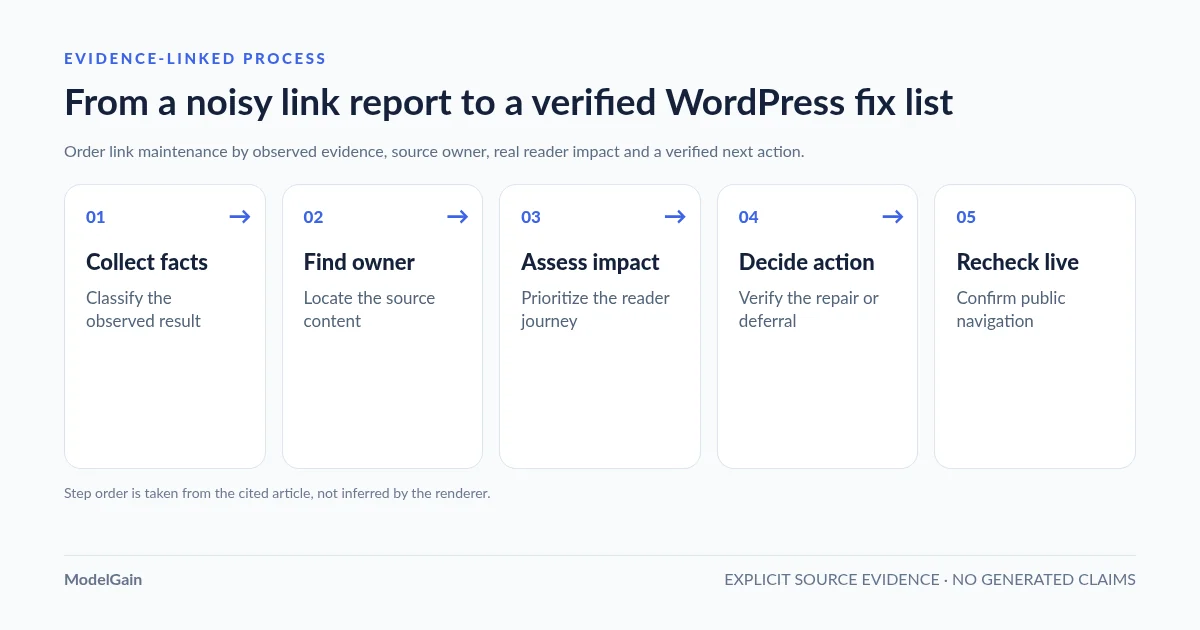
Collect evidence → Find source owners → Assess reader impact → Choose a verified action → Recheck the public result. Work from a small sample before scheduling site-wide changes.
- Collect evidence. Save the exact target URL, observed HTTP code, first-hop Location if present, last checked time and any browser verification. Separate hard not-found from authentication or network failures. A single automated result is not proof of what every visitor sees.
- Find source owners. Record the published WordPress post/page ID, editor or menu/template that actually emits each link. Deduplicate target checks without hiding the fact that one destination may have several independent source posts.
- Assess reader impact. Ask whether the source is prominent in navigation, on a high-use landing page, in a quote/contact/checkout step or in an essential guide. Use your own analytics and business knowledge only if verified and available; do not substitute guessed visitor counts or an invented page score.
- Choose a verified action. Update a source URL to a relevant new destination, fix a genuinely wrong internal route, retain an intentional link, remove an obsolete citation with appropriate context, or open a follow-up for uncertain evidence.
- Recheck the public result. Visit the source while logged out, click the corrected link, inspect the final content and status, and note the date and owner. Close the issue only when the user’s path—not merely a scanner badge—is correct.
Status codes: decide what is proven before assigning urgency
404 and 410: these are strong evidence that the requested URL was not found or has been removed. For a current internal link from an important source, investigate promptly. If an old URL is intentionally gone and nothing links to it, Google’s 404 guidance does not require a blanket redirect. Even a confirmed external 404 still needs editorial judgment about whether a new reference conveys the same information.
403, 429, 5xx and transport errors: these can arise from authentication, bot defenses, rate limits or transient infrastructure faults. They are often a verification task, not immediate authorization to delete a citation. For the concrete browser-versus-checker discrepancy, see our WordPress 403 false-positive guide.
301/308 versus 302/307 and other 3xx: a permanent redirect to the correct content is not inherently broken. Important internal links can point directly to the final page while preserving the old redirect for historical visitors. Temporary redirects may be intentional. HTTP 304 Not Modified is a cache-validation response, not a navigational move, even if a broad link-scanner UI groups all 3xx under Redirect. See the 301 link-update decision guide for a detailed status table.
A final 200 can still be the wrong outcome: a redirected citation may reach a homepage, error message or unrelated article. Check the page’s actual content against the surrounding source sentence. Google’s crawling-error guidance also explains soft-404 situations where successful-looking HTTP responses do not serve the promised resource.
Which source pages should you check first?
Review critical site navigation and actual user transactions first, then high-value pages and frequently used knowledge content, then lower-impact archives. For a B2B WordPress site, a wrong link to a request-for-quote page, technical specification, compliance document or current product category may interrupt a real commercial task. This is a practical user-experience judgment, not a Google-published priority weight.
Watch for shared sources. One broken URL in a global header, footer or reusable block may appear across many pages; it often has a single underlying owner. A source-aware audit should record both how many public pages expose a link (if a rendered crawl verifies it) and which editable component owns it. Neither count is supplied automatically by every WordPress link checker. For a step-by-step editor workflow, see how to find the exact WordPress post containing a broken URL.
Keep source owner and destination owner separate. Your WordPress editor, site administrator or template maintainer controls the link you publish. The destination’s publisher controls an external page, its permissions and its redirects. You can fix your outbound citation or contact that publisher, but you cannot directly repair its external server. For an internal destination on your own site, the source-content and destination-routing responsibilities may still belong to different editors or technical owners.
After a site migration, first separate website-wide permalink/rewrite failures from individual outdated links. A routing issue causing every post to 404 should be investigated at the server and permalink level, not queued as hundreds of content edits. Our post-migration internal-link audit covers this separate failure pattern and official old-to-new URL mapping guidance.
How to make a source-aware WordPress link report actionable
ModelGain Content Link Health Check is publicly distributed under the Upaccn Content Link Health Check plugin listing. In version 0.1.0, start a scan at Tools → Content Link Health and keep the administrator page open for its incremental batches. The plugin checks HTTP/HTTPS anchors in stored post_content from published public post types (excluding attachments), deduplicates destinations and associates results with source posts.
It uses conservative response labels: 404/410 under Broken; 3xx under Redirect; access restrictions, throttling and other uncertain failures under Retry. It does not calculate traffic impact, priority scores or SEO penalties, edit source posts, or create redirects. In v0.1.0 its results interface displays up to 100 URL result rows and previews up to five source references for each URL, with +N more for additional stored source owners. These interface limits mean the visible table is not an exhaustive export of every discovered URL or source when more exist. It also does not render arbitrary page-builder DOM or guarantee coverage of menus, custom fields or theme templates outside stored post bodies.
Use the plugin as the evidence and source-attribution layer, then add the judgment layer yourself: source-page importance, customer task interrupted, correct alternative, responsible editor and outcome confirmation. The plugin records its own local scan state but does not rewrite the actual article link content. If its status is inconclusive, manually recheck instead of bulk-editing.
A compact repair worklist you can actually maintain
For each actionable source-link reference, record the following fields. You can use a spreadsheet, issue tracker or content maintenance board; none requires building a new scoring platform.
| Field | Example or rule |
|---|---|
| Source owner | WordPress post ID, menu, builder template or shared footer; link to its editable record. |
| Target and evidence | Exact normalized URL, stored href variant, 404/301/429 etc., date and verification method. |
| Reader impact | Important navigation, product/quote journey, reference guide, or low-use archive; label as an editorial judgment. |
| Decision and replacement | Fix first / Verify first / Plan or defer, with a confirmed relevant destination if changing. |
| Owner and verification | Source editor/administrator versus target publisher or routing owner; public source URL, final result and recheck date. |
Example: if your product page links to a now-missing PDF specification, and a verified current specification exists, correcting that source may come before an old blog citation. If a third-party article returns 403 only to the checker, log it under Verify first. If a discontinued, unreferenced URL correctly returns 410, leave the server response intact. These are illustrative decisions, not measurements from ModelGain’s own users.
Avoid three expensive cleanup mistakes
- Blind replacement: do not swap every occurrence of a broken host for a homepage or an unverified substitute. One target may be used in different editorial contexts. Google’s site-move guidance warns that redirecting many unrelated pages to a generic homepage can be treated as a soft 404.
- Fixing a count instead of a cause: a shared template may emit one broken link on hundreds of URLs. Fix the source component once where appropriate, but verify its public appearances.
- Confusing scan state with reader success: a clean report can miss rendered templates or show a first-hop 301 without evaluating its final content. Check the real user journey before closing a high-priority item.
Two real WordPress.org support reports illustrate the verification problem. In “Useful but annoyingly inaccurate”, a user estimated that roughly 90% of reported link failures were actually accessible links blocked by a “Forbidden” response; that is the reviewer’s estimate, not an independently verified error rate. Another support thread about a sudden increase in 403/415 reports describes destination links that opened normally in a browser. These individual reports, not controlled studies, illustrate why automated errors need source-context and manual verification before deletion.
Frequently asked questions
Do I need to fix every broken link for SEO?
No. Google explicitly says many 404s do not need fixing. Focus on the links visitors actually encounter in important content and navigational paths, and preserve legitimate 404/410 responses for removed content without a replacement.
Are broken internal links more urgent than external ones?
Often, when the internal link is on a critical current page and its target is truly wrong, because you control both sides and can fix the journey directly. But an external reference in a compliance-critical document could outrank a minor internal archive link. Prioritize by verified reader impact, not just internal versus external.
Should an HTTP 403 or 429 be in the fix-now queue?
Not without more evidence. Authentication, bot filtering and rate limiting can make working links appear inaccessible to automated requests. Verify the page’s public behavior and whether it fulfills the source text before deciding.
What if the same failed URL appears in many WordPress posts?
Identify every unique source owner and review the reference in its actual context. Deduplicating network checks saves work but does not mean there is only one content edit. With a shared template, many rendered appearances may come from one editor-level owner.
Does ModelGain automatically assign a priority score or fix links?
No. Upaccn Content Link Health Check v0.1.0 is a diagnostic utility. It checks stored content links and records source references, but does not know traffic, revenue impact or a confirmed replacement and does not auto-edit posts. The queues in this article are a human review framework, not a product feature.
Evidence and further reading
- Google Search Console: many 404 URLs do not need fixing.
- Google Search Central: crawling errors, genuine removal and soft 404.
- Google Search Central: internal link updates and relevant redirect mapping.
- WordPress.org: product scope and status classifications for Upaccn Content Link Health Check.
- WordPress.org: reader-reported 403 false positives.
- WordPress.org support: reported 403/415 scanner discrepancies.