WORDPRESS
IndexNow Key URL Redirects to Homepage: Fix the Wrong Response
IndexNow key URL redirects to your WordPress homepage? Trace HTTP 301/302, detect 200 HTML fallbacks, and fix the offending route or cache safely.
Does your IndexNow key URL open the WordPress homepage instead of the key? Inspect the redirect chain and response body before changing the key or your SEO plugin.
This is not the same failure as an IndexNow key file returning 404. You may see a visible 301 or 302 redirect to /, or the key URL may return 200 OK while silently serving homepage HTML. In either case, the public response does not contain the plain-text ownership key the IndexNow sender expects. A successful-looking browser tab or final HTTP 200 is not a verification test.
Rank Math describes this exact symptom in its IndexNow documentation: its Check Key address may open the homepage or a 404 page instead of the dynamically hosted text key. The failure is real, but the responsible layer varies by site. The following workflow distinguishes a redirect rule, WordPress fallback, canonical-host rewrite and cache without disabling security controls.
The diagnostic sequence is: copy the sender’s actual key URL → record the first GET response → follow the chain separately → inspect the final body → correct only the responsible route. All inspection steps are read-only.
Trace a key URL that serves the homepage
Applies when: Your IndexNow key address redirects to the homepage or returns homepage HTML instead of the required verification text.
Quick answer
Check the first HTTP response without following redirects, then inspect the full redirect chain and final response body. A 200 homepage is not a valid key-file response. Fix the routing layer that substitutes HTML, not the key value by default.
What to do
-
Request the exact advertised key URL anonymously without automatically following redirects; capture status and Location header.
-
Follow redirects separately and check whether the body contains the expected key text rather than an HTML page.
-
Check CDN, server redirects, caching and WordPress rewrites one layer at a time before making a reversible correction.
Which redirect pattern appears?
All paths are listed below. Select a symptom to focus on the most relevant path.
Identify the explicit redirect
Inspect the first Location header and the component issuing it. Restrict any correction to the exact key path and validate host consistency.
Investigate rewrite or application fallback
A 200 status with homepage markup may be a catch-all route, host mapping issue or cached substitute. Compare the response body with the expected plaintext key.
Follow the missing-route path
Check whether a real file or WordPress virtual route should serve the key. A genuine 404 needs a different diagnosis.
Did this help?
What a valid key response looks like
The IndexNow protocol requires a publicly accessible UTF-8 text file containing the ownership key. It can be a physical file or an equivalent publicly served plain-text response. The key’s location, host and, for a custom non-root location, directory scope must agree with the submission.
| Request result | What it actually tells you | Next step |
|---|---|---|
301/302 to https://example.com/ |
A redirect rule intercepted the key path. | Read Location and identify the rule owner. |
200 at the original key URL, body begins <!doctype html> |
A front controller or cached page supplied HTML at the wrong path. | Inspect the response body, public routing and origin/cache difference. |
301 from HTTP to HTTPS or non-www to www, final body is the key |
Canonicalization may be involved; the final content is at least correct. | Verify that the sender advertises the intended host and key location. Avoid assuming all IndexNow validators treat redirects identically. |
200 directly, body is exactly the sender’s key |
The public key route passes the local content check. | Investigate the IndexNow API request only if submission still fails. |
Step 1: copy the URL your IndexNow integration really sends
In Rank Math, open Rank Math SEO → Instant Indexing → Settings → Check Key. The location may vary with plugin version. Copy the complete URL from the link. Other SEO plugins, standalone IndexNow plugins or hosting integrations may use their own keys and endpoints: don’t assume that a guessed /indexnow.txt or a file seen on disk is the sender’s key.
Also record whether the site publishes at https://example.com/ or https://www.example.com/. For WordPress installed in a subdirectory, its siteurl and public home addresses may legitimately differ. The verifier needs to fetch the location corresponding to the public host being submitted, not an incidental admin or origin address.
Step 2: test the first HTTP GET without following redirects
Run these commands from a machine outside the site. Replace the placeholder with the exact address copied from the sender. The commands only request a public URL and write diagnostic files to your own machine.
KEY_URL='https://example.com/YOUR-KEY.txt'

curl --silent --show-error --max-time 20
  --dump-header /tmp/indexnow-first.headers
  --output /tmp/indexnow-first.body
  "$KEY_URL"

grep -iE '^(HTTP/|location:|content-type:|cache-control:|server:)'
  /tmp/indexnow-first.headers
The initial status and Location identify a real HTTP redirect. If the response is 200 with no Location header but the body contains a website page, you are looking at a fallback or rewrite to the homepage without an external redirect. Those are different incidents and require different fixes. Avoid diagnosing with curl -I alone; HEAD and GET need not invoke exactly the same WordPress or proxy behavior.
Step 3: follow the chain, then inspect what was served
Request the same URL with redirect-following enabled, but capture the final destination and save the response body. Do not trust the displayed browser page as a substitute for this measurement.
curl --silent --show-error --max-time 20 --location
  --max-redirs 5
  --output /tmp/indexnow-final.body
  --write-out 'final_status=%{http_code}nfinal_url=%{url_effective}ncontent_type=%{content_type}nredirects=%{num_redirects}n'
  "$KEY_URL"

# Inspect only the beginning of the body. It should be key text, not HTML.
head -c 120 /tmp/indexnow-final.body; printf 'n'
Keep the actual key out of public screenshots and support tickets. The example prints a small part of the body locally to make HTML fallbacks obvious; do not paste the output into a shared log. For a definitive equality check, compare the downloaded body with the expected key locally using your sender’s current value, taking care of file encoding and incidental line endings. An HTML page with 200 OK is not an acceptable key response.
If a redirect leads to a different host, confirm that the sender’s configured key, host and optional keyLocation describe the same ownership context. The protocol explicitly ties keys to a host and, for non-root locations, to a directory scope; our keyLocation directory-scope guide shows which submitted paths remain eligible. The protocol does not promise that every verifier will accept arbitrary redirect chains, so a direct and stable key endpoint is preferable.
Step 4: locate the layer responsible for the homepage response
Use the evidence you collected to select one investigation path, rather than changing WordPress, hosting and CDN configuration simultaneously.
A. Explicit 301 or 302 to the homepage
Inspect the exact redirect source rule in your WordPress redirection plugin, hosting panel and web-server configuration. Check whether an overbroad rule redirects unknown URLs, all .txt requests or everything unmatched to /. Rank Math has a redirect tracing guide for rules it manages, but it cannot identify an unrelated Nginx, CDN or hosting rule. Check the server’s redirect logs and the specific rule ID where available before editing anything.
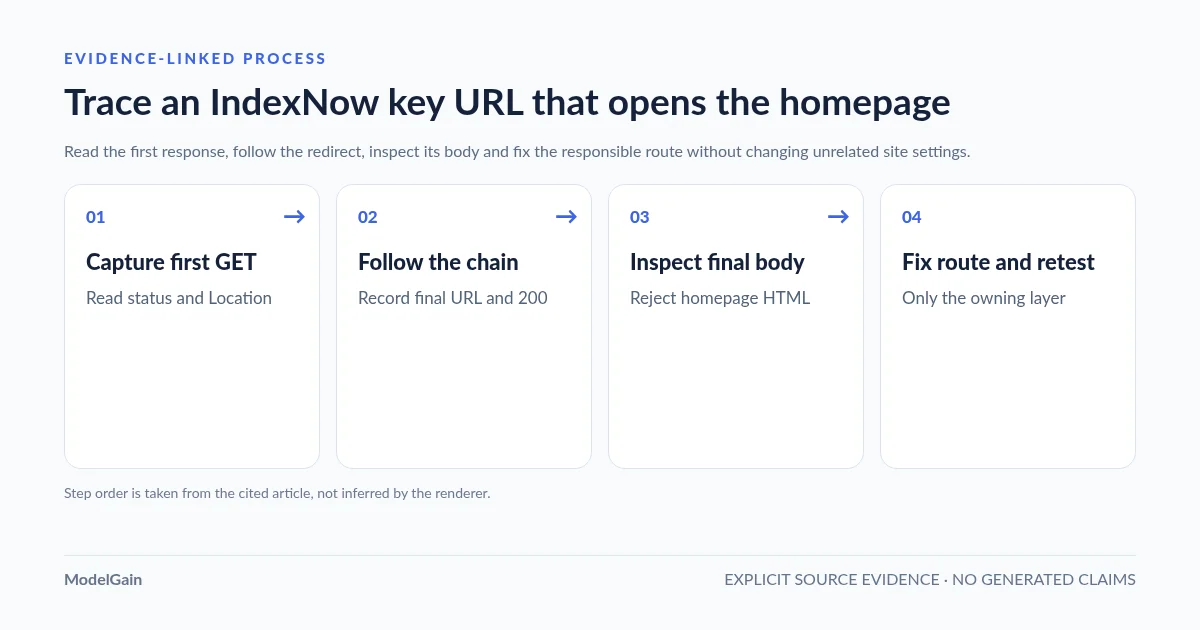
Do not delete sitewide canonical redirects merely because this one path fails. Exempt or correctly serve the precise key route, retain unrelated redirects, then rerun the same read-only GET test.
B. HTTP 200 with HTML at the original .txt URL
This may be an internal rewrite or WordPress front-controller fallback rather than a visible redirect. Check whether the key request reaches the intended plugin handler, or whether a template, custom 404-to-homepage behavior or application proxy intercepts it first. Rank Math documents dynamic key hosting; the absence of a physical file does not prove its route is broken. A server-side catch-all can turn a missing .txt path into a homepage response.
Use wp option get home, wp option get siteurl and wp plugin list for read-only context if you control the WordPress site. Inspect rewrite rules only when that particular key integration depends on WordPress rewrite rules. Saving Settings → Permalinks mutates routing state and is not a universal fix; first identify that dependency and preserve a recovery path.
C. Public CDN response differs from the origin
A cached 301, HTML response or security challenge can remain publicly visible after origin routing is corrected. Compare the public response headers and a controlled origin-only fetch if your infrastructure permits it without bypassing necessary access controls. After proving the origin is correct, invalidate only the affected key URL at the relevant cache layer, then retest the normal public URL without a cache-busting parameter. Avoid flushing every page cache or disabling the entire WAF.
D. Correct key body exists, but the sender points somewhere else
The issue may be the sender’s public address rather than routing. Compare the actual request fields to the final verified key URL, especially www, HTTPS and keyLocation. For a non-root key, the documented path scope limits which URLs it can authorize. Fix the sender’s location or place its own key where the integration expects it; do not create a second unrelated key.
Should you upload a physical key file?
Only when your active integration and the hosting layout support that fix. Rank Math explicitly suggests placing [your_api_key].txt with the matching key text at the public website root if its generated key URL opens the homepage or a 404 page. This is a documented fallback for Rank Math, not a required first step for every plugin. If a higher-priority redirect intercepts all .txt requests, uploading a file alone may still fail. Verify the correct public document root, use UTF-8 text, and test the response after deploying the file.
If you see a genuine 404 rather than a redirect or HTML fallback, use our dedicated IndexNow key file 404 guide. It covers the physical-file versus virtual-handler distinction without changing the site blindly.
Retest the key route before testing a submission
After a targeted fix, verify the exact advertised key-file URL again. Require a public HTTP 200 with the expected key text at the correct host and applicable path scope. Then, if necessary, submit one actually changed URL through the existing integration and inspect the IndexNow API response.
The protocol defines endpoint 200 as accepted submission, 202 as received while ownership verification is pending, 403 as a failed ownership-key check and 422 as a URL, host or key-location mismatch. Those are remote API responses, not the HTTP status of your public key URL. If the key file returns plain text but verification still fails, use our key content mismatch checklist; for a broader endpoint failure, follow the IndexNow 403 troubleshooting workflow. Neither 200 nor 202 guarantees crawling, indexing or rankings.
Use an independent diagnostic route when two plugins disagree
Upaccn Health Check for IndexNow is a separate WordPress diagnostic utility, also listed on WordPress.org. It serves and checks its own public key route, so you can test whether ordinary WordPress public routing works independently of your SEO plugin. It does not access, rewrite or repair Rank Math’s key, and it does not replace your automatic IndexNow sender. Its optional live submission is administrator-triggered and limited to a controlled homepage notification after prerequisites pass.
If the independent key route returns plain text but Rank Math’s key returns homepage HTML, focus on the Rank Math-specific path or its intercepting rule. If both routes return the homepage, check shared WordPress, web-server and caching layers. This comparison narrows the fault boundary; it is not proof of which product introduced the problem.
FAQ
Why does my IndexNow key URL show 200 OK when the key is not working?
HTTP 200 only describes the response status. An application can serve its homepage HTML at any URL. Verify the body and final destination: the response must contain the expected key text, not a page template.
Is a normal HTTP-to-HTTPS redirect always an IndexNow failure?
No universal rule can be inferred from seeing a single 301. Check the final host, status and body, then test the actual IndexNow submission response. Since the protocol requires the search engine to fetch a key from the declared location, prefer a directly reachable, stable location rather than relying on multiple redirects.
Should I regenerate the IndexNow key when it redirects to the homepage?
Not before checking the route. Generating a new key changes the value or file path but may leave an overbroad redirect or HTML fallback untouched. Fix the public response first; rotate a key only for a separately established reason.
Can I just disable my SEO plugin or Cloudflare?
Broad deactivation changes multiple variables and can disrupt unrelated site functionality. First inspect the single request’s response, the configured key route and its redirect/cache owner. Make the smallest reversible change and retest that path.
References
- IndexNow protocol: key verification, keyLocation and API statuses.
- Rank Math: dynamic key hosting, Check Key and homepage/404 fallback.
- Rank Math: tracing redirect rules owned by the plugin.
- WordPress.org: independent IndexNow health-check plugin and its limits.
- ModelGain: the separate 404 failure mode.