WORDPRESS
IndexNow Key File Returns 404 in WordPress: Diagnose the Public URL
IndexNow key file returning 404? Check the public key URL and its GET response before rotating keys or resubmitting URLs.
IndexNow key file returning 404? Check the public key URL and its GET response before rotating keys or resubmitting URLs.
A WordPress plugin may store the verification key in the database and serve /YOUR-KEY.txt through a virtual route, so a missing physical file is not necessarily an error. What matters is whether an anonymous HTTP GET to the exact key URL advertised by your active IndexNow sender returns HTTP 200 and the expected key text.
Rank Math explicitly documents the case where its Check Key link opens a 404 page or the homepage. A separate WordPress.org support discussion reports a generated key URL consistently returning 404 in both a browser and Wget. These are observed symptoms, not evidence that every affected installation needs the same fix. This guide helps you identify which layer owns the broken route before making changes.
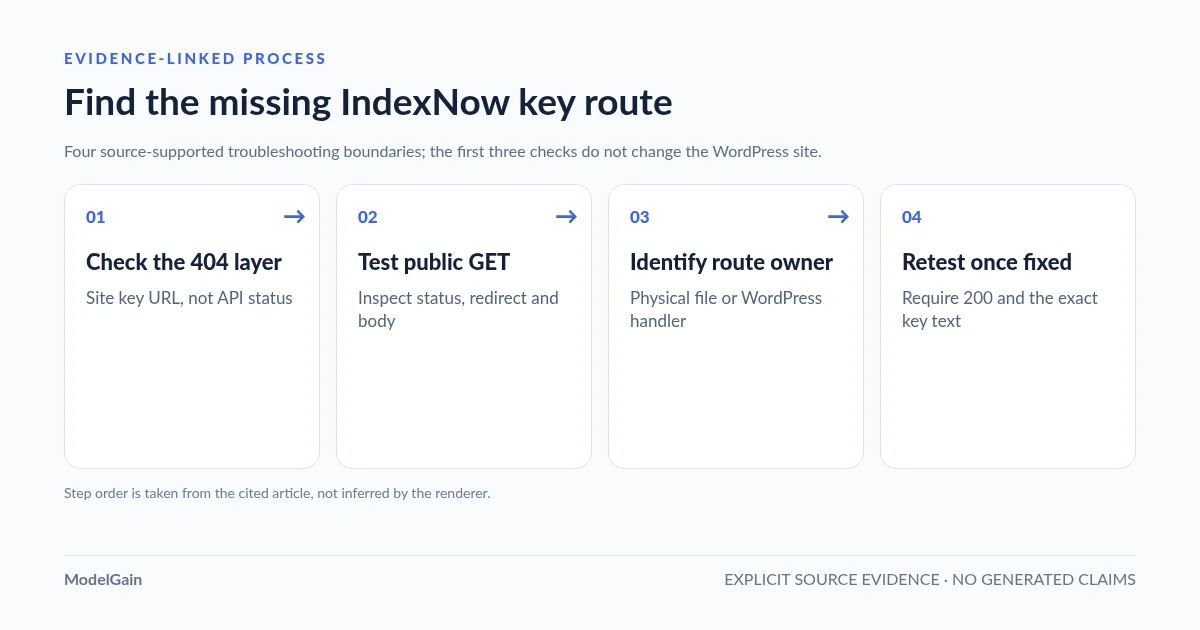
Use this diagnostic sequence: copy the actual key URL → fetch its public GET response → identify its physical or virtual owner → retest only the corrected route. You can complete the first three checks without making any change to the site.
Find why the IndexNow key URL returns 404
Applies when: The exact public key-file URL configured by your WordPress IndexNow sender returns an HTTP 404.
Quick answer
Check which integration is serving the key URL and whether it uses a real TXT file or a virtual WordPress route. Test the exact advertised address as an anonymous GET before uploading a replacement or resetting permalinks. An IndexNow API 404 is a separate request.
What to do
-
Use the active SEO or IndexNow plugin's configured key path rather than guessing a filename.
-
Check response status, final URL and content using an unauthenticated GET request.
-
Check the physical document root, WordPress virtual handler, rewrites or host mapping according to how the integration publishes its key.
What response do you actually receive?
All paths are listed below. Select a symptom to focus on the most relevant path.
Check a missing or unreachable route
Inspect the exact route owner and web-server/WordPress rewrite behavior before deciding whether to restore a physical file or virtual handler.
Trace redirects and catch-all rewriting
A homepage response can result from a redirect or fallback rather than a missing key. Inspect the redirect chain and body.
Compare the content, not just HTTP status
A readable 200 response is insufficient if its text does not match the sender's active key.
Did this help?
Quick diagnosis: a 404 at the key URL is not an IndexNow API 404
| Observed result | Most useful hypothesis | Next read-only check |
|---|---|---|
GET /YOUR-KEY.txt returns 404 |
The public key route does not resolve to the expected file or virtual handler. | Confirm exact key URL, host, WordPress route, hosting document root, and rewrite behavior. |
| Key URL returns 200 with the homepage HTML | A catch-all rewrite, redirect, or fallback may be substituting the page. | Read the response body and inspect the final URL; do not treat HTTP 200 alone as success. |
| Key URL redirects from one host to another | Canonical host, CDN or redirect rules may change which key file is fetched. | Compare the initially advertised address with the final location and configured sender host. |
| Key URL returns 403 or a bot challenge | Security or access control may block verification, which is a different problem from 404. | Inspect exact origin/WAF logs; do not broadly disable the firewall. |
| Key returns 200 and matching text, but IndexNow submission returns 403 | The endpoint might be checking a different key, host or keyLocation. |
Inspect the actual submission fields; follow the IndexNow 403 troubleshooting guide. |
Step 1: copy the actual key URL from the sending plugin
Get the key-file address from the active IndexNow integration, rather than guessing a filename from your domain. In Rank Math SEO, go to Rank Math SEO → Instant Indexing → Settings → Check Key (labels and placement can vary with plugin version). Rank Math says it normally generates and serves the key dynamically; the Check Key button opens the actual location. Other IndexNow plugins and hosting integrations may publish a different route, and multiple senders on one WordPress site may use different keys.
Record the intended public URL, exact hostname (including www if present), response status, and the actual keyLocation used in the outgoing submission, if any. A conventional root key may omit keyLocation; a non-root key must declare its location, and that location’s host and directory scope must cover the submitted URLs. Do not assume home_url() and site_url() have the same path: WordPress can be installed in a subdirectory while the public website is at the host root. See the IndexNow protocol specification.
Step 2: verify the public GET response, including its body
Test the URL as an unauthenticated visitor, not through a WordPress admin session. In a terminal, replace the example URL with the key-file URL copied from your actual plugin:
curl --silent --show-error --dump-header - --output /dev/null
  'https://example.com/YOUR-KEY.txt'

curl --silent --show-error
  'https://example.com/YOUR-KEY.txt'
The first command prints the response headers without following redirects; the second prints the body. A successful verification route should return an HTTP 200 response whose body consists of the key text expected by the sender, not a WordPress 404 template, an HTML document, a sign-in form, or a CDN challenge page. The publicly reachable IndexNow key is an ownership-verification value, not a WordPress password; it is still sensible to omit unnecessary key values from support reports.
Do not rely solely on curl -I or a HEAD request. Some WordPress and proxy routes handle HEAD differently from GET. If the request redirects, inspect the Location header, then test the redirect target separately. A URL that ends at the homepage and returns HTTP 200 is still an invalid key-file response if its body is HTML instead of the expected key.
Step 3: determine whether the key should be a real file or a virtual route
Identify how the specific plugin is supposed to serve its key before uploading anything. There are two legitimate implementation patterns:
| Implementation | Expected behavior | Where a 404 can arise |
|---|---|---|
| Physical UTF-8 text file | A file named exactly YOUR-KEY.txt exists at the correct public document-root path and contains the key. |
Wrong upload directory, filename/case, missing deploy asset, or public server not serving that path. |
| Virtual WordPress key route | The plugin registers a route or handler that serves the same plain-text key to public requests; no physical file is required. | Plugin not active, plugin-specific handler failing, rewrite issue where applicable, routing intercepted by web server/CDN, or handler never reached. |
In its IndexNow guide, Rank Math explains that the WordPress installation serves the key dynamically; its documented fallback for a key URL opening the homepage or 404 page is manually placing [your_api_key].txt in the website root. Its dedicated verification guide also covers key accessibility. The physical-file fallback is plugin-specific guidance, not a reason to create files for every IndexNow integration or to replace a working virtual route.
Step 4: inspect WordPress routes without changing the site
If your plugin uses a virtual route, first confirm its installation and public URL configuration. In WordPress, check that the submitting plugin’s relevant IndexNow feature is active. Review Settings → Permalinks and the site’s public address. If authorized WP-CLI access is available, these commands only read current values:
wp option get home
wp option get siteurl
wp option get permalink_structure
wp plugin list --fields=name,status,version --format=table
wp rewrite list --format=table
The rewrite table can help an experienced operator inspect patterns, but virtual key URLs may also be implemented using template_redirect or web-server handlers without a dedicated rewrite rule; the absence of an obvious row is not proof of a broken plugin. A CDN can also return a cached 404 even when the origin would return 200. Check public response headers and, when available, a controlled comparison against the origin. Do not expose the server or weaken access controls just to perform that comparison.
A permalink resave changes routing state, and only helps when the specific plugin relies on rewrite rules. Some plugins recommend visiting Settings → Permalinks → Save Changes to refresh those rules. It will not repair a broken template_redirect handler, a missing physical file or a CDN-cached response. If plugin-specific evidence supports a rewrite issue, use a controlled write with backup and recovery path, then verify the key URL and other important routes. Do not reflexively run wp rewrite flush --hard or replace the site’s Nginx/Apache configuration.
Step 5: fix the observed failure, not every possible component
Choose the smallest corrective action supported by your evidence:
- Incorrect key URL or hostname: correct the sender’s configured public host or key location. Confirm whether the request is for
wwwor non-www; avoid creating redirects that hide a bad key URL. - Physical-file mode with a genuine missing file: place the exact UTF-8 key text at the documented public document root using the sender’s own key. Do not put it in
wp-admin, an arbitrary WordPress install folder, or a private storage directory. - Virtual-route mode with a missing rewrite/handler: confirm the plugin is active and determine its actual implementation. Only consider a controlled permalink resave when the vendor documents a rewrite-rule dependency; otherwise investigate the plugin handler and the public server path.
- Cached HTML or 404: invalidate only the affected key URL after the origin has been repaired; test the public address again without a cache-busting query string.
- Wrong body despite HTTP 200: check whether another plugin, fallback page, security product or stale cache is supplying content instead of the current expected key.
Do not rotate a key to fix an unproven 404: it changes the filename or verification value and can make the mismatch harder to diagnose. Likewise, do not disable your CDN, firewall or all redirect rules as a first response. If an anonymous GET returns 403 or a challenge instead of 404, follow our security-plugin and WAF key-URL diagnostic guide to identify the actual blocking layer. Each of those broad actions changes a wider security and availability boundary than the failing key route.
Retest and distinguish 200, 202 and 403
After correction, verify the exact advertised key-file URL again: HTTP 200 + correct key body + correct public host and applicable path scope. A corrected key route must return HTTP 200 with the correct key body and applicable public hostname. Then use the existing submission plugin for one URL that was actually added, updated or deleted; don’t send repeated bulk submissions merely to test the connection.
The IndexNow endpoint defines 200 as successful receipt, 202 as received with key validation pending, and 403 as failed key validation. It also distinguishes 400 (malformed request), 422 (invalid URL/host or key schema relationship) and 429 (rate limiting). These are codes from the remote submission endpoint, not your site’s key-file route. For endpoint errors rather than a local 404, follow the IndexNow API response troubleshooting guide. Successful receipt does not guarantee crawling or indexing.
Independent diagnostics: what the plugin can and cannot prove
Upaccn Health Check for IndexNow is a separate diagnostic WordPress plugin available through WordPress.org. It can test its own plugin-created public key route and check basic indexability signals; only after an explicit administrator action and successful key-route, homepage and visibility prerequisites will it send one controlled diagnostic notification for the homepage. Opening the dashboard does not send a test.
It does not read or fix Rank Math’s key. If the independent key route works but Rank Math’s key URL returns 404, that points the investigation toward the sender-specific key/routing configuration; it does not establish a defect in Rank Math. Conversely, if both independent key routes are inaccessible, inspect the shared hosting/proxy path. The plugin does not replace your site’s normal IndexNow sender, automatically repair rewrite rules, or guarantee indexing.
FAQ
Why is there no YOUR-KEY.txt file in the WordPress root?
Your SEO plugin may generate the public text response dynamically. A physical file is unnecessary if the actual key route returns the expected text to unauthenticated GET requests. Follow that plugin’s documentation rather than creating a duplicate file blindly.
My IndexNow key URL redirects to the homepage. Is that fixed because the response says 200?
No. An HTML homepage is not the required plain-text key content. Inspect redirects, rewrite fallbacks and caching, then fix the path that should serve the key. Follow the homepage redirect and HTML response guide for a targeted check; if the URL serves the key but validation still fails, use the key content mismatch checklist.
Will changing WordPress permalinks resolve the key-file 404?
Only if your plugin uses WordPress rewrite rules might a controlled permalink resave help. It cannot repair an unrelated handler, a missing physical file, a wrong public host, or a CDN-cached error. Do not change permalink structure just to test it. Verify the specific plugin’s route first and recheck affected routes after any write.
Does IndexNow key-file HTTP 404 mean my post itself is missing or deindexed?
No. The key URL proves host ownership for IndexNow submissions; it is separate from a page’s canonical URL and indexing status. Test the actual page independently, and consult the search engine’s webmaster tools for crawl and index data.
References and real support evidence
- IndexNow documentation: ownership keys, file placement and keyLocation scope.
- IndexNow FAQ: key-file validation and troubleshooting.
- Rank Math: Check Key, dynamic key routing and documented 404 fallback.
- WordPress.org support: generated IndexNow key URL returns 404.
- ModelGain: distinguish an IndexNow API 403 from a site-owned key route failure.