WORDPRESS
PHP Compatibility Checker Is No Longer Maintained: What to Use Instead
WP Engine's PHP Compatibility Checker is unmaintained and stops at PHP 8.0. Compare maintained ways to check WordPress plugins for PHP 8.3 to 8.5.
FREE WORDPRESS PLUGIN
PHP Upgrade Risk Audit
Before switching PHP, scan installed plugins and themes for known PHP 8 compatibility risks—without changing your server runtime.
- Install the plugin
- Choose your target PHP version
- Review the scan findings
Read-only risk scan, not a repair. If your site is down, restore access first. Test on staging; the official WordPress.org URL remains unchanged after the brand update.
Short answer: WP Engine’s PHP Compatibility Checker now opens its WordPress.org listing with a notice that it is no longer actively maintained and that no further releases, including security releases, are planned. If you need to check plugins and themes before moving a site to PHP 8.3, 8.4 or 8.5, use a tool that is still maintained, scans the PHP version you are actually moving to, and can read the code you really run, including premium and custom plugins.
This guide compares the realistic options, explains what each one can and cannot tell you, and gives a short process you can follow today. It is written by the team behind one of the options, so the comparison sticks to facts each project publishes about itself.
Pick a PHP compatibility check
Applies when: You used, or were told to use, PHP Compatibility Checker and need to check a WordPress site before a PHP 8.x upgrade.
Quick answer
Use a maintained scanner that targets the PHP version you are moving to and can read all the code you run. Then confirm the result on staging; a static scan is evidence, not a guarantee.
What to do
-
Note the PHP version WordPress uses now (Site Health, Info, Server) and the version your host will enable.
-
Include premium, custom and inactive plugins you might re-enable, not only WordPress.org plugins.
-
Update, replace or fix Blocked components, review warnings, then switch PHP on staging before production.
Which describes your setup?
All paths are listed below. Select a symptom to focus on the most relevant path.
Scan inside WordPress
A scanner that runs in WordPress needs no exec(), Composer or upload. PHP Upgrade Risk Audit checks PHP 8.0 to 8.5 targets, including premium and custom plugins, and shows file and line for each finding.
Run PHPCompatibilityWP directly
Install the PHPCompatibilityWP ruleset with Composer and run PHP_CodeSniffer against a copy of wp-content with your target testVersion. Check which ruleset version you install, because newer PHP 8.x checks are in the 3.0 pre-releases.
Keep the audit current
Run the free scan first. If you look after client sites, the optional Pro add-on re-scans on a schedule, keeps history, emails you once when a component newly becomes Blocked and adds a WP-CLI check that can stop a deployment.
Did this help?
What changed with PHP Compatibility Checker
PHP Compatibility Checker was for years the default answer to “how do I check my WordPress plugins for PHP 8?”. It still has around 200,000 active installations. Its own WordPress.org page, read on 22 November 2026, states:
- it is no longer actively maintained, and no additional releases, including security releases, will be made;
- since version 1.6.0, scans no longer run on your server: results come from Tide, a remote service, and plugins or themes that are not on WordPress.org are skipped;
- the
phpcompatWP-CLI command was removed in 1.6.0; - the description promotes checks “up to PHP 8.0”, and the listing says it was tested up to WordPress 6.4, while the current WordPress release is 7.1.
None of this means the plugin will break your site. It means the answers it gives are limited to code that Tide has scanned, to the PHP versions it knows about, and to a project that will not receive fixes. For a decision such as “can we switch this client site to PHP 8.4 next week?”, those limits matter.
What a replacement needs to do
Before comparing tools, it helps to be precise about the job:
- Target the PHP version you will run. Hosts are moving sites from PHP 7.4 and 8.1 to 8.3 and later. Functions such as
each()andcreate_function()were removed in PHP 8.0, and later releases deprecate more behaviour. A check that stops at 8.0 misses later changes. - Read every component you run. Premium plugins, a custom theme and an agency’s in-house plugin are exactly the code nobody else has scanned.
- Work on ordinary hosting. Many managed hosts disable
exec()and give no shell, so a tool that needs Composer or the command line cannot run there. - Explain each finding. File, line and rule let you decide whether to update, replace or fix a component.
- Be honest about limits. Static analysis finds known incompatible patterns; it does not execute your site. You still test on staging.
Your realistic options
1. Keep using PHP Compatibility Checker
Reasonable only for a quick, rough look at a site that uses WordPress.org plugins exclusively and targets PHP 8.0. Treat the result as a hint, not as evidence for a newer PHP version, and expect no fixes if something goes wrong.
2. Run PHPCompatibilityWP yourself
The scanner most WordPress compatibility tools build on is the open source PHPCompatibilityWP ruleset for PHP_CodeSniffer. If you have a development machine or CI, you can install it with Composer and run it against a copy of wp-content with a target such as testVersion 8.4-. Newer PHP 8.x checks live in the 3.0 pre-release line (3.0.0-alpha3 at the time of writing), so check which version you install. This route is free, scriptable and precise, and it is the right choice for developers who already work this way. It is not practical for a site owner on managed hosting, and you need to read raw sniff output and separate bundled vendor/ libraries yourself.
3. Scan inside WordPress with PHP Upgrade Risk Audit
ModelGain PHP Upgrade Risk Audit is a free WordPress.org plugin built for this exact decision. It bundles a PHPCompatibility-based scanner and runs it inside WordPress, so it works without shell access, Composer or uploading your code anywhere. In version 1.0.1:
- you choose a target from PHP 8.0 to 8.5; the site itself can keep running PHP 7.4 or later while you scan;
- any readable plugin or theme can be scanned, including premium and custom ones, because the code never leaves your server;
- each component gets Ready, Review, Blocked or Incomplete, with file, line, rule and message for every finding, and findings in bundled
vendor/code labelled separately; - scans run in small batches, so large plugins do not hit a request timeout;
- the last report stays on the site and exports to CSV or JSON for a client or a ticket;
- it is read-only: it never edits code and never changes your PHP version.
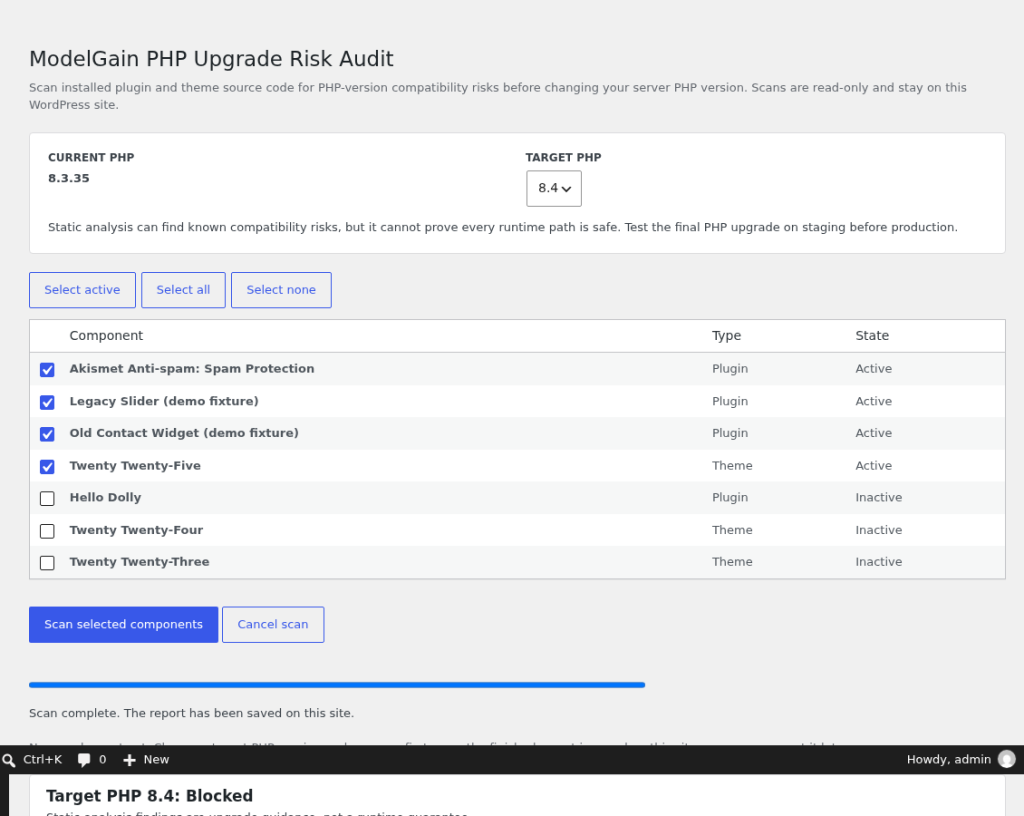
Like every static checker, it cannot run every code path, so a Ready result is evidence for your decision, not a guarantee. The PHP 8 upgrade checklist shows how to combine a scan with a staging test.
Side-by-side
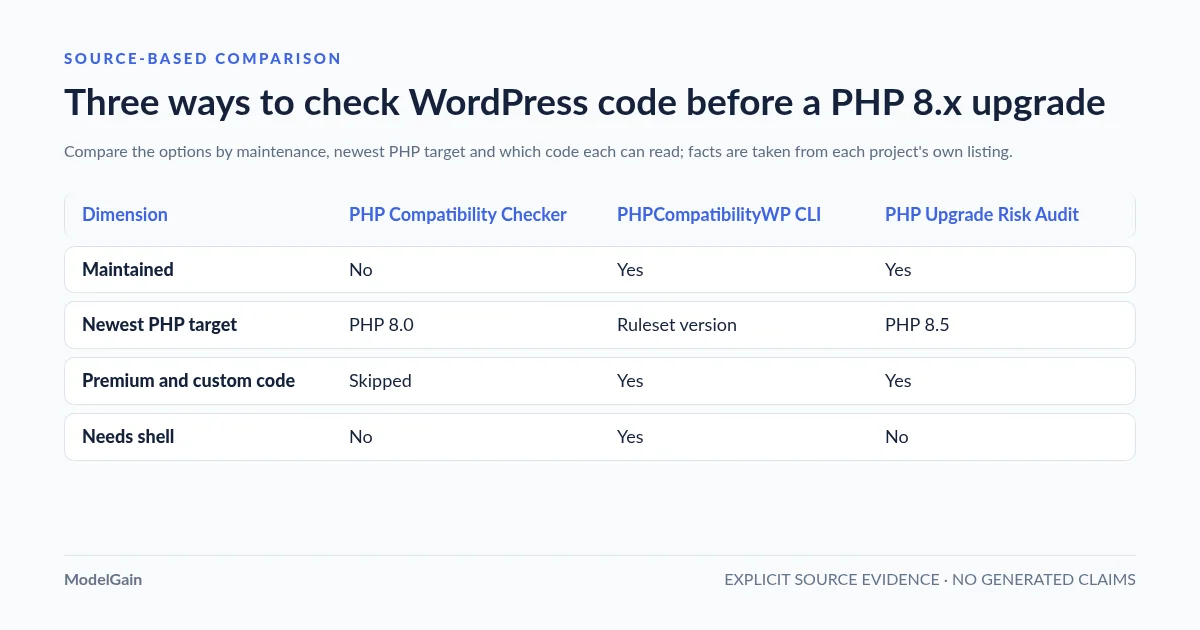
| PHP Compatibility Checker | PHPCompatibilityWP (CLI) | PHP Upgrade Risk Audit | |
|---|---|---|---|
| Maintained | No, per its listing | Yes, open source project | Yes, 1.0.1 released November 2026 |
| Newest PHP target | PHP 8.0 (as advertised) | Depends on the ruleset version you install | PHP 8.5 |
| Premium and custom plugins | Skipped (Tide covers WordPress.org only) | Yes | Yes |
| Where code is analysed | Remote Tide results | Your machine or CI | Your WordPress server |
| Needs shell or Composer | No | Yes | No |
| WP-CLI | Removed in 1.6.0 | Native CLI | In the Pro add-on |
| Price | Free | Free | Free; optional Pro add-on |
A five-step process for your next PHP upgrade
- Note the PHP version WordPress actually uses in Tools → Site Health → Info → Server, and the version your host plans to enable.
- Install PHP Upgrade Risk Audit from WordPress.org and open Tools → ModelGain PHP Upgrade Risk Audit.
- Choose that target version and scan your active plugins and theme, then any inactive ones you might re-enable.
- For each Blocked component, update it, replace it or send the file and line to its developer. Read Review findings before deciding.
- Switch PHP on a staging copy first, test logins, forms, checkout and scheduled jobs, then switch production with a rollback plan.
When the Pro add-on is worth it
One scan answers “can we upgrade today?”. Sites keep changing, though: plugins update, a client installs something new, and the host announces the next deadline. The optional Pro add-on, for people who look after client sites or several sites, keeps the audit current:
- scheduled daily or weekly background re-scans for your target PHP version;
- scan history (last 20 scans) with a comparison to the previous scan;
- one email when a component newly becomes Blocked (or Review, if you choose), with no repeat emails while nothing changes;
- WP-CLI, for example
wp modelgain-pua scan --target=8.4 --fail-on=blocked, which exits with an error so a deployment can stop.
Pro costs $19.99 per year or $29.99 once for lifetime use, per site, and requires the free plugin. The free plugin has no scan limits without it. Details and checkout are on the PHP Upgrade Risk Audit product page.
Summary
PHP Compatibility Checker was useful in the PHP 7 era, but by its own description it is unmaintained, stops at PHP 8.0 and skips code that is not on WordPress.org. Developers with a CLI workflow can run PHPCompatibilityWP directly. Everyone else can run a maintained scanner inside WordPress, check the exact PHP version their host is moving to, and confirm the result on staging before switching.