WORDPRESS
Broken Link Checker for WordPress: Local Scan or Cloud Crawler?
Compare WordPress broken link checkers by where they run: WPMU DEV, AIOSEO's cloud checker and a local, account-free scan. Pick the right one for your site.
FREE WORDPRESS PLUGIN
Content Link Health Check
Find links in stored WordPress content, locate their source pages, and distinguish broken URLs from redirects or retryable responses.
- Install the link checker
- Scan stored post and page links
- Inspect the source and status
Read-only; no link repairs or page-builder HTML crawling. HTTP 403/429 may be temporary. The WordPress.org listing retains the original plugin URL.
Short answer: the WordPress broken link checkers you will find fall into two groups. Some send your links to a cloud crawler run by the vendor, which needs an account. Others scan on your own server. Pick a cloud checker if you want images, videos and page-builder layouts checked and are happy to connect an account. Pick a local checker if you want no account, no third-party crawler and fewer false alarms on links that are only rate-limited or blocked.
This guide compares the three free options most site owners end up choosing between, using what each plugin’s own WordPress.org page says (read on 22 November 2026). One of them is ours, so we list where it does less, not only where it does more.
Pick a broken link checker
Applies when: You want to find broken links on a WordPress site and are choosing between a cloud checker and a local scan.
Quick answer
Choose by where checks run and what you need covered. Cloud checkers cover more content types but need an account; local checkers need nothing outside your site.
What to do
-
Links in posts only, or also images, videos, comments and page-builder layouts?
-
Your server, or a vendor's cloud crawler that requires an account and may have a free monthly limit.
-
Fix 404 and 410 links first; recheck 403, 429 and timeouts later before changing content.
What matters most for this site?
All paths are listed below. Select a symptom to focus on the most relevant path.
Consider a cloud checker
A cloud checker can check images, deleted videos and page-builder layouts without using your server for the requests. Check the free plan's link limit against your site size before relying on it.
Scan on your own server
Content Link Health Check scans anchor links in published content on your server, with no account, and lists the posts that use each link. It does not check images or page-builder output.
Separate real 404s from blocked requests
Many links reported broken on every scan are rate-limited, behind bot protection or behind a login. Treat 404 and 410 as broken and recheck 403, 429 and timeouts before changing content.
Did this help?
The three options
Broken Link Checker by WPMU DEV
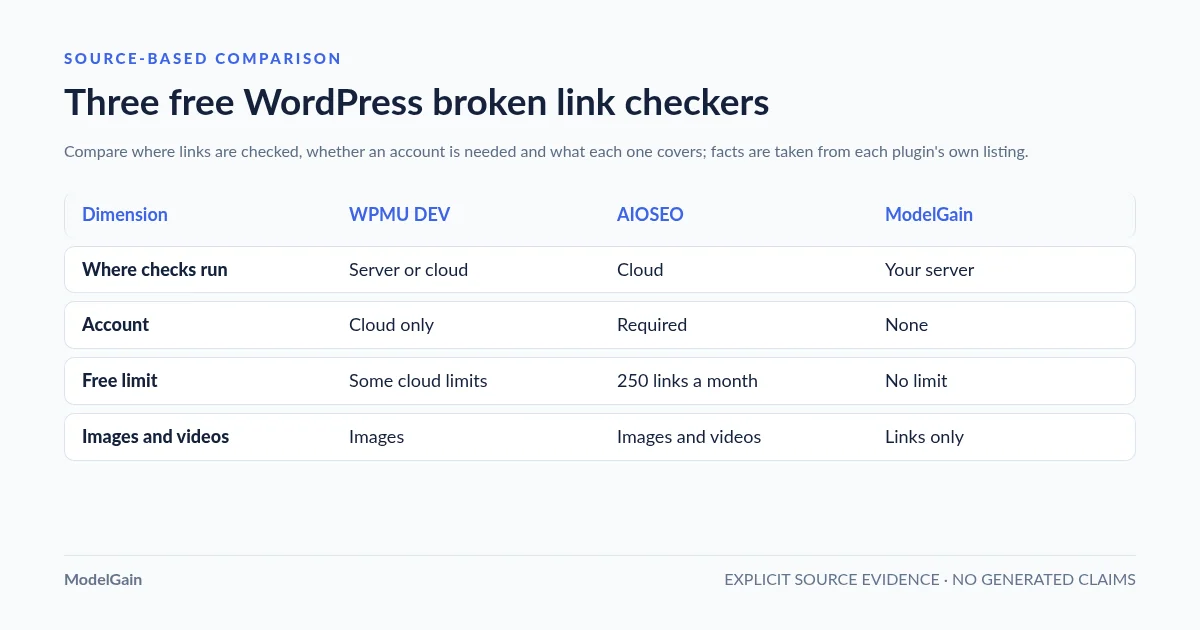
Broken Link Checker is the best known option, with around 500,000 active installations. Its listing describes two engines: a local engine that runs on your server and only works in your site admin, and a cloud engine on WPMU DEV servers, which needs a connection to WPMU DEV. A free Hub account works for the cloud engine, with some restrictions. It scans posts, pages, comments and custom fields, checks images and redirects, sends email alerts, supports Multisite, and lets you edit, unlink or ignore links from its dashboard.
Broken Link Checker by AIOSEO
Broken Link Checker by AIOSEO has around 200,000 active installations and is cloud only: scanning runs on AIOSEO’s servers and requires an AIOSEO account. The free account scans up to 250 internal links per month; paid subscriptions cover more internal and external links and more frequent monitoring. Its listing describes checks that go beyond status codes, including deleted YouTube and Vimeo videos, broken images, expired SSL certificates and links behind a login, plus page-builder layouts, weekly email reports and CSV export.
Content Link Health Check by ModelGain
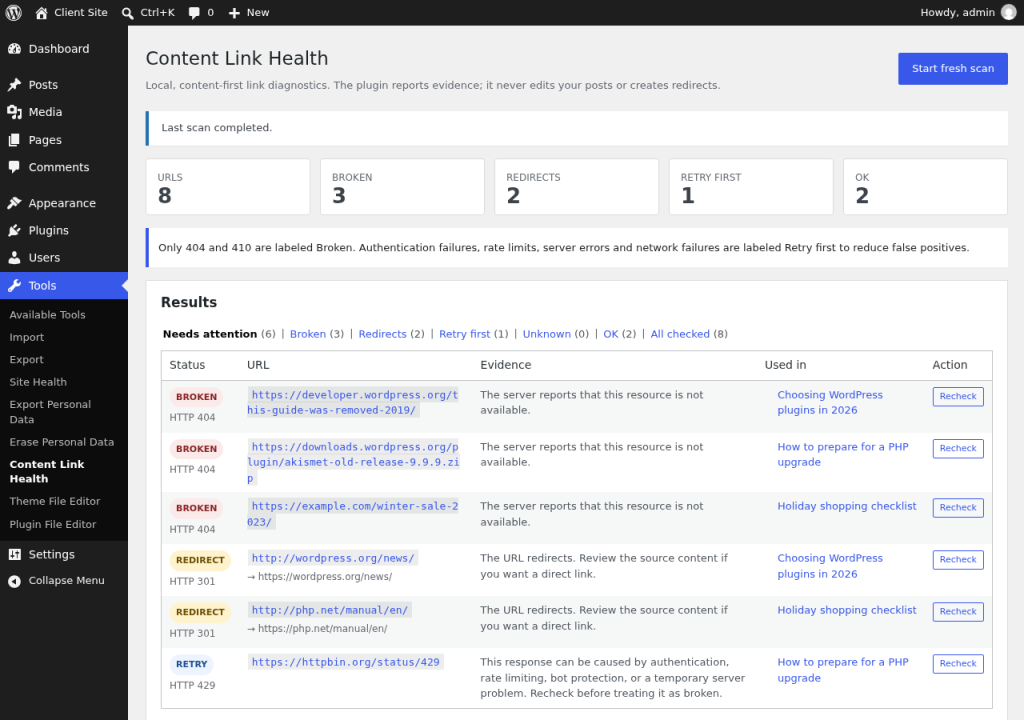
ModelGain Content Link Health Check is a free plugin that runs entirely on your WordPress site, with no account and no cloud crawler. In version 1.0.1 it scans anchor links stored in published posts, pages and other public post types, checks each unique URL once in short batches you can resume, and lists every post that uses each link with an edit link. Its classification is deliberately conservative:
- Broken only for HTTP 404 and 410;
- Redirect for 3xx, with the target shown;
- Retry first for 401/403, 429 rate limits, 5xx errors and DNS, TLS or network failures, which are often temporary or caused by bot protection.
It is read-only: it never edits posts, unlinks URLs or creates redirects. It does not check images, scripts or styles, and it does not crawl rendered page-builder output.
Side-by-side
| WPMU DEV | AIOSEO | ModelGain | |
|---|---|---|---|
| Where links are checked | Your server or WPMU DEV cloud | AIOSEO cloud | Your server |
| Account needed | Only for the cloud engine | Yes | No |
| Free limit | Free; cloud has some restrictions | 250 internal links per month | No scan limit |
| Images and videos | Images | Images, audio, videos | No |
| Edits your content | Edit, unlink or ignore | Edit, unlink or remove | No, read-only |
| 403 and 429 responses | Not stated on the listing | Explains the reason per link | Shown as Retry first, never Broken |
| Automatic scans and email | Yes | Yes, weekly email | In the Pro add-on |
Which one fits your site
- You want the widest coverage and don’t mind an account. A cloud checker checks things a local scan does not, such as deleted videos and page-builder layouts, and does not use your server for the requests. Check the free limit against your link count first: 250 internal links a month is small for a large blog.
- You don’t want an account or a third-party crawler. Use a local scan. Both WPMU DEV’s local engine and Content Link Health Check run on your server; see how link scans affect server load if your hosting is small.
- Your reports are full of “broken” links that open fine. That is usually rate limiting, bot protection or a login, not a missing page. A checker that keeps 403 and 429 out of Broken saves you from chasing them; our false-positive triage guide explains the patterns.
- You want a checker that never changes content. Content Link Health Check only reports, with the posts that use each link, so you fix links in the editor yourself.
A 15-minute local check
- Install Content Link Health Check from WordPress.org and open Tools → Content Link Health.
- Click Start fresh scan and keep the tab open. If you close it, use Resume scan.
- Open Needs attention. Fix Broken links first, starting with links that appear in many posts.
- Update Redirect links to their final URL when it is the page you meant to link to.
- Recheck Retry first links later before changing anything, then use Recheck on a single link after you fix it.
When the Pro add-on is worth it
The free plugin is complete for manual scans. Links break after you publish, though, and nobody remembers to scan every month. The optional Pro add-on keeps watching for you:
- scheduled daily or weekly background scans;
- one email per scheduled scan, only when links break that were fine in the previous scan (optionally new redirects too);
- scan history (last 20 scans) with newly broken, newly redirected and fixed links;
- CSV export of the latest results with post title, view URL and edit URL, ready to send to a client;
- WP-CLI commands such as
wp modelgain-clhc scan --fail-on=new-brokenfor scheduled jobs and deploy checks.
Pro costs $19.99 per year or $29.99 once for lifetime use, per site, and requires the free plugin. Checks run on your server the same conservative way. Details and checkout are on the Content Link Health Check product page.
Summary
Cloud checkers cover more content types but need an account and, on free plans, have limits. Local checkers need nothing outside your site. If you want a local, read-only scan that separates real 404s from blocked or rate-limited links, start with the free Content Link Health Check, and add Pro when you want it to run and report on its own.