WORDPRESS
WordPress PHP 8 Invalid Callback: Find the Broken Hook
WordPress PHP 8 call_user_func_array() invalid callback? Identify the hook owner, distinguish named-argument errors, and verify the fix safely.
Does your WordPress site show Uncaught TypeError: call_user_func_array(): Argument #1 ($callback) must be a valid callback after switching to PHP 8? The error usually means that WordPress tried to run a registered action or filter whose callback is no longer callable. The file wp-includes/class-wp-hook.php is often where the error is thrown—not necessarily where the faulty callback was registered.
First move: preserve the full fatal message, the affected request, and a recovery route; find the missing function, method, class or malformed callback named in the error; then trace which plugin, theme, must-use plugin or custom snippet registered that hook. Fix that owning component on staging and retry the same request. Do not patch class-wp-hook.php or disable every production plugin as your first diagnostic step.
Which callback is failing after PHP 8?
Applies when: A WordPress site reports a PHP 8 call_user_func_array invalid callback TypeError and needs to trace the registered hook to the source owner without altering WordPress core.
Quick answer
call_user_func_array still exists in PHP 8. Preserve the full error, distinguish an invalid callback from a named-argument error, find which plugin/theme/custom code registered the hook, apply an upstream or reviewed fix, and retest the exact original request.
What to do
-
Preserve the error and request context; identify the missing function, method, callback array shape or named-argument problem.
-
Use the callback identifier and hook registration to identify the real plugin, theme or custom-code source.
-
Prefer supported updates or reviewed source changes on staging, then rerun the original trigger on the same PHP version.
Which clue best matches the evidence you have?
All paths are listed below. Select a symptom to focus on the most relevant path.
Find who registered the missing callback
The missing function, method or class name is your starting point. Search installed code for its add_action/add_filter registration, verify loading and namespaces in the failing execution context, and prefer the owning package's maintained fix.
Inspect callback shape in source
A callback array must identify a callable target and method. Review the registered array and its instance/class context in the plugin or theme; do not patch WordPress core or invent a placeholder handler.
The dispatcher is not the owner by itself
class-wp-hook.php invokes hooks registered elsewhere. Obtain the complete fatal line and original callback identifier, then inspect the plugin, theme or must-use module that registered the hook.
This is an argument-mapping problem
An Unknown named parameter error may arise when associative array keys become named arguments on PHP 8. Confirm callback signature and intended ordering before changing associative keys or using array_values in owned code.
Check the update/AJAX execution context
Some callbacks are registered but not loaded during wp-admin/admin-ajax.php plugin-upgrade operations. Find the exact missing callback and the owning update hook; review vendor releases and retest the update on staging.
Recover evidence before changing components
Use the hosting PHP error log and WordPress Recovery Mode where available; get a rollback path and do scoped component recovery rather than mass-deactivating plugins or editing wp-includes.
Did this help?
What changed in PHP 8—and what did not
call_user_func_array() still exists in PHP 8. It accepts a callable and an array of arguments, as documented by the PHP manual. In PHP 7.x, certain invalid hook callbacks could produce a warning and let execution continue; in PHP 8.x, passing a non-callable to this function can produce a TypeError and stop the request if uncaught. WordPress documented the behavior in Core Trac #60235’s archived report and the archived closure as a duplicate of earlier discussions. This is not a WordPress core fix announcement.
That behavior differs from create_function(), a separate legacy API removed in PHP 8. If your log explicitly says Call to undefined function create_function(), use our create_function() fatal-error guide instead. Do not confuse those two remedies.
There is also a second, distinct PHP 8 issue: associative keys passed as the argument array to call_user_func_array() are interpreted as named arguments rather than discarded. An error such as Unknown named parameter requires investigating argument names and the callback signature, not just whether the callback exists. Both behaviors are described by PHP 8’s backward-incompatible changes; the error text determines which branch to follow.
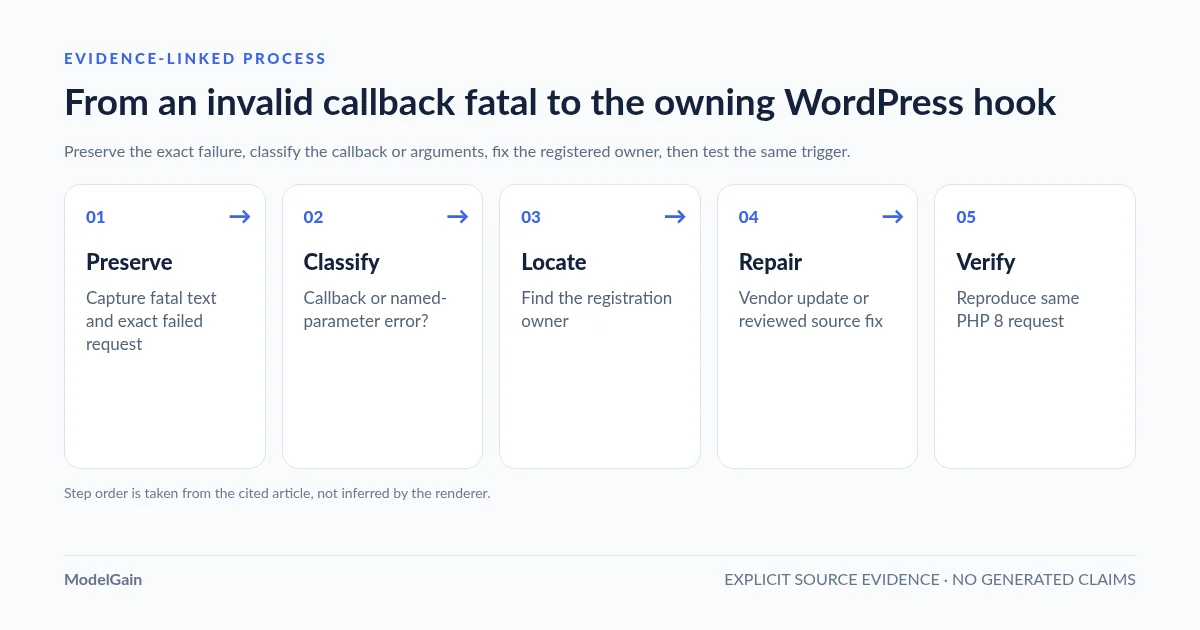
A five-check path from the fatal to the owning callback
Preserve the log → Classify the error → Locate the callback registration → Repair the owner → Reproduce the failed request. Complete one change at a time; a successful homepage load alone does not verify a failure that occurred only during a plugin update, checkout, scheduled task or AJAX request.
- Preserve context. Keep the full fatal error, timestamp, URL or task, the current web-serving PHP version, relevant plugin versions and a usable backup or rollback path. Redact private paths, tokens and customer data before sharing a log.
- Classify the first error. Look for
Argument #1 ($callback) must be a valid callback, the named missing function/method, or insteadUnknown named parameter. Do not group these under a generic ‘PHP 8 incompatible’ label. - Find the registration. Identify the action or filter and search the installed source on a staging copy for the callback name or registration through
add_action()/add_filter(). Include custom snippets,mu-pluginsand code loaded only for admin, AJAX or update requests. - Repair the owning component. Prefer a maintained upstream plugin/theme release. For code you own, correct the callable, registration order, class instance or signature as supported by the evidence. Avoid broad changes in production.
- Verify the same trigger. On the intended PHP 8 runtime, rerun the exact failing request, read the fresh logs and test the affected feature. Deploy a reviewed change with an explicit rollback plan.
Why class-wp-hook.php often appears at the top of the stack
WordPress registers a callback with add_action() or add_filter(). Later, WP_Hook dispatches that callback. The dispatcher’s source file may therefore be the crash site even though a plugin, a child theme or a must-use module supplied the invalid callback. The WordPress core frame identifies the call site; the callback name and registration identify the probable owner.
Consider this synthetic and sanitized diagnostic excerpt, not a ModelGain customer log:
PHP Fatal error: Uncaught TypeError:
call_user_func_array(): Argument #1 ($callback) must be
a valid callback, function "site_update_notice" not found
in /site/wp-includes/class-wp-hook.php:324
Stack trace:
#0 /site/wp-includes/class-wp-hook.php(...): WP_Hook->apply_filters(...)
#1 /site/wp-includes/plugin.php(...): WP_Hook->do_action(...)
#2 /site/wp-admin/includes/class-plugin-upgrader.php(...): do_action(...)
#3 /site/wp-admin/admin-ajax.php(...): wp_ajax_update_plugin(...)
The example tells us when the callback failed—an admin plugin-update action—and what callable was missing: site_update_notice. It does not prove which installed package registered it. The next investigation is a source search for that name and its add_action() / add_filter() registration, then a check of that package’s current version and the update/AJAX execution context.
| What the fatal names | Likely investigation | Avoid this shortcut |
|---|---|---|
function "example_handler" not found |
Search for its hook registration; confirm the function is defined and loaded on the failing request | Adding an empty global function just to hide the fatal |
class ... not found |
Check class loading, namespace and plugin dependency/version | Assuming the WordPress dispatcher is broken |
class ... does not have a method |
Review method spelling, visibility, and the actual object instance | Changing unrelated PHP configuration |
array callback must have exactly two members |
Review callback array shape ([object, 'method'] or permitted class callable form) |
Blindly wrapping an invalid array in another array |
Unknown named parameter |
Check associative argument keys passed to call_user_func_array() against the callable’s parameter names |
Assuming the callback does not exist |
Real reports show why the exact request matters
In a WordPress.org report about failed plugin updates, an administrator saw array callback must have exactly two members in class-wp-hook.php during an updater action. The user later reported that removing a problematic plugin restored updates. This illustrates a workflow-specific callback failure; it does not establish that the user’s other active plugins had a PHP compatibility problem.
A separate historical v4.0.0 plugin-update thread documented an update-time acf_wysiwyg_cl__track_plugin_update function that was not available in the AJAX callback context. A maintainer replied that the issue was fixed upstream and recommended updating; the official plugin changelog for 4.0.1 records a fix for an undefined-function fatal during update tracking. Do not turn this old version-specific incident into a claim that the plugin’s current version is defective.
Another historical plugin support thread recorded an undefined add_links callback, with the maintainer attributing it to a missing namespace and announcing a corrected release. An older named-argument case showed a different failure mode: nonnumeric keys were passed through to a callback and caused a PHP 8 error; the maintainer reported a later fix. These cases are evidence that callback shape, load context and argument mapping all matter—not evidence of defects in current versions.
In a more recent Flexible Invoices 6.2.26 incident, the callback error named a missing WPDesk_Tracker class while the fatal line was in WordPress core’s dispatcher. Its maintainer reported a repair in version 6.2.27, and another user confirmed the fix. This is a specific historical version pair, not a claim about the latest release.
How to trace a callback you cannot find in the visible stack
Use the callback’s exact identifier from the fatal, not the generic call_user_func_array function name. On a controlled staging copy or in your version-controlled source, search the plugin, theme and must-use directories for the quoted function or method, then inspect its registration and initialization context.
For example, this illustrative broken code registers a function that is not available when the hook fires:
// Example only: this callback has not been defined.
add_action('upgrader_process_complete', 'site_update_notice', 10, 2);
The verified repair could be a plugin update, restoring the correct function definition, correcting a typo or registering the callback only where its implementation is loaded. If a callback is an object method, check that the object exists at registration time and the method is callable. PHP 8 also tightened calls to non-static methods made as static callables; see the PHP migration manual.
Do not paste the error message into a new global function or remove a hook without understanding its purpose. Hooks may be responsible for payments, inventory, access control, updates or email delivery. A page that no longer crashes could still be missing a critical function.
If the message says “Unknown named parameter” instead
When the callback itself is valid but call_user_func_array() receives string-keyed arguments, PHP 8 treats those keys as named arguments. Consider this simplified, synthetic example:
function price_label($amount) { return '$' . $amount; }

// The argument key 'value' does not match the parameter 'amount'.
call_user_func_array('price_label', ['value' => 25]);
// PHP 8 can throw: Unknown named parameter $value
For code you maintain, determine whether the API intended positional or named invocation. Passing array_values($args) is only appropriate after verifying that key names carried no meaning and the resulting positional order is correct. Renaming arbitrary keys or suppressing the exception is not a general fix. This issue belongs to the arguments side of the API, not an unregistered WordPress hook.
Restore service safely if wp-admin or plugin updates are unavailable
Use the host’s PHP error log or the administrator’s WordPress Recovery Mode message to identify the failing component. Recovery Mode can help during certain normal web requests, but background jobs and some bootstrap failures may not activate it. The WordPress debugging handbook documents WP_DEBUG_LOG and warns against displaying detailed errors to public visitors. Treat logs as sensitive operational data.
If an identified plugin prevents access, work with the host or administrator on a scoped recovery step, backed by an undo plan. Avoid renaming every plugin directory or editing WordPress core as a first resort. A temporary supported PHP version rollback may restore service while you fix the callback, but unsupported PHP versions are not a permanent resolution. The broader outage procedure is in our critical-error recovery guide.
What the ModelGain PHP scanner can—and cannot—tell you
For a functioning WordPress admin or staging copy, ModelGain PHP Upgrade Risk Audit (listed on WordPress.org) can perform local, read-only source-level checks on selected readable installed plugins and themes for PHP 8.0–8.5 target compatibility. In version 0.1.0 it processes bounded 30-file batches without shell commands or source upload. It requires WordPress 6.9+ and PHP 7.4+; it neither changes the active PHP version nor fixes a crashed admin.
Its file, line, component and rule findings can reveal suspicious compatibility constructs before a rollout. But a static analyzer cannot prove which registered callback executed at runtime, and a Ready label does not certify all hooks or execution contexts. An overall Blocked result can reflect a scan execution failure, not just an incompatible source rule. First inspect real log evidence, then use the scanner to prioritize further review—not as an automatic replacement for a stack trace.
Prove that the fix survives PHP 8 and the original workflow
After a vendor update or a reviewed source fix, repeat the same operation on staging: the same PHP 8 version, URL, plugin-update action, AJAX request, checkout step or scheduled job. Verify that the original fatal no longer occurs, the expected callback actually ran and the feature produced its correct result. Read the PHP log again after the test, check nearby critical business flows and retain an immediate rollback plan for production.
Record the error string, callback identifier, owning source, fix version, reproduced trigger and verified outcome. That becomes reusable compatibility evidence for future upgrades. For a wider component inventory before switching PHP, use our plugin identification guide and the PHP upgrade preflight checklist. The present article solves the narrower invalid-callback problem.
Frequently asked questions
Was call_user_func_array() removed in PHP 8?
No. The function remains available. A previously tolerated invalid callback can now throw a TypeError; separately, associative argument keys are interpreted as named parameters in PHP 8.
Why does the error mention wp-includes/class-wp-hook.php?
That file dispatches registered WordPress actions and filters. The error’s callback identifier and hook registration—not the dispatcher path alone—are what you need to find the owner.
Can I delete the hook to stop the error?
Not safely without understanding its behavior. Removing a hook may suppress the crash while silently disabling a security, payment, inventory or update function. Update or correct the owning code and test the intended outcome.
Does this always happen on every page after a PHP upgrade?
No. The invalid callback may be reached only by a particular filter, AJAX plugin update, administrator screen or background operation. Always reproduce the original trigger.
Can PHP Upgrade Risk Audit automatically find the callback that crashed?
No. The tool reports bounded, static source risks; it cannot observe the live hook dispatcher, reconstruct every runtime registration or repair a fatal error. Use actual logs to attribute this incident.
Primary documentation and community incident references
- PHP manual: call_user_func_array() and PHP 8 migration incompatibilities.
- WordPress Core Trac #60235 archived PHP 7/8 callback comparison and archived duplicate closure.
- WordPress developer reference: add_action().
- WordPress community: fatal during plugin updates; fixed historical plugin callback case.
- ACF character-limit plugin changelog: 4.0.1 callback tracking repair; Flexible Invoices 6.2.26/6.2.27 case.
- WordPress community: historical namespace/callback defect and historical named-argument regression.
- WordPress Recovery Mode; WordPress debugging handbook.