WORDPRESS
Call to undefined function create_function() in WordPress on PHP 8
WordPress PHP 8 fatal create_function() error? Find the plugin or child-theme file, replace outdated callbacks safely and verify the fix on staging.
Seeing PHP Fatal error: Uncaught Error: Call to undefined function create_function() after moving WordPress to PHP 8? The immediate cause is known: PHP deprecated create_function() in PHP 7.2 and removed it in PHP 8.0. But the actual fix depends on which plugin, child theme, parent theme or custom code executed the removed function. Use the filename and line in the first relevant fatal error—not the generic WordPress critical-error screen—to find that owner.
Fast diagnosis: preserve the error evidence and a recovery path; inspect the fatal file under wp-content/; verify whether the responsible component has a supported update; test a closure-based change or upstream replacement on staging; and then retest the exact failed route on PHP 8. Do not edit WordPress core, install an unreviewed eval() polyfill, or bulk-replace every occurrence of the function name.
Where does create_function() fail on your WordPress site?
Applies when: WordPress fails after switching to PHP 8 with a fatal error calling the removed create_function() API, and a site owner needs to locate the actual component and fix it safely.
Quick answer
PHP 8.0 removed create_function(); check the exact file and line of the fatal rather than guessing which plugin broke. Prefer a maintained update or a tested native closure in code you own, restore availability through supported incident procedures, and verify on staging. A static scan cannot repair a crashed site.
What to do
-
Preserve the host PHP error and identify its concrete wp-content path and the failed request.
-
Separate parent from child theme, plugin from bundled vendor library, or a WordPress core dispatcher from custom callbacks; update or review the owner.
-
Use the intended PHP 8 version on staging, test the exact route and log result, then deploy with rollback and production monitoring.
Where does the fatal log point?
All paths are listed below. Select a symptom to focus on the most relevant path.
Identify the actual plugin and its dependency
The path under plugins/ identifies an installed component, possibly a bundled vendor library. Record plugin version and the line and prefer a supported upstream update. Test the same request on PHP 8 staging; do not mass-deactivate unrelated plugins.
Check child theme ownership before blaming the parent
A fatal in a child-theme functions.php belongs to that custom code even if a parent theme loads it. Ask its maintainer for a closure-based repair and test the registered hook on staging.
Treat this as custom code with an accountable owner
Must-use modules and custom snippets may sit outside normal plugin update/deactivation controls. Preserve a copy, inspect the exact callback and coordinate a version-controlled staged fix.
Find the caller, not just the core dispatcher
Core hook machinery can appear in a stack without containing the obsolete API call. Obtain the actual first fatal file line and surrounding frames before changing any code. Never patch wp-includes to hide a plugin or theme issue.
Restore access and preserve evidence first
Use your host's logs and WordPress Recovery Mode where possible. If supported and authorized, a temporary PHP rollback can restore public service while the relevant component is updated. Do not force a scanner into inaccessible wp-admin.
Replace the full callback, not only its function name
create_function accepted source strings, whereas a native closure has different syntax and scope. Refactor the full callback using known behavior in code you own, avoid eval polyfills and test the exact hook on staging.
Did this help?
Why PHP 8 reports an undefined create_function()
The official PHP manual documents that create_function(string $args, string $code) dynamically generated a function by evaluating source strings. It was deprecated in PHP 7.2 and removed entirely in PHP 8.0. A call that may have worked on PHP 7.4 can therefore fail as soon as the relevant code path runs on PHP 8.0, 8.1, 8.2, 8.3, 8.4 or 8.5. The removal is confirmed in PHP’s backward-incompatible changes.
This is not an HTTP 404, a WordPress permalink problem, or evidence that every installed plugin is broken. The PHP error names a missing runtime function; the file path and stack identify where your site actually invoked it. A theme may fail while WordPress is loading, a plugin may fail only when a form is submitted, and an inactive or unused library may contain the same text without ever executing it.
Five checks that lead from a fatal error to the owning file
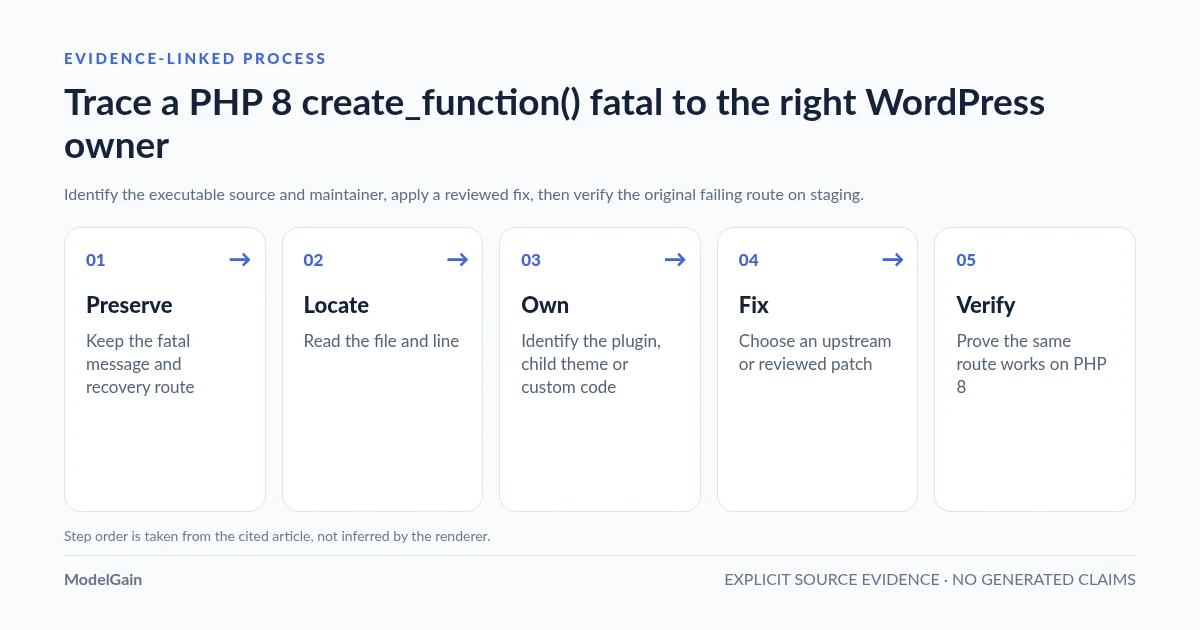
Preserve the error → Read the fatal location → Identify its owner → Apply a supported change → Test the failing path. Avoid changing several components simultaneously, or the result will not identify which change fixed the fault.
- Preserve the error. Record the active web-server PHP version, the exact fatal message, timestamp, failing URL or task, and a verified current backup. Keep private file paths and tokens out of public support posts. If the site is down, use your host’s incident and temporary rollback options before experimenting.
- Read the fatal location. Open the relevant host PHP log or WordPress Recovery Mode email. Find the line containing
Call to undefined function create_function()and itsin /.../file.php:LINEsuffix. Include surrounding frames only to establish which request or component loaded it. - Identify its owner. A path under
wp-content/plugins/identifies the plugin directory;wp-content/themes/identifies the parent or child theme directory;mu-plugins/identifies must-use code. Check whether the file is bundled third-party vendor code. Awp-includes/callback frame alone may not identify the code that registered or invoked the removed function. - Apply a supported change. Prefer a vendor-maintained release or a tested child-theme/custom-code repair. A
create_function()call usually requires rewriting the callback as a native anonymous function, not a blind replacement of the function name. - Test the failing path. On staging with the intended PHP version, exercise the exact page, hook or form that crashed. Check logs again, then test adjacent business functions and document a production rollback before deploying.
How to interpret the fatal stack trace
Consider this synthetic, sanitized example (not a trace from a real ModelGain site):
PHP Fatal error: Uncaught Error: Call to undefined function create_function()
in /site/wp-content/themes/brand-child/functions.php:46
Stack trace:
#0 /site/wp-settings.php(710): include()
#1 /site/wp-config.php(97): require_once(...)
#2 /site/wp-load.php(50): require_once(...)
#3 {main}
The actionable evidence is themes/brand-child/functions.php:46. WordPress loads the theme during bootstrap, but the owner of this legacy code is the child theme. Do not infer that the parent theme or WordPress core is defective simply because those components appear elsewhere in the trace. Confirm the actual file with the host’s file manager, a staging code editor or repository history. Never paste a private full path, IP or access token into a public report.
| Fatal file path | Investigate first | Safe next step |
|---|---|---|
wp-content/plugins/example-addon/includes/hooks.php |
The installed example-addon plugin and any dependency that owns the line |
Confirm plugin version, ask its maintainer for a supported PHP 8 release, reproduce on staging |
wp-content/themes/brand-child/functions.php |
Custom child-theme code, not automatically its parent theme | Identify the hook and replace the legacy callback in version-controlled staging code |
wp-content/mu-plugins/site-hooks.php |
Must-use site code, often outside ordinary plugin deactivation controls | Contact the site’s developer or hosting administrator; plan a controlled code fix |
wp-content/plugins/example-addon/vendor/library/... |
A bundled library distributed by the named plugin | Prefer a plugin release updating that vendor dependency instead of patching distributed files |
Only wp-includes/class-wp-hook.php appears in a frame |
Registered callback and earlier application/plugin frames | Obtain the complete fatal location and surrounding stack; do not edit WordPress core |
Real WordPress cases: the parent theme may be innocent
In a WordPress.org theme support discussion, a site owner initially mentioned the Twenty Seventeen parent theme. The fatal log actually pointed to wp-content/themes/dedi-custom/functions.php:181, a custom child theme. Support advised getting that child theme repaired rather than changing the WordPress core theme.
A separate Alara discussion records a user blaming PHP 8 support in the theme but later identifying their own child-theme functions.php calling create_function() inside a login_errors filter. They reported that removing the problematic custom code restored the site’s behavior. These are individual historical cases, not proof that either current parent theme contains this function.
A Job Postings plugin support thread identifies the legacy call inside a plugin function and file. It shows a different ownership case: the same PHP 8 symptom can arise from plugin code, not only themes. Do not assume that a modern release of the named plugin is affected just because an older support thread records the historical issue.
How to replace create_function() safely in code you own
The old function took argument and body strings; a closure is native PHP syntax that receives arguments normally. Replacing only the token create_function with function produces invalid or unintended code. If the affected code is third-party software, obtain a vendor update or qualified code review instead of editing live plugin files.
For a simple custom callback, the pattern can change from:
// Historical code. Fails if this path executes on PHP 8.
add_filter('example_label', create_function('$value', 'return trim($value);'));
to:
// Modern equivalent for this simple, context-free example.
add_filter('example_label', function ($value) {
    return trim($value);
});
This example is deliberately small: the callback only trims one value, so its intent is easy to preserve. More complicated dynamically constructed function-body strings may reference variables, rely on specific scope, or perform actions that a direct closure rewrite changes. A closure can explicitly capture lexical variables using use ($name) when appropriate, but that requires knowing what the old function actually did. Do not use eval() to recreate the removed API or fetch unknown PHP patches from arbitrary forums.
When the failing custom code belongs to an obsolete login, editor or template hook, also determine whether the behavior is still needed. Removing an unnecessary callback can be appropriate after validating its purpose; deleting a security-sensitive or business-critical hook merely to silence the fatal may break other workflows.
If the site is already down: restore service without hiding the cause
The first priority during a production outage is user-facing availability and preserving the original error evidence. If your provider offers a supported temporary switch back to the previous working PHP runtime, that may restore access while you prepare a proper fix. This does not make PHP 7.4 a suitable permanent plan; it is end-of-life. A host may not offer an older runtime and switching may affect other sites or extensions sharing the same configuration.
Check the administrator’s WordPress Recovery Mode message and the host’s error log. Recovery Mode may help with fatal errors in regular requests but cannot be guaranteed for background work or every bootstrap failure. If a plugin is clearly implicated and your incident process permits it, isolate only that component; for a child-theme error, a controlled test using a known compatible theme can help but will alter the site’s appearance and should be done on staging first where practical.
Do not deactivate every plugin, rename all theme folders, overwrite the only backup, or publish the site’s PHP logs as first-line actions. The generic recovery steps and safe handling of WP_DEBUG_LOG are covered in our WordPress critical-error recovery guide and the official WordPress debugging handbook.
Use a source scanner to find additional risks before trying PHP 8 again
Once WordPress admin is accessible—or on a working staging clone—ModelGain PHP Upgrade Risk Audit, published as Upaccn PHP Upgrade Risk Audit, can scan selected installed readable plugins and themes for known PHP compatibility patterns for a PHP 8.0–8.5 target. Version 0.1.0 uses local, read-only static analysis in bounded 30-file batches, excludes its own scanner component, requires no shell execution functions, and does not upload source code. It does not switch PHP, edit a source file, repair a crashed WordPress administration panel or prove which component executed in a particular fatal trace.
Review source-level component, file, line and rule evidence. A Blocked outcome with a genuine compatibility ERROR merits investigation; a separate scan execution error can also result in an overall Blocked state and is not proof of incompatible code. Review requires contextual judgment, and Ready is not a runtime guarantee. This release requires WordPress 6.9+ and PHP 7.4+ to run the scanner; don’t force it onto an unsupported or currently crashed site.
For the complete pre-change process and safe staging checklist, see how to identify which WordPress plugin may break after switching to PHP 8 and how to check WordPress plugins before a PHP 8 upgrade. This article addresses the one create_function() fatal pattern, not every PHP upgrade incompatibility.
Verify the fix: same error, exact PHP version and real feature
After a source change or vendor update, use a representative staging site running the actual proposed web PHP version. Reopen the page or route that failed and inspect the error log for that exact timestamp. Test the affected hook’s behavior, other key site functions, admin access and the relevant business workflows (forms, checkout or scheduled actions). If a new fatal appears, record it as a separate problem rather than claiming the PHP 8 upgrade is solved.
Keep a short maintenance note with the original fatal, owner, component version, corrected source location, staging PHP version, observed test outcomes and the rollback method. You can then deploy during a monitored window and verify the same scenario in production, instead of relying only on a cleared warning count.
Frequently asked questions
Was create_function() removed in PHP 8.0?
Yes. The PHP manual states it was deprecated in PHP 7.2 and removed in PHP 8.0. The issue applies to newer PHP 8 releases whenever that legacy function call is executed.
Does a file under wp-includes mean WordPress core is to blame?
Not necessarily. Core may be calling a plugin hook or loading a theme. Locate the actual fatal in ... file.php:line and follow the associated stack to code registered by a plugin, child theme or custom module before making changes.
Can I fix the error by replacing create_function with function?
Not with a blind text substitution. The removed API accepted strings of code; native closures have a different syntax and scoping model. Use a vendor update or rewrite the full callback in code you own, then test its actual behavior.
Should I downgrade WordPress or PHP?
A temporary, supported hosting PHP rollback may be justified to restore an outage, but it is not a durable fix. Downgrading WordPress core rarely addresses the fact that PHP 8 removed a runtime function. Identify and update the legacy component, then validate an appropriately supported PHP runtime in staging.
Can PHP Upgrade Risk Audit repair create_function() automatically?
No. It is a read-only source diagnostic for installed plugins/themes, not a code rewriter or incident-recovery tool. Its output can guide a developer to file and line evidence before a PHP upgrade, but a real fatal still requires stack-trace investigation.
Official references and real problem reports
- PHP manual: create_function() removed in PHP 8.0.
- PHP manual: PHP 8.0 backward-incompatible changes.
- WordPress.org: custom child-theme function at the fatal location.
- WordPress.org: Alara user discovers a child-theme create_function() call.
- WordPress.org: historical Job Postings plugin create_function() error.
- WordPress.org: Recovery Mode.
- WordPress developer handbook: debugging safely.
- WordPress.org: Upaccn PHP Upgrade Risk Audit and limits of static scanning.