MODELGAIN / WORDPRESS PRODUCT
ModelGain Email Failure Monitor
See when WordPress fails to send email: a private failed wp_mail() log, a test email with the exact mailer error, and a Site Health warning.
PRODUCT OVERVIEW
WordPress / WordPress email failure monitoring
How it works.
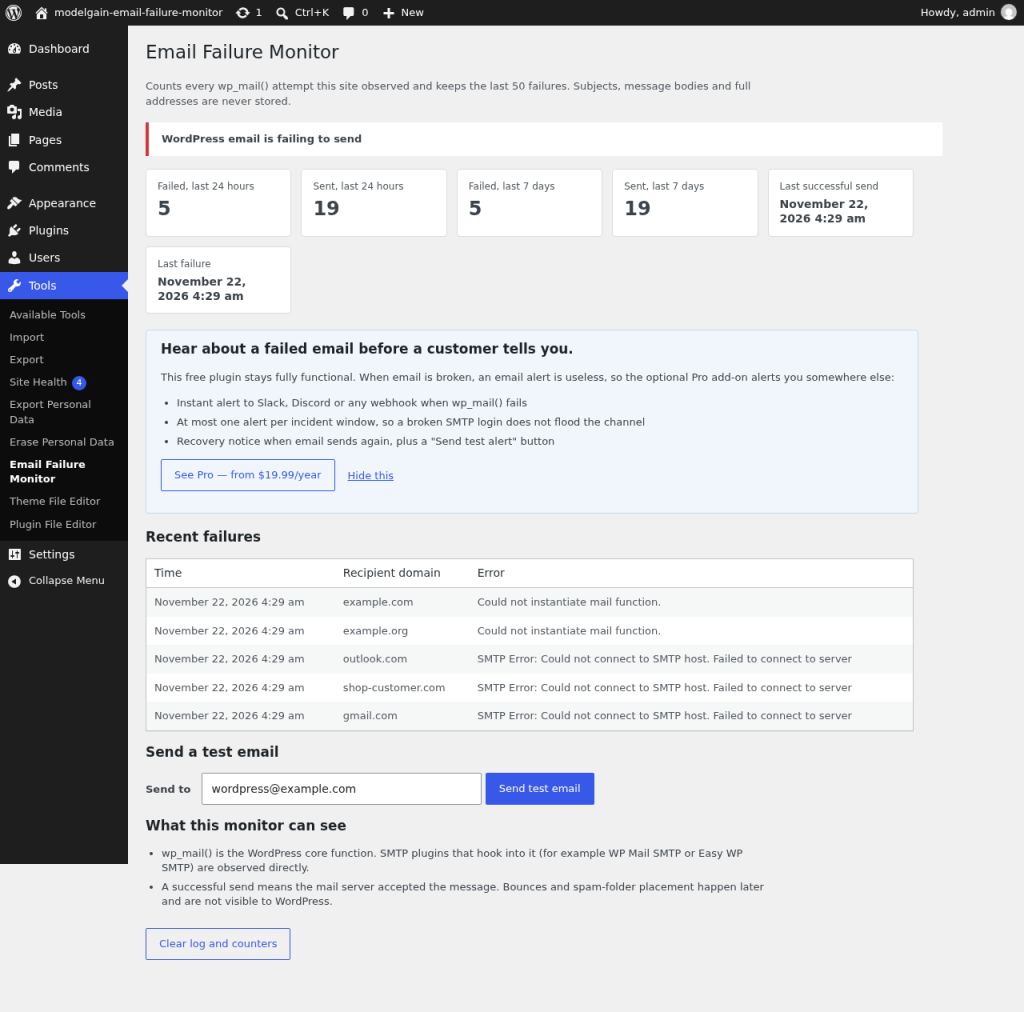
ModelGain Email Failure Monitor shows WordPress administrators when the site stops sending email. It counts every wp_mail() attempt the site observes, keeps the last 50 failures with the time, recipient domain and mailer error, and adds a Site Health warning when the most recent attempt failed. A Send test email button shows the exact error from your mailer instead of a silent failure. Subjects, message bodies and full email addresses are never stored, and the log is not autoloaded. It works with the default PHP mail transport and with SMTP plugins that use wp_mail(), such as WP Mail SMTP Lite or Easy WP SMTP. The optional Pro add-on sends an alert to Slack, Discord or any HTTPS webhook when a failure happens, at most once per incident window, with a recovery notice when email works again.
PRODUCT SCREENSHOT
CORE CAPABILITIES
What it does
Key capabilities and controls to review before using the product.
Count sent and failed wp_mail() attempts for the last 24 hours and 7 days, with the last successful send and last failure times.
Keep the last 50 failures with recipient domain and redacted mailer error; never subjects, bodies or full addresses.
Send a test email from Tools → Email Failure Monitor and see the exact mailer error on screen.
Flag "WordPress email is failing to send" in Site Health when the latest attempt failed.
INTERPRETING THE RESULTS
Know the limits
Information for better decisions, not a guarantee.
Requires WordPress 6.9+ and PHP 7.4+. A successful send means the mail server accepted the message; bounces, spam-folder placement and later delivery problems are not visible to WordPress. Plugins that replace wp_mail() entirely or short-circuit it before sending may hide attempts from the monitor, and the coverage panel shows when this is detected. The free plugin does not send alerts or retry failed email. Pro alerts depend on the webhook service accepting the request.
AVAILABLE · PRO ADD-ON
For agencies and site maintainers
$19.99 per year, or $29.99 once for lifetime use, per site.
When WordPress email breaks, an email alert cannot reach you. The free plugin shows failures when you open it. Pro tells you in Slack, Discord or your own webhook the moment password resets, orders or form notifications stop sending, once per incident instead of on every page load, and tells you again when email works.
The free plugin stays fully functional. Pro is a separate add-on for people who maintain client sites or many sites. It needs the free plugin installed and active. Checkout, licensing and invoices are handled by Freemius, our reseller and Merchant of Record.
| Feature | Free | Pro |
|---|---|---|
| Count sent and failed wp_mail() attempts for the last 24 hours and 7 days, with the last successful send and last failure times. | ✓ Included | ✓ Included |
| Keep the last 50 failures with recipient domain and redacted mailer error; never subjects, bodies or full addresses. | ✓ Included | ✓ Included |
| Send a test email from Tools → Email Failure Monitor and see the exact mailer error on screen. | ✓ Included | ✓ Included |
| Flag "WordPress email is failing to send" in Site Health when the latest attempt failed. | ✓ Included | ✓ Included |
| Alert to Slack, Discord or any HTTPS webhook when wp_mail() fails | Not included | ✓ Included |
| One alert per incident window; repeat failures are counted and reported as +N more | Not included | ✓ Included |
| Optional recovery notice when email sends again | Not included | ✓ Included |
| Send test alert button and the last delivery error on screen | Not included | ✓ Included |
| Webhook URL is stored privately and never shown again after saving | Not included | ✓ Included |
Questions before buying? Email [email protected].
GET THE PRODUCT
Ready to take a closer look?
Visit the verified release listing to check installation requirements, release history and support before using the product.
Verified external listing · Check its current requirements